FAQ
How to onboard the MEXC Broker Program?
The institutional program application process consists of two stages. Please follow the steps below:
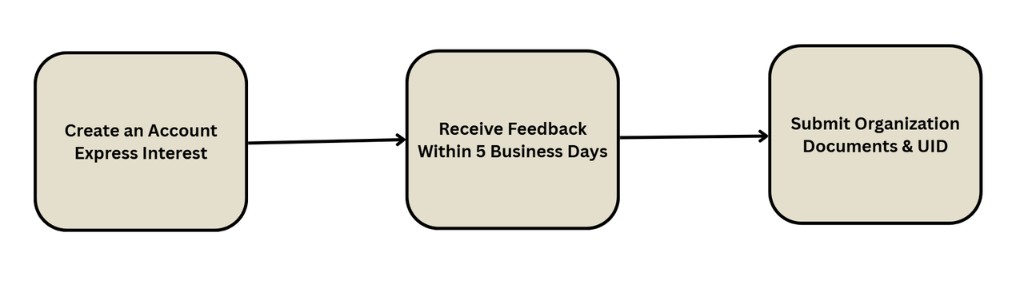
Step 1: Account Setup & Application Submission
- Sign Up on MEXC: Create or designate an official main account on MEXC.
- Submit Your Application: Complete the official Institutional Program application form or send your inquiry through the designated official contact channel.
- Review Period: The MEXC team will contact you within 5 business days after receiving your application.
Step 2: Submit Institutional Documents & Configuration Information
After receiving feedback from the official team, please submit the required institutional documents and trading configuration details via email or through the official communication channels below.
Official Contact Channels:
- Email: [email protected]
- Telegram: @Mexc_Institution
Required Information Checklist
| Category | Item | Requirements (Example) |
|---|---|---|
| Institutional Information | Official Website | Official compliant website of the institution or project |
| Monthly Trading Volume | Recent average monthly trading volume (used for evaluation and tier assessment) | |
| Connected Exchanges | Other major trading platforms currently used by the institution | |
| Email Address | Official business contact email address | |
| Account Configuration | Main Account UID | Primary account UID used for API trading |
| Rebate Receiving UID | UID designated to receive rebates (can be the same as the main account UID) ※ Applicable to API / OAuth brokers only | |
| Broker Type | Broker Type: 1. API Broker 2. Independent Broker 3. OAuth Broker | Please select the broker model that best matches your business needs |
| OAuth-Specific Information | Logo URL | Hosted URL link for the institution's brand logo ※ Applicable to API / OAuth brokers only |
| Callback URL | Callback URL used after successful API authorization ※ Applicable to API / OAuth brokers only |
Step 3: Technical Integration
After approval, the Account Manager will generate a unique Broker_ID. You can set up your project by referring to our API documentation. Spot and futures trading share the same Broker_ID.
Brokers must add the required request header so that our backend can recognize their users. Please refer to the example:
curl --location --request POST 'https://api.mexc.com/api/v3/order' \
--header 'source: Broker_ID' \
--header 'Content-Type: application/json' \
--data-raw '{"type":"LIMIT","price":"3","quantity":"400","symbol":"MXUSDT","side":"BUY"}'
Step 4: Place Orders for Users
After successful integration, you will be able to place orders on behalf of your users and earn high rebates.
Trading fees and rate limits
API Rate Limits
- API trading frequency and rate limits must comply with the specifications outlined in the official MEXC API technical documentation.
Spot Trading Fees
- Spot trading via API is not eligible for fee discount promotions available on the Web or App platforms.
- For the latest standard fee rates, please refer to the official fee page.
Futures Trading Fees
- Trading pairs in the Innovation Zone are currently not supported for API trading. Please avoid placing orders for these pairs through the APIs.
- API trading uses a separate fee structure, and Web/App fee discounts or promotional offers do not apply.
As an Independent Broker, is there a limit to the number of sub-accounts I can create?
Independent Brokers can have up to 100,000 sub-accounts. Each sub-account has an independent rate limit and can deposit and withdraw independently.
As an API/OAuth Broker, how is my rebate calculated? When and how can I check my rebate?
For both Spot and Futures: if your user does not have an affiliate relationship, your commission rate ranges from 40% to 60% (please contact your Account Manager to set the commission rate). If your user already has an affiliate relationship, your commission rate is fixed at 20%. Rebates are paid on T+1. You can check your rebate using GET /api/v3/broker/rebate/taxQuery.