Seznam kategorií
Zrušit

What to do if you are not receiving the email?

If you have successfully linked your email address but are unable to receive email notifications from MEXC, please try the following steps:

1. Confirm that the linked email address is correct


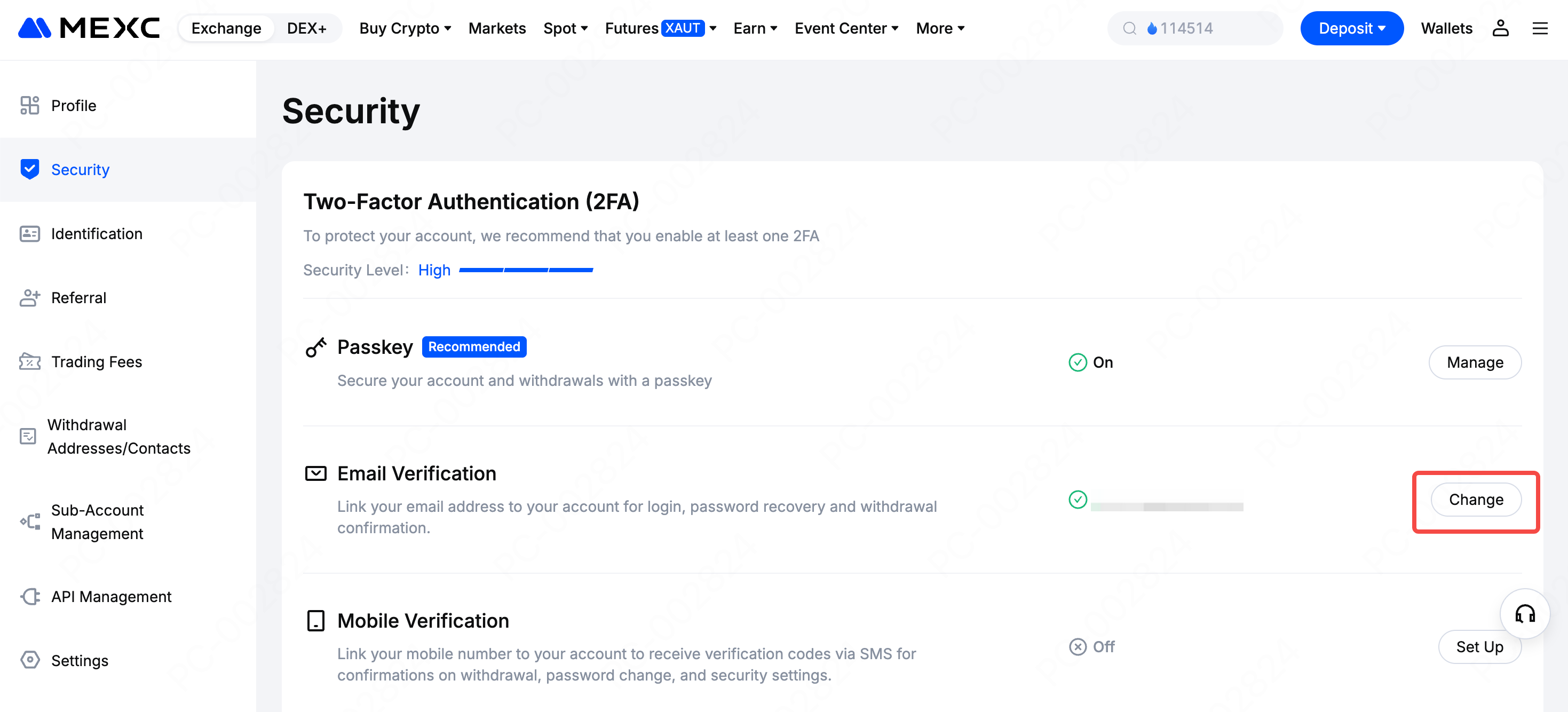
Go to the MEXC official website and log in. From the top navigation bar, click your profile icon, then go to Security. On the Security page, you can see the email address that has been successfully linked and verified. Please check whether the linked email address is the one you are using to receive verification codes. If it is not correct, click Change on the right to link a different email address.


2. Check the spam folder or other mail folders


Check the spam, trash, or other folders of your linked email inbox to confirm whether your email provider has placed MEXC emails outside of the primary inbox. If MEXC emails are found in spam or other folders, you can add MEXC to your email whitelist so that future emails will be delivered directly to your inbox.

3. Check whether your email client is working properly


If you are using an email client or app, please check whether it is functioning properly. For example:
  • Whether the network connection is stable
  • Whether the email client version is outdated
  • Whether a third-party email client is being used
  • Whether there are conflicts with antivirus or security software
If you are unable to rule out these issues or are unsure, please try accessing your email through the web version of your email provider. Make sure to use the official website.

4. Check whether your inbox is full


If your inbox storage has reached its limit, you may be unable to send or receive emails. Delete old emails to free up space so you can receive emails from MEXC.

5. Use a mainstream email provider when possible


We recommend using mainstream email services such as Gmail, Outlook, Hotmail, Yahoo, or iCloud to link your account and receive email notifications. Some corporate email systems automatically block external emails, so using a work email address is not recommended.

6. Possible network delay


Verification codes are valid for 15 minutes. Due to network delays, sender or recipient server processing delays, or email client settings, email delivery may be delayed. Please wait for a short period and check your inbox again.

7. Still not receiving emails


If you are still unable to receive emails, they may be blocked. Manually add the MEXC email domain to your email whitelist and then try requesting the email again. You can refer to the Email Whitelist Setup Guide and follow the instructions to add the MEXC email domain to your whitelist before retrying.


What to do if you are not receiving the email?

If you have successfully linked your email address but are unable to receive email notifications from MEXC, please try the following steps:

1. Confirm that the linked email address is correct


Go to the MEXC official website and log in. From the top navigation bar, click your profile icon, then go to Security. On the Security page, you can see the email address that has been successfully linked and verified. Please check whether the linked email address is the one you are using to receive verification codes. If it is not correct, click Change on the right to link a different email address.


2. Check the spam folder or other mail folders


Check the spam, trash, or other folders of your linked email inbox to confirm whether your email provider has placed MEXC emails outside of the primary inbox. If MEXC emails are found in spam or other folders, you can add MEXC to your email whitelist so that future emails will be delivered directly to your inbox.

3. Check whether your email client is working properly


If you are using an email client or app, please check whether it is functioning properly. For example:
  • Whether the network connection is stable
  • Whether the email client version is outdated
  • Whether a third-party email client is being used
  • Whether there are conflicts with antivirus or security software
If you are unable to rule out these issues or are unsure, please try accessing your email through the web version of your email provider. Make sure to use the official website.

4. Check whether your inbox is full


If your inbox storage has reached its limit, you may be unable to send or receive emails. Delete old emails to free up space so you can receive emails from MEXC.

5. Use a mainstream email provider when possible


We recommend using mainstream email services such as Gmail, Outlook, Hotmail, Yahoo, or iCloud to link your account and receive email notifications. Some corporate email systems automatically block external emails, so using a work email address is not recommended.

6. Possible network delay


Verification codes are valid for 15 minutes. Due to network delays, sender or recipient server processing delays, or email client settings, email delivery may be delayed. Please wait for a short period and check your inbox again.

7. Still not receiving emails


If you are still unable to receive emails, they may be blocked. Manually add the MEXC email domain to your email whitelist and then try requesting the email again. You can refer to the Email Whitelist Setup Guide and follow the instructions to add the MEXC email domain to your whitelist before retrying.