Problem: UK NHS & council letters are dense, full of dates and instructions, and often cause confusion. Solution: I built LetterLens, an Android app (Kotlin + OCR + ML Kit) that scans letters and summarizes them into What/When/Next steps. Why it matters: Runs fully on-device for privacy, works offline, and helps people understand critical info in secondProblem: UK NHS & council letters are dense, full of dates and instructions, and often cause confusion. Solution: I built LetterLens, an Android app (Kotlin + OCR + ML Kit) that scans letters and summarizes them into What/When/Next steps. Why it matters: Runs fully on-device for privacy, works offline, and helps people understand critical info in second

Building LetterLens: An OCR-Powered Android App With Kotlin + ML Kit, and Ktor

The first time I saw my family struggle to interpret the NHS and council letters, I decided to create an application that explains these letters in plain English. Government letters are unstructured data full of dates, instructions, codes, and jargon, but mostly people only need to know three things: what it’s about, when it’s happening, and what to do next. That became the starting point for LetterLens.

Purpose

I aimed to reduce the anxiety people feel when dealing with government paperwork. With LetterLens, the user simply scans the letter, and the system translates it into easy-to-understand English with clear next steps. It highlights the key actions the letter expects, so users know exactly what to do.


:::info Disclaimer: LetterLens is an educational prototype, not an alternative for legal advice.

:::


Tech Stack (Decision-making)

  • Jetpack Compose: Modern declarative UI, quick prototyping, and easier state handling.
  • CameraX: Lifecycle-aware camera integration, seamless with compose.
  • Ktor: Lightweight Kotlin-native backend to classify and elaborate the letter types.
  • ML Kit: On-device OCR for privacy and low latency.

Under the Hood(Deep Dive)

Camerax: capture and preview

Camerax makes capturing and analyzing images. Here's the setup to bind a preview and analyzer to the lifecycle.

val cameraProviderFuture = ProcessCameraProvider.getInstance(ctx) cameraProviderFuture.addListener({    val provider = cameraProviderFuture.get()    val preview = Preview.Builder()        .setTargetAspectRatio(AspectRatio.RATIO_4_3) // keep 4:3        .build()        .also { it.setSurfaceProvider(view.surfaceProvider) }    provider.unbindAll()    provider.bindToLifecycle(        lifecycle,        CameraSelector.DEFAULT_BACK_CAMERA,        preview,        imageCapture    ) }, ContextCompat.getMainExecutor(ctx)) 

:::tip Tip: Rotate based on EXIF and crop margins; sharper, upright images improve OCR markedly.

:::

ML Kit OCR: Extract raw text on-device

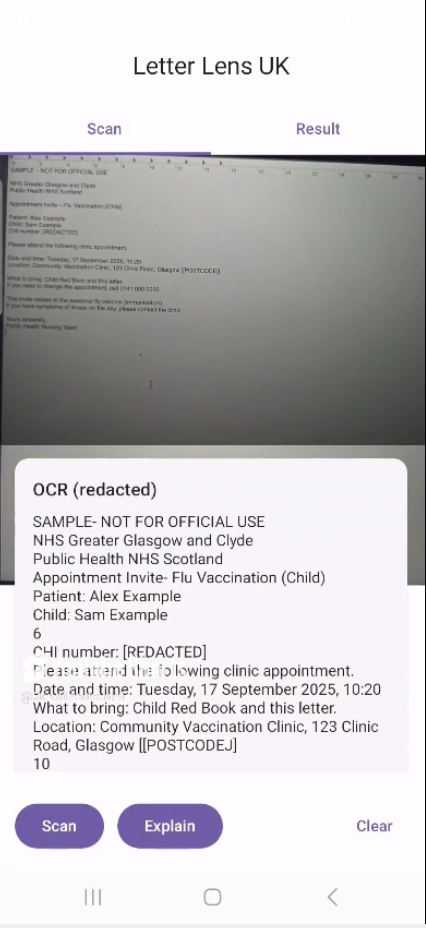
ML Kit processes the image and extracts raw text and confidence scores.

val img = InputImage.fromFilePath(context, Uri.fromFile(photo)) val rec = TextRecognition.getClient(TextRecognizerOptions.DEFAULT_OPTIONS) rec.process(img)    .addOnSuccessListener { onText(it.text) }    .addOnFailureListener { e -> onError("OCR failed: ${e.message}") } 

:::info Note: I keep work entirely on-device; no letter images leave the phone.

:::

\

Ktor 'explains' endpoint: classify + extract

A small Ktor service classifies text and pulls deadlines/actions.

routing { &nbsp;&nbsp;&nbsp;post("/explain") { &nbsp;&nbsp;&nbsp;&nbsp;&nbsp;&nbsp;&nbsp;val req = call.receive<ExplainReq>() &nbsp;&nbsp;&nbsp;&nbsp;&nbsp;&nbsp;&nbsp;val type = classify(req.text, req.hint) &nbsp;&nbsp;&nbsp;&nbsp;&nbsp;&nbsp;&nbsp;val deadline = extractDeadline(req.text, type) &nbsp;&nbsp;&nbsp;&nbsp;&nbsp;&nbsp;&nbsp;val (summary, actions, citations) = explainForType(type, req.text) &nbsp;&nbsp;&nbsp;&nbsp;&nbsp;&nbsp;&nbsp;call.respond(ExplainRes(type, deadline, summary, actions, citations)) &nbsp;&nbsp;&nbsp;} } 

Keyword heuristics (examples)

  • NHS Appointment: “appointment”, “please attend”, “clinic”, “vaccination”, “CHI number”.

  • Electoral Register / Annual Canvass: “Electoral Registration Office”, “annual canvass”, “unique security code”, “register to vote”.

    \

Data Parsing & Classification

Beyond the /explain endpoint, the core of LetterLens is its classifier. Government letters are messy—mixed fonts, spacing, codes, dates, so I added helpers for normalization, fuzzy matching, and deadline detection.

Normalization helpers:

private fun norm(s: String) = s &nbsp;&nbsp;&nbsp;.lowercase() &nbsp;&nbsp;&nbsp;.replace('’', '\'') &nbsp;&nbsp;&nbsp;.replace('–', '-') &nbsp;&nbsp;&nbsp;.replace(Regex("\\s+"), " ") &nbsp;&nbsp;&nbsp;.trim() 

Fuzzy matching (so “N H-S” still matches “NHS”):

private fun fuzzyRegex(token: String): Regex { &nbsp;&nbsp;&nbsp;val letters = token.lowercase().filter { it.isLetterOrDigit() } &nbsp;&nbsp;&nbsp;val pattern = letters.joinToString("\\W*") &nbsp;&nbsp;&nbsp;return Regex(pattern, RegexOption.IGNORE_CASE) } 

Classify by domain:

private fun classify(textRaw: String, hint: String?): String { &nbsp;&nbsp;&nbsp;val n = norm("${hint ?: ""} $textRaw") &nbsp;&nbsp;&nbsp;if (hasAny(n, "nhs", "appointment", "vaccination")) return "NHS Appointment" &nbsp;&nbsp;&nbsp;if (hasAny(n, "electoral register", "unique security code")) return "Electoral Register" &nbsp;&nbsp;&nbsp;if (hasAny(n, "council tax", "arrears")) return "Council Tax" &nbsp;&nbsp;&nbsp;if (hasAny(n, "hmrc", "self assessment")) return "HMRC" &nbsp;&nbsp;&nbsp;if (hasAny(n, "dvla", "vehicle tax")) return "DVLA" &nbsp;&nbsp;&nbsp;if (hasAny(n, "ukvi", "visa", "biometric residence")) return "UKVI"   &nbsp;return "Unknown"  } 

Deadline extraction (supports both 12 Sept 2025 and 12/09/2025 formats):

private fun extractDeadline(raw: String, type: String? = null): String? { &nbsp;&nbsp;&nbsp;val n = norm(raw) &nbsp;&nbsp;&nbsp;return DATE_DMY_SLASH.find(n)?.value ?: DATE_DMY_TEXT.find(n)?.value } 

Explain response with summary + actions + citations:

private fun explainForType(type: String, text: String): Triple<String, List<String>, List<String>> { &nbsp;&nbsp;&nbsp;return when (type) { &nbsp;&nbsp;&nbsp;&nbsp;&nbsp;&nbsp;&nbsp;"Electoral Register" -> Triple( &nbsp;&nbsp;&nbsp;&nbsp;&nbsp;&nbsp;&nbsp;&nbsp;&nbsp;&nbsp;&nbsp;"Looks like an Electoral Register annual canvass letter.", &nbsp;&nbsp;&nbsp;&nbsp;&nbsp;&nbsp;&nbsp;&nbsp;&nbsp;&nbsp;&nbsp;listOf("Go to website", "Enter unique security code", "Confirm/update household"), &nbsp;&nbsp;&nbsp;&nbsp;&nbsp;&nbsp;&nbsp;&nbsp;&nbsp;&nbsp;&nbsp;listOf("https://www.gov.uk/register-to-vote") &nbsp;&nbsp;&nbsp;&nbsp;&nbsp;&nbsp;&nbsp;) &nbsp;&nbsp;&nbsp;&nbsp;&nbsp;&nbsp;&nbsp;"NHS Appointment" -> Triple( &nbsp;&nbsp;&nbsp;&nbsp;&nbsp;&nbsp;&nbsp;&nbsp;&nbsp;&nbsp;&nbsp;"An NHS clinic invite (likely vaccination).", &nbsp;&nbsp;&nbsp;&nbsp;&nbsp;&nbsp;&nbsp;&nbsp;&nbsp;&nbsp;&nbsp;listOf("Add to calendar", "Bring Red Book", "Call if reschedule needed"), &nbsp;&nbsp;&nbsp;&nbsp;&nbsp;&nbsp;&nbsp;&nbsp;&nbsp;&nbsp;&nbsp;listOf("https://www.nhs.uk/nhs-services/appointments-and-bookings/") &nbsp;&nbsp;&nbsp;&nbsp;&nbsp;&nbsp;&nbsp;) &nbsp;&nbsp;&nbsp;&nbsp;&nbsp;&nbsp;&nbsp;else -> Triple("Generic gov letter", listOf("Read carefully", "Follow instructions"), listOf("https://www.gov.uk")) &nbsp;&nbsp;&nbsp;} } 

\

Show an example API call/output:

Sample request:

POST /explain { &nbsp;&nbsp;&nbsp;"text": "Your NHS vaccination appointment is on 25 Sept at Glasgow Clinic. Please bring your Red Book." } 

Sample response:

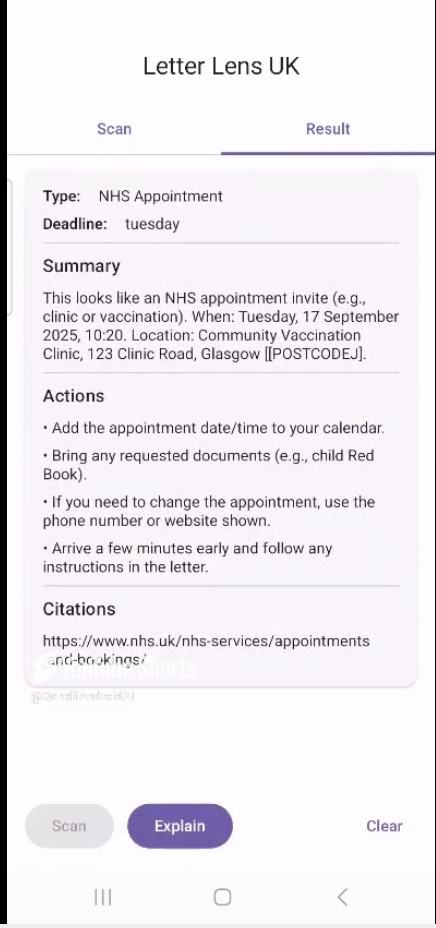
{ &nbsp;&nbsp;&nbsp;"type": "NHS Appointment", &nbsp;&nbsp;&nbsp;"deadline": "25 Sept 2025", &nbsp;&nbsp;&nbsp;"summary": "This looks like an NHS appointment invite (e.g., vaccination). When: 25 Sept. Location: Glasgow Clinic.", &nbsp;&nbsp;&nbsp;"actions": [ &nbsp;&nbsp;&nbsp;"Add the appointment date/time to your calendar.", &nbsp;&nbsp;&nbsp;"Bring any requested documents (e.g., child Red Book).", &nbsp;&nbsp;&nbsp;"If you need to reschedule, call the number on the letter." &nbsp;&nbsp;&nbsp;], &nbsp;&nbsp;&nbsp;"citations": ["https://www.nhs.uk/nhs-services/appointments-and-bookings/"] } 

\

Compose UI:

A simple card shows type, deadline, summary, and actions.

ElevatedCard(Modifier.fillMaxWidth()) { &nbsp;&nbsp;&nbsp;Column( &nbsp;&nbsp;&nbsp;&nbsp;&nbsp;&nbsp;&nbsp;Modifier.padding(16.dp), &nbsp;&nbsp;&nbsp;&nbsp;&nbsp;&nbsp;&nbsp;verticalArrangement = Arrangement.spacedBy(8.dp) &nbsp;&nbsp;&nbsp;) { &nbsp;&nbsp;&nbsp;&nbsp;&nbsp;&nbsp;&nbsp;Row(horizontalArrangement = Arrangement.spacedBy(16.dp)) { &nbsp;&nbsp;&nbsp;&nbsp;&nbsp;&nbsp;&nbsp;&nbsp;&nbsp;&nbsp;&nbsp;Text("Type:", fontWeight = FontWeight.SemiBold) &nbsp;&nbsp;&nbsp;&nbsp;&nbsp;&nbsp;&nbsp;&nbsp;&nbsp;&nbsp;&nbsp;Text(r.type) &nbsp;&nbsp;&nbsp;&nbsp;&nbsp;&nbsp;&nbsp;} &nbsp;&nbsp;&nbsp;&nbsp;&nbsp;&nbsp;&nbsp;Row(horizontalArrangement = Arrangement.spacedBy(16.dp)) { &nbsp;&nbsp;&nbsp;&nbsp;&nbsp;&nbsp;&nbsp;&nbsp;&nbsp;&nbsp;&nbsp;Text("Deadline:", fontWeight = FontWeight.SemiBold) &nbsp;&nbsp;&nbsp;&nbsp;&nbsp;&nbsp;&nbsp;&nbsp;&nbsp;&nbsp;&nbsp;Text(r.deadline ?: "—") &nbsp;&nbsp;&nbsp;&nbsp;&nbsp;&nbsp;&nbsp;} &nbsp;&nbsp;&nbsp;&nbsp;&nbsp;&nbsp;&nbsp;Divider() &nbsp;&nbsp;&nbsp;&nbsp;&nbsp;&nbsp;&nbsp;Text("Summary", style = MaterialTheme.typography.titleMedium) &nbsp;&nbsp;&nbsp;&nbsp;&nbsp;&nbsp;&nbsp;Text(r.summary) &nbsp;&nbsp;&nbsp;&nbsp;&nbsp;&nbsp;&nbsp;Divider() &nbsp;&nbsp;&nbsp;&nbsp;&nbsp;&nbsp;&nbsp;Text("Actions", style = MaterialTheme.typography.titleMedium) &nbsp;&nbsp;&nbsp;&nbsp;&nbsp;&nbsp;&nbsp;r.actions.forEach { a -> Text("• $a") } &nbsp;&nbsp;&nbsp;&nbsp;&nbsp;&nbsp;&nbsp;Divider() &nbsp;&nbsp;&nbsp;&nbsp;&nbsp;&nbsp;&nbsp;Text("Citations", style = MaterialTheme.typography.titleMedium) &nbsp;&nbsp;&nbsp;&nbsp;&nbsp;&nbsp;&nbsp;r.citations.forEach { c -> Text(c) } &nbsp;&nbsp;&nbsp;} } 

\

Results

  • A letter that takes ~5 minutes to interpret can be summarized in ~10 seconds.
  • In my tests on NHS/council letters, the app reliably pulled dates, locations, and required items.
  • Clear, low-friction UX reduced the cognitive load for non-technical users.

Lessons Learned

  • ML Kit OCR is surprisingly easy to set up in < 20 lines of Kotlin.
  • On-device AI ensures privacy (no letter leaves the phone).
  • Compose + CameraX makes UI binding smooth.

What's next

  • IOS version with KMP/Swift.
  • Multi-lingual support.
  • More letter types.

Screenshots

\ \

\

Conclusion

LettersLens demonstrates how small, focused AI tools can make everyday tasks, such as opening a letter, less stressful and more actionable.

Try it

  • Code: LetterLens GitHub Repo

  • Demo video: YouTube Dem

    \

\

Market Opportunity
RWAX Logo
RWAX Price(APP)
$0.0002354
$0.0002354$0.0002354
+0.94%
USD
RWAX (APP) Live Price Chart
Disclaimer: The articles reposted on this site are sourced from public platforms and are provided for informational purposes only. They do not necessarily reflect the views of MEXC. All rights remain with the original authors. If you believe any content infringes on third-party rights, please contact [email protected] for removal. MEXC makes no guarantees regarding the accuracy, completeness, or timeliness of the content and is not responsible for any actions taken based on the information provided. The content does not constitute financial, legal, or other professional advice, nor should it be considered a recommendation or endorsement by MEXC.

You May Also Like

Q4 2025 May Have Marked the End of the Crypto Bear Market: Bitwise

Q4 2025 May Have Marked the End of the Crypto Bear Market: Bitwise

The fourth quarter of 2025 may have quietly signaled the end of the crypto bear market, according to a new report from digital asset manager Bitwise, even as prices
Share
CryptoNews2026/01/22 15:06
CEO Sandeep Nailwal Shared Highlights About RWA on Polygon

CEO Sandeep Nailwal Shared Highlights About RWA on Polygon

The post CEO Sandeep Nailwal Shared Highlights About RWA on Polygon appeared on BitcoinEthereumNews.com. Polygon CEO Sandeep Nailwal highlighted Polygon’s lead in global bonds, Spiko US T-Bill, and Spiko Euro T-Bill. Polygon published an X post to share that its roadmap to GigaGas was still scaling. Sentiments around POL price were last seen to be bearish. Polygon CEO Sandeep Nailwal shared key pointers from the Dune and RWA.xyz report. These pertain to highlights about RWA on Polygon. Simultaneously, Polygon underlined its roadmap towards GigaGas. Sentiments around POL price were last seen fumbling under bearish emotions. Polygon CEO Sandeep Nailwal on Polygon RWA CEO Sandeep Nailwal highlighted three key points from the Dune and RWA.xyz report. The Chief Executive of Polygon maintained that Polygon PoS was hosting RWA TVL worth $1.13 billion across 269 assets plus 2,900 holders. Nailwal confirmed from the report that RWA was happening on Polygon. The Dune and https://t.co/W6WSFlHoQF report on RWA is out and it shows that RWA is happening on Polygon. Here are a few highlights: – Leading in Global Bonds: Polygon holds 62% share of tokenized global bonds (driven by Spiko’s euro MMF and Cashlink euro issues) – Spiko U.S.… — Sandeep | CEO, Polygon Foundation (※,※) (@sandeepnailwal) September 17, 2025 The X post published by Polygon CEO Sandeep Nailwal underlined that the ecosystem was leading in global bonds by holding a 62% share of tokenized global bonds. He further highlighted that Polygon was leading with Spiko US T-Bill at approximately 29% share of TVL along with Ethereum, adding that the ecosystem had more than 50% share in the number of holders. Finally, Sandeep highlighted from the report that there was a strong adoption for Spiko Euro T-Bill with 38% share of TVL. He added that 68% of returns were on Polygon across all the chains. Polygon Roadmap to GigaGas In a different update from Polygon, the community…
Share
BitcoinEthereumNews2025/09/18 01:10
BlackRock Increases U.S. Stock Exposure Amid AI Surge

BlackRock Increases U.S. Stock Exposure Amid AI Surge

The post BlackRock Increases U.S. Stock Exposure Amid AI Surge appeared on BitcoinEthereumNews.com. Key Points: BlackRock significantly increased U.S. stock exposure. AI sector driven gains boost S&P 500 to historic highs. Shift may set a precedent for other major asset managers. BlackRock, the largest asset manager, significantly increased U.S. stock and AI sector exposure, adjusting its $185 billion investment portfolios, according to a recent investment outlook report.. This strategic shift signals strong confidence in U.S. market growth, driven by AI and anticipated Federal Reserve moves, influencing significant fund flows into BlackRock’s ETFs. The reallocation increases U.S. stocks by 2% while reducing holdings in international developed markets. BlackRock’s move reflects confidence in the U.S. stock market’s trajectory, driven by robust earnings and the anticipation of Federal Reserve rate cuts. As a result, billions of dollars have flowed into BlackRock’s ETFs following the portfolio adjustment. “Our increased allocation to U.S. stocks, particularly in the AI sector, is a testament to our confidence in the growth potential of these technologies.” — Larry Fink, CEO, BlackRock The financial markets have responded favorably to this adjustment. The S&P 500 Index recently reached a historic high this year, supported by AI-driven investment enthusiasm. BlackRock’s decision aligns with widespread market speculation on the Federal Reserve’s next moves, further amplifying investor interest and confidence. AI Surge Propels S&P 500 to Historic Highs At no other time in history has the S&P 500 seen such dramatic gains driven by a single sector as the recent surge spurred by AI investments in 2023. Experts suggest that the strategic increase in U.S. stock exposure by BlackRock may set a precedent for other major asset managers. Historically, shifts of this magnitude have influenced broader market behaviors as others follow suit. Market analysts point to the favorable economic environment and technological advancements that are propelling the AI sector’s momentum. The continued growth of AI technologies is…
Share
BitcoinEthereumNews2025/09/18 02:49