How to Customize Appwrite Email Templates in Production
When running Appwrite in production (especially from Digital Ocean Marketplace or other pre-built installations), you might want to customize email templates to match your brand. This guide shows you how to do it properly using volume mounts to ensure your changes persist across updates.
\
Understanding Appwrite Email System
Appwrite’s email system consists of two main components:
- Template Files (
.tpl): HTML structure of emails located in/usr/src/code/app/config/locale/templates/ - Translation Files (
.json): Text content for different languages in/usr/src/code/app/config/locale/translations/
Available email templates include:
-
email-magic-url.tpl– Passwordless login emails -
email-inner-base.tpl– Password recovery emails -
email-otp.tpl– One-time password emails -
email-mfa-challenge.tpl– Multi-factor authentication -
email-session-alert.tpl– New session notifications\
The Problem with Direct Editing
When using pre-built Appwrite images (like from Digital Ocean Marketplace), the files exist inside Docker containers. If you edit them directly in the container, your changes will be lost when you:
-
Update Appwrite to a new version
-
Recreate containers
-
Scale your deployment
\
The Solution: Volume Mounts
Volume mounts let you replace container files with your own custom versions that persist on the host filesystem.
\
Step-by-Step Implementation
Step 1: SSH into Your Server
ssh root@your-server-ip cd ~/appwrite # or wherever your docker-compose.yml is located
\
Step 2: Extract Original Files from Container
Since the files are inside the Docker image, we need to copy them out first:
# Create directories for custom files mkdir -p custom-templates mkdir -p custom-translations # Copy all template files from container docker cp appwrite:/usr/src/code/app/config/locale/templates/. ./custom-templates/ # Copy all translation files from container docker cp appwrite:/usr/src/code/app/config/locale/translations/. ./custom-translations/
\ Important: You must copy ALL translation files, not just the ones you want to edit. When you mount a directory, it replaces the entire directory in the container.
\ And you should end up like the following:
\
Step 3: Customize Your Files
Now edit the files you want to customize:
# Edit the English translations vim custom-translations/en.json
\ You insert button, then when finished, insert again, escape then :wq to write and close. Example customization for magic URL email:
{ "emails.magicSession.subject": "Sign In to {{project}}", "emails.magicSession.hello": "Welcome back, {{user}}!", "emails.magicSession.buttonText": "Access My Account", "emails.magicSession.signature": "The {{project}} Team", "emails.magicSession.optionButton": "Click below to securely sign in to your {{b}}{{project}}{{/b}} account. This link expires in 1 hour." }
\
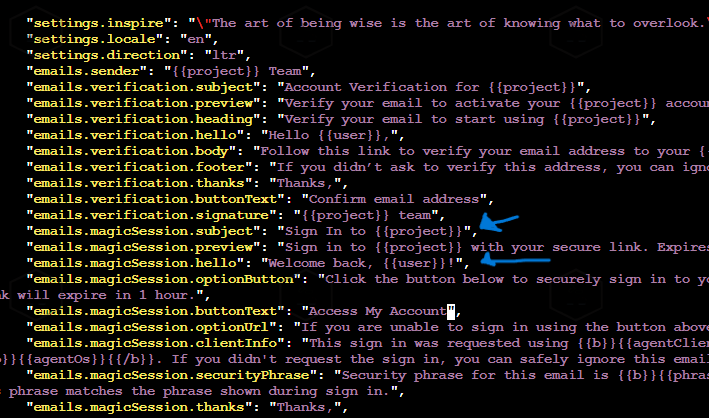
\ Or edit template structure:
vim custom-templates/email-magic-url.tpl
\
Step 4: Update docker-compose.yml
Add volume mounts to your docker-compose.yml under the appwrite service:
appwrite: image: appwrite/appwrite:1.8.0 container_name: appwrite restart: unless-stopped volumes: # Add these two lines for custom email templates - ./custom-templates:/usr/src/code/app/config/locale/templates:ro - ./custom-translations:/usr/src/code/app/config/locale/translations:ro # ... other existing volumes ... - appwrite-uploads:/storage/uploads:rw - appwrite-cache:/storage/cache:rw
The :ro flag makes them read-only for security.
\
Step 5: Apply Changes
# Recreate the appwrite container with new volumes docker compose up -d appwrite # Restart the mail worker to reload translations docker restart appwrite-worker-mails
\
Step 6: Test Your Changes
Trigger a test email through the API:
curl --location 'https://your-domain.com/v1/account/sessions/magic-url' \ --header 'Content-Type: application/json' \ --header 'X-Appwrite-Project: your-project-id' \ --data '{ "userId": "unique()", "email": "[email protected]", "url": "https://your-domain.com/auth" }'
\ Check your email to see the customized template! Here is the email I received, where you can see the new updates:
Understanding Translation Variables
Translation files use placeholders that get replaced with dynamic values:
{{project}}– Your project name{{user}}– User’s name or email{{b}}...{{/b}}– Bold text markers{{redirect}}– The action URL{{agentClient}}– Browser/client info{{agentDevice}}– Device type{{agentOs}}– Operating system{{phrase}}– Security phrase for verification
Common Email Templates Reference
Magic URL Login
- Template:
email-magic-url.tpl - Translations:
emails.magicSession.* - Triggered by: Creating a magic URL session via API
Password Recovery
- Template:
email-inner-base.tpl - Translations:
emails.recovery.* - Triggered by: Password reset request
Email Verification (OTP)
- Template:
email-otp.tpl - Translations:
emails.verification.* - Triggered by: Email verification flow
Troubleshooting
Changes Not Reflecting
Problem: You updated the files, but emails still show old content.
Solution: Translations are cached in memory. Always restart both containers:
docker restart appwrite sleep 5 docker restart appwrite-worker-mails # If that still doesn’t work, do a full restart: docker compose down docker compose up -d
\
Error 500 After Changes
Problem: Server returns 500 error after modifying translation files.
Solution: This usually means JSON syntax error. Validate your JSON:
cat custom-translations/en.json | python3 -m json.tool
Common mistakes:
- Missing commas between properties
- Extra comma after last property
- Using single quotes instead of double quotes
- Unescaped special characters
Missing Translation File Error
Problem: Error saying translation file not found.
Solution: Ensure you copied ALL translation files, not just the ones you modified:
# Re-copy all files docker cp appwrite:/usr/src/code/app/config/locale/translations/. ./custom-translations/
Changes Lost After Update
Problem: Updated Appwrite and customizations disappeared.
Solution: This shouldn’t happen with volume mounts. Verify your docker-compose.yml still has the volume mounts after the update.
Development vs Production
Local Development
For local development with the full Appwrite source code:
- Edit files directly in your local repository
- Files are already mounted via
./app:/usr/src/code/app - Changes are live – just restart containers
- Test with MailCatcher at
http://localhost:9503
Production Deployment
For production:
- Use the volume mount approach described above
- Keep your custom files in version control
- Consider creating a custom Docker image for larger customizations
- Always test in staging before applying to production
Best Practices
- Version Control: Keep your
custom-templatesandcustom-translationsdirectories in git - Backup: Backup these directories before major updates
- Testing: Always test email templates in a staging environment first
- Documentation: Document what you’ve customized for your team
- Minimal Changes: Only customize what’s necessary – makes updates easier
- Multi-language: If you support multiple languages, update all relevant translation files
\
You May Also Like

Firestorm follows Trump plan to destroy Jefferson-era White House fixtures
Ethereum Exodus: Seven New Wallets Withdraw $161M from Binance in 16-Hour Surge