Stateful API-to-Database Synchronization: Implementing Incremental Data Ingestion from REST APIs wit
In distributed systems architecture, the synchronization gap between external HTTP APIs and relational database targets represents a persistent engineering challenge—particularly when API responses lack native transactional semantics or expose non-normalized, deeply nested JSON payloads (comment threads, organizational hierarchies, multi-level BOM structures). CocoIndex's Custom Source abstraction provides a declarative framework for converting arbitrary HTTP/gRPC endpoints into stateful, incrementally-synced data streams with built-in checkpointing, content fingerprinting (SHA256-based deduplication), and differential update propagation. Unlike imperative polling scripts (cron jobs invoking curl + jq + psql INSERT), Custom Sources implement a **pull-based CDC (Change Data Capture) model** via ordinal watermarking—analogous to Kafka Connect source connectors, but optimized for HTTP APIs without native offset management. The framework maintains persistent state (last-seen timestamp vectors, content hashes) in a local metadata store (SQLite by default, configurable to Postgres/Redis for multi-process deployments), enabling exactly-once delivery semantics and automatic retry logic with exponential backoff. This tutorial demonstrates building a production-ready Custom Source targeting the HackerNews Algolia Search API (hn.algolia.com/api/v1), implementing:
• Stateless API→Stateful Stream transformation: Converting REST GET requests into append-log semantics
• Recursive tree traversal with cycle detection: Handling unbounded-depth comment DAGs (Directed Acyclic Graphs) without stack overflow
• Schema evolution support: Python dataclass-based typing with forward compatibility via structural subtyping
• Postgres sink connector integration: Leveraging psycopg3 async connection pooling + COPY protocol for bulk inserts
• GIN-indexed full-text search configuration: Materializing tsvector columns with English dictionary stemming + ranking functions
\ In this example, we build a custom connector for HackerNews. It fetches recent stories + nested comments, indexes them, and exposes a simple search interface powered by Postgres full-text search.
\
Why Use a Custom Source?
In many scenarios, pipelines don't just read from clean tables. They depend on:
- Internal REST services
- Partner APIs
- Legacy systems
- Non-standard data models that don’t fit traditional connectors
CocoIndex’s Custom Source API makes these integrations declarative, incremental, and safe by default. Instead of writing ad-hoc scripts, you wrap your API as a “source component,” and CocoIndex takes it from there.
\
Project Walkthrough — Building a HackerNews Index
Goals
- Call HackerNews Search API
- Fetch nested comments
- Update only modified threads
- Store content in Postgres
- Expose a text search interface
CocoIndex handles change detection, idempotency, lineage, and state sync automatically.
Overview
\ The pipeline consists of three major parts:
- Define a custom source (
HackerNewsConnector)
- Calls HackerNews API
- Emits rows for changed/updated threads
- Pulls full thread + comment tree
- Build an index with CocoIndex Flow
- Collect thread content
- Collect all comments recursively
- Export to a Postgres table (
hn_messages)
- Add a lightweight query handler
- Uses PostgreSQL full-text search
- Returns ranked matches for a keyword query
Each cocoindex update only processes changed HN threads and keeps everything in sync.
The project is open source and available on GitHub.
\
Prerequisites
-
Install Postgres if you don't have one.
\
Defining the Data Model
Every custom source defines two lightweight data types:
- Key Type → uniquely identifies an item
- Value Type → the full content for that item
In Hacker News, each news is a thread, and each thread can have multiple comments.
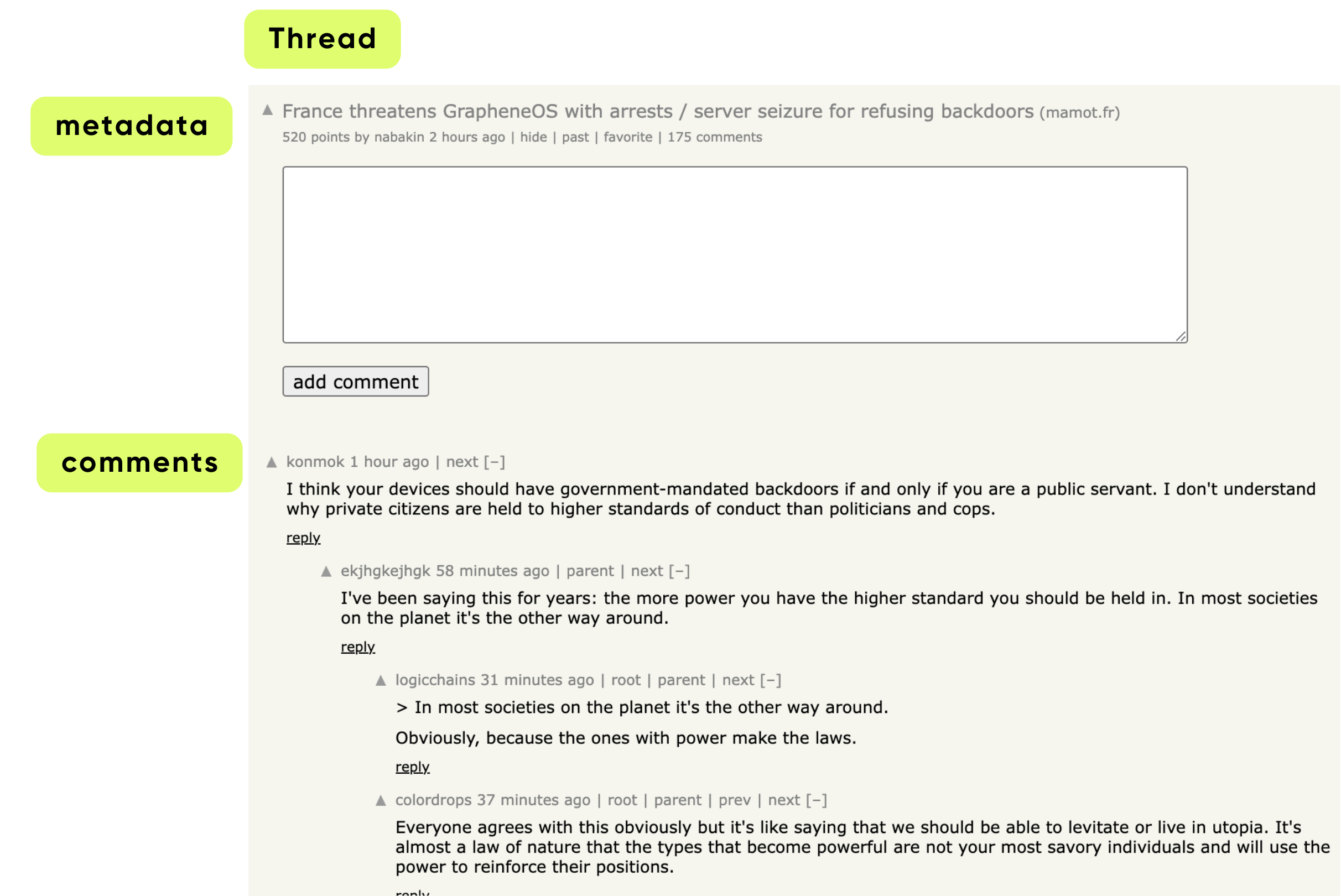
\ For HackerNews, let’s define keys like this:
class _HackerNewsThreadKey(NamedTuple): """Row key type for HackerNews source.""" thread_id: str
\ Keys must be:
- hashable
- serializable
- stable (doesn’t change over time)
Values hold the actual dataset:
@dataclasses.dataclass class _HackerNewsComment: id: str author: str | None text: str | None created_at: datetime | None @dataclasses.dataclass class _HackerNewsThread: """Value type for HackerNews source.""" author: str | None text: str url: str | None created_at: datetime | None comments: list[_HackerNewsComment]
\ This tells CocoIndex exactly what every HackerNews “item” looks like when fully fetched. _HackerNewsThread holds a post and all its comments, while _HackerNewsComment represents individual comments.
\
Building a Custom Source Connector
A Custom Source has two parts:
- SourceSpec — declarative configuration
- SourceConnector — operational logic for reading data
Writing the SourceSpec
A SourceSpec in CocoIndex is a declarative configuration that tells the system what data to fetch and how to connect to a source. It doesn’t fetch data itself — that’s handled by the source connector.
class HackerNewsSource(SourceSpec): """Source spec for HackerNews API.""" tag: str | None = None max_results: int = 100
\ Fields:
tag- Optional filter for the type of HackerNews content.
- Example:
"story","job","poll". - If
None, it fetches all types. max_results- Maximum number of threads to fetch from HackerNews at a time.
- Helps limit the size of the index for performance or testing.
\
Defining the connector
Sets up the connector's configuration and HTTP session so it can fetch HackerNews data efficiently.
@source_connector( spec_cls=HackerNewsSource, key_type=_HackerNewsThreadKey, value_type=_HackerNewsThread, ) class HackerNewsConnector: """Custom source connector for HackerNews API.""" _spec: HackerNewsSource _session: aiohttp.ClientSession def __init__(self, spec: HackerNewsSource, session: aiohttp.ClientSession): self._spec = spec self._session = session @staticmethod async def create(spec: HackerNewsSource) -> "HackerNewsConnector": """Create a HackerNews connector from the spec.""" return HackerNewsConnector(spec, aiohttp.ClientSession())
source_connectortells CocoIndex that this class is a custom source connector. It specifies:spec_cls: the configuration class (HackerNewsSource)key_type: how individual items are identified (_HackerNewsThreadKey)value_type: the structure of the data returned (_HackerNewsThread)create()is called by CocoIndex to initialize the connector, and it sets up a freshaiohttp.ClientSessionfor making HTTP requests.
\
Listing Available Threads
The list() method in HackerNewsConnector is responsible for discovering all available HackerNews threads that match the given criteria (tag, max results) and returning metadata about them. CocoIndex uses this to know which threads exist and which may have changed.
async def list( self, ) -> AsyncIterator[PartialSourceRow[_HackerNewsThreadKey, _HackerNewsThread]]: """List HackerNews threads using the search API.""" # Use HackerNews search API search_url = "https://hn.algolia.com/api/v1/search_by_date" params: dict[str, Any] = {"hitsPerPage": self._spec.max_results} if self._spec.tag: params["tags"] = self._spec.tag async with self._session.get(search_url, params=params) as response: response.raise_for_status() data = await response.json() for hit in data.get("hits", []): if thread_id := hit.get("objectID", None): utime = hit.get("updated_at") ordinal = ( int(datetime.fromisoformat(utime).timestamp()) if utime else NO_ORDINAL ) yield PartialSourceRow( key=_HackerNewsThreadKey(thread_id=thread_id), data=PartialSourceRowData(ordinal=ordinal), )
list() fetches metadata for all recent HackerNews threads.
- For each thread:
- It generates a
PartialSourceRowwith:key: the thread IDordinal: the last updated timestamp
- Purpose: allows CocoIndex to track what threads exist and which have changed without fetching full thread content.
\
Fetching Full Thread Content
This async method fetches a single HackerNews thread (including its comments) from the API, and wraps the result in a PartialSourceRowData object — the structure CocoIndex uses for row-level ingestion.
async def get_value( self, key: _HackerNewsThreadKey ) -> PartialSourceRowData[_HackerNewsThread]: """Get a specific HackerNews thread by ID using the items API.""" # Use HackerNews items API to get full thread with comments item_url = f"https://hn.algolia.com/api/v1/items/{key.thread_id}" async with self._session.get(item_url) as response: response.raise_for_status() data = await response.json() if not return PartialSourceRowData( value=NON_EXISTENCE, ordinal=NO_ORDINAL, content_version_fp=None, ) return PartialSourceRowData( value=HackerNewsConnector._parse_hackernews_thread(data) )
get_value()fetches the full content of a specific thread, including comments.- Parses the raw JSON into structured Python objects (
_HackerNewsThread+_HackerNewsComment). - Returns a
PartialSourceRowDatacontaining the full thread.
\
Ordinal Support
Tells CocoIndex that this source provides timestamps (ordinals).
def provides_ordinal(self) -> bool: return True
CocoIndex uses ordinals to incrementally update only changed threads, improving efficiency.
\
Parsing JSON into Structured Data
This static method takes the raw JSON response from the API and turns it into a normalized _HackerNewsThread object containing:
- The post (title, text, metadata)
- All nested comments, flattened into a single list
- Proper Python datetime objects
It performs a recursive traversal of the comment tree.
@staticmethod def _parse_hackernews_thread( dict[str, Any]) -> _HackerNewsThread: comments: list[_HackerNewsComment] = [] def _add_comments(parent: dict[str, Any]) -> None: children = parent.get("children", None) if not children: return for child in children: ctime = child.get("created_at") if comment_id := child.get("id", None): comments.append( _HackerNewsComment( id=str(comment_id), author=child.get("author", ""), text=child.get("text", ""), created_at=datetime.fromisoformat(ctime) if ctime else None, ) ) _add_comments(child) _add_comments(data) ctime = data.get("created_at") text = data.get("title", "") if more_text := data.get("text", None): text += "\n\n" + more_text return _HackerNewsThread( author=data.get("author"), text=text, url=data.get("url"), created_at=datetime.fromisoformat(ctime) if ctime else None, comments=comments, )
- Converts raw HackerNews API response into
_HackerNewsThreadand_HackerNewsComment. _add_comments()recursively parses nested comments.- Combines
title+textinto the main thread content. - Produces a fully structured object ready for indexing.
\
Putting It All Together in a Flow
Your flow now reads exactly like a React component.
Define the flow and connect source
@cocoindex.flow_def(name="HackerNewsIndex") def hackernews_flow( flow_builder: cocoindex.FlowBuilder, data_scope: cocoindex.DataScope ) -> None: # Add the custom source to the flow data_scope["threads"] = flow_builder.add_source( HackerNewsSource(tag="story", max_results=500), refresh_interval=timedelta(minutes=1), ) # Create collectors for different types of searchable content message_index = data_scope.add_collector()
\
Process each thread and collect structured information
with data_scope["threads"].row() as thread: # Index the main thread content message_index.collect( id=thread["thread_id"], thread_id=thread["thread_id"], content_type="thread", author=thread["author"], text=thread["text"], url=thread["url"], created_at=thread["created_at"], )
\
Process each comment of a thread and collect structured information
with thread["comments"].row() as comment: message_index.collect( id=comment["id"], thread_id=thread["thread_id"], content_type="comment", author=comment["author"], text=comment["text"], created_at=comment["created_at"], )
\
Export to database tables
message_index.export( "hn_messages", cocoindex.targets.Postgres(), primary_key_fields=["id"], )
CocoIndex now:
- polls the HackerNews API
- tracks changes incrementally
- flattens nested comments
- exports to Postgres
- supports live mode
Your app can now query it as a real-time search index.
\
Querying & Searching the HackerNews Index
At this point you are done with the index flow. As the next step, you could define query handlers — so you can run queries in CocoInsight. You can use any library or framework of your choice to perform queries. You can read more in the documentation about Query Handler.
@hackernews_flow.query_handler() def search_text(query: str) -> cocoindex.QueryOutput: """Search HackerNews threads by title and content.""" table_name = cocoindex.utils.get_target_default_name(hackernews_flow, "hn_messages") with connection_pool().connection() as conn: with conn.cursor() as cur: # Simple text search using PostgreSQL's text search capabilities cur.execute( f""" SELECT id, thread_id, author, content_type, text, created_at, ts_rank(to_tsvector('english', text), plainto_tsquery('english', %s)) as rank FROM {table_name} WHERE to_tsvector('english', text) @@ plainto_tsquery('english', %s) ORDER BY rank DESC, created_at DESC """, (query, query), ) results = [] for row in cur.fetchall(): results.append( { "id": row[0], "thread_id": row[1], "author": row[2], "content_type": row[3], "text": row[4], "created_at": row[5].isoformat(), } ) return cocoindex.QueryOutput(results=results)
\ This code defines a query handler that searches HackerNews threads and comments indexed in CocoIndex. It determines the database table storing the messages, then uses PostgreSQL full-text search (to_tsvector and plainto_tsquery) to find rows matching the query.
Results are ranked by relevance (ts_rank) and creation time, formatted into dictionaries, and returned as a structured cocoindex.QueryOutput. Essentially, it performs a full-text search over the indexed content and delivers ranked, structured results.
\
Running Your HackerNews Custom Source
Once your custom source and flow are ready, running it with CocoIndex is straightforward. You can either update the index on-demand or keep it continuously in sync with HackerNews.
\
1. Install Dependencies
Make sure you have Python installed and then install your project in editable mode:
pip install -e .
This installs CocoIndex along with all required dependencies, letting you develop and update the connector without reinstalling.
\
2. Update the Target (On-Demand)
To populate your target (e.g., Postgres) with the latest HackerNews threads:
cocoindex update main
- Only threads that have changed will be re-processed.
- Your target remains in sync with the most recent 500 HackerNews threads.
- Efficient incremental updates save time and compute resources.
Note that each time when you run the update command, CocoIndex will only re-process threads that have changed, and keep the target in sync with the recent 500 threads from HackerNews. You can also run update command in live mode, which will keep the target in sync with the source continuously:
cocoindex update -L main
- Runs the flow in live mode, polling HackerNews periodically.
- CocoIndex automatically handles incremental changes and keeps the target synchronized.
- Ideal for dashboards, search, or AI pipelines that require real-time data.
- \
3. Troubleshoot & Inspect with CocoInsight
CocoInsight lets you visualize and debug your flow, see the lineage of your data, and understand what’s happening under the hood.
Start the server:
cocoindex server -ci main
Then open the UI in your browser: https://cocoindex.io/cocoinsight
Note that this requires QueryHandler setup in previous step.
\
What You Can Build Next
This simple example opens the door to a lot more:
- Build a trending-topic detector
- Run LLM summarization pipelines on top of indexed threads
- Add embeddings + vector search
- Mirror HN into your internal data warehouse
- Build a real-time HN dashboard
- Extend to other news sources (Reddit, Lobsters, etc.)
Because the whole pipeline is declarative and incremental, extending it is straightforward.
Since Custom Sources allow you to wrap any Python logic into an incremental data stream, the best use cases are usually "Hard-to-Reach" data—systems that don't have standard database connectors, have complex nesting, or require heavy pre-processing.
The Knowledge Aggregator for LLM Context
Building a context engine for an AI bot often requires pulling from non-standard documentation sources.
The "Composite" Entity (Data Stitching)
Most companies have user data fragmented across multiple microservices. You can build a Custom Source that acts as a "virtual join" before the data ever hits your index. For example the Source:
- Fetches a User ID from an Auth Service (Okta/Auth0).
- Uses that ID to fetch billing status from Stripe API.
- Uses that ID to fetch usage logs from an Internal Redis.
Instead of managing complex ETL joins downstream, the Custom Source yields a single User360 object. CocoIndex tracks the state of this composite object; if the user upgrades in Stripe or changes their email in Auth0, the index updates automatically.
The "Legacy Wrapper" (Modernization Layer)
Enterprises often have valuable data locked in systems that are painful to query (SOAP, XML, Mainframes). You get a modern, queryable SQL interface (via the CocoIndex target) on top of a 20-year-old system without rewriting the legacy system itself.
Public Data Monitor (Competitive Intelligence)
Tracking changes on public websites or APIs that don't offer webhooks.
- The Source:
- Competitor Pricing: Scraping e-commerce product pages.
- Regulatory Feeds: Polling a government RSS feed or FDA drug approval database.
- Crypto/Stocks: Hitting a CoinGecko or Yahoo Finance API.
The CocoIndex Value: Using the diff capabilities, you can trigger downstream alerts only when a price changes by >5% or a new regulation is posted, rather than spamming your database with identical polling results.
\
Why This Matters
Custom Sources extend this model to any API — internal, external, legacy, or real-time.
This unlocks a simple but powerful pattern:
Whether you’re indexing HackerNews or orchestrating dozens of enterprise services, the framework gives you a stable backbone with:
- persistent state
- deterministic updates
- automatic lineage
- flexible target exports
- minimal infrastructure overhead
⭐ Try It, Fork It, Star It
If you found this useful, a star on GitHub means a lot — it helps others discover CocoIndex and supports further development.
You May Also Like

Worst case scenario: At least 50% rice, pork, chicken price hike if Gulf crisis persists

Worldcoin bears force yet another structure break: What’s next for WLD?