15 Best Crypto Hardware Wallets: Top Crypto Storage Solutions for 2026
While there are many ways to hold your cryptocurrency assets, not all types of wallets are equal in terms of safety. While leaving your coins on centralized exchanges is undoubtedly the most convenient way, it is also the least safe way to hold your precious digital assets. There are countless tragic stories of how investors lost sizeable crypto portfolios because they kept it on an exchange that went bust, the last infamous example being the collapse of FTX in November 2022.
Compared to exchanges, even keeping your coins in web, mobile, or desktop wallets, where you are the owner of the private keys to your wallet, is a much safer option. Nevertheless, offline hardware wallets (also referred to as “cold storage”) are unequivocally the safest cryptocurrency storage method. Hardware crypto wallets are made of durable material and only connect with the network when you want to move the funds from or off them, which makes them extremely resilient to hacking attempts.
List of the best crypto hardware wallets for 2026:
- Ledger Nano X – The best hardware wallet for most crypto holders
- Ledger Nano S Plus – A budget-friendly option from Ledger
- Trezor Safe 5 – Trezor’s flagship hardware wallet model
- Trezor Safe 7 – Next-generation Trezor wallet featuring enhanced security upgrades
- ShapeShift KeepKey – A cheap hardware wallet that does not compromise on security
- Trezor Safe 3 – A simple yet secure hardware wallet from Trezor
- Ledger Nano (5th Gen) – The newest Ledger model offering improved speed and performance
- NGRAVE ZERO – Powerful wallet with a myriad of security protocols
- Ledger Flex – A high-end option with an E Ink touchscreen display
- Cypherock X1 – A seedless hardware wallet with NFC-based multi-factor authentication
- Ledger Stax – A premium crypto wallet designed for advanced users
- Coinkite ColdCard Mk4 – A truly air-gapped crypto hardware wallet
- CoolWallet S – A highly portable credit card-like crypto wallet
- SecuX V20 – A robust wallet with dual connectivity and a large responsive touchscreen
- Tangem – A simple and lightweight hardware wallet
- Keystone Pro – A secure hardware wallet powered by AAA batteries
- Shift Crypto BitBox02 – A crypto wallet capable of connecting to full Bitcoin nodes
The 17 best crypto hardware wallets in 2026: A detailed overview
Over the years, many different types and brands of hardware crypto wallets appeared on the market, which makes deciding on which one to buy increasingly difficult. Hardware wallets differ greatly in backup features, the number of supported blockchains, materials used, and also price. To make the decision at least a bit easier we have prepared an overview of the best crypto hardware wallets on the market today.
1. Ledger Nano X – The best hardware wallet for most crypto holders
Ledger Nano X is the flagship product of French company Ledger and is often considered to be one of the best and most versatile cryptocurrency hardware wallets on the market. This hardware wallet boasts a CC EAL5+ certified secure element chip and supports over 5000 cryptocurrencies and is therefore a suitable storage option for almost any cryptocurrency user. In addition, Ledger Nano X is compatible with almost all popular operating systems, including Android, iOS, MacOS, Windows, and Linux. The hardware wallet can be connected either via USB or Bluetooth, one of the biggest differences that sets it apart from the Nano S.
The wallet uses Ledger’s proprietary Ledger Live software, which simplifies cryptocurrency management and seed phrase generation and restoration. A small display on the hardware wallet provides the user with immediate visual feedback, making processes more intuitive. In addition, the Nano X does not only support a huge number of cryptos but can also connect with a whooping 100 applications. Integration with hot wallets like Metamask and other Web3 wallets is another advantage of the Ledger Nano X, allowing users to access DeFi platforms and blockchain dApps.
Last but not least, Ledger’s hardware wallets have not been exploited or found to have vulnerabilities, which provides a good illustration of the company’s commitment to top-tier security standards. Although the market price of $149 sets Ledger Nano X among the more expensive crypto hardware wallets, the Nano X’s superior security and dApp integrations make it the best hardware wallet available in 2025
Pros of Ledger Nano X:
- Full self-custody and control over private keys
- Open source code for transparency
- Very intuitive, attractive user interface
- Built-in exchange for top rates on coin swaps
- Based in privacy-protecting Switzerland
- Helpful developers provide direct support
- Fully free with no transaction fees (of course, except for blockchain miner fees)
Cons of Ledger Nano X:
- Currently only adaptive web interface
- Limited language support at launch
- New project with a short track record so far
- Open source design means independent auditing is needed
2. Ledger Nano S Plus – A budget-friendly option from Ledger
Ledger Nano S Plus is a highly secure hardware crypto wallet that offers many of the features of the more expensive Nano X but at a lower price point. Ledger Nano S Plus also supports over 5,500 cryptocurrencies and allows you to install up to 100 applications. It featured the same advanced security systems as its more expensive option, including a CC EAL5+ certified security element. This hardware wallet utilizes Ledger Live software that streamlines the process of creating a new wallet or transferring your old wallet to a new platform.
On the other hand, the Ledger Nano S Plus has a storage capacity of 1.5 MB, which is slightly less than the Ledger Nano X, which has 2 MB. While most ordinary hardware wallet users should find 1.5 MB of storage more than enough, some might miss the Bluetooth support, which Ledger Nano S Plus also lacks. However, the USB-only connectivity of the Nano S Plus eliminates the need for a battery, which makes the Ledger Nano S Plus extra light (it weighs only 21 grams). The wallet comes in five different colors, including Matte Black, Mystic White, BTC Orange, Deepsea Blue, and Ice.
The Ledger Nano S Plus is packed with features and is available at almost half of the price of the Nano X. This makes Ledger Nano S Plus one of the most popular hardware crypto wallets. In fact, the Nano S Plus seems to continue the legacy of its predecessor, the Nano S, which was a bestseller among hardware wallets, when it launched back in 2016.
Pros of Ledger Nano S Plus:
- Supports more than 5,500 cryptocurrencies
- Top-tier security (CC EAL5+ certified chip)
- Affordable (priced at $79)
- Among best-selling hardware wallets
Cons of Ledger Nano S Plus:
- No Bluetooth connectivity
- The device’s user interface and navigation can be complicated for novice users
3. Trezor Safe 5 – Trezor’s flagship hardware wallet

Trezor Safe 5 is an advanced next-generation hardware wallet designed to provide top-tier security while keeping usability at the forefront. It supports over 9,000 cryptocurrencies, including Bitcoin, Ethereum, and ERC-20 tokens, and allows users to send, receive, and stake assets directly through the Trezor Suite desktop app or compatible third-party wallets such as MetaMask.
This model introduces the new 1.54-inch Trezor Touch color touchscreen with haptic feedback, offering a more intuitive and tactile user experience compared to previous versions. Built with open-source transparency, it features an EAL 6+ Secure Element for enhanced offline and online protection. The Trezor Safe 5 also includes a microSD card slot for additional security options, and its Gorilla Glass 3 screen paired with an anodized aluminum backplate makes it both durable and premium in feel.
For backup, users can rely on a new 20-word recovery seed with optional Multi-share Backup support, making it safer to restore wallets in case of loss or damage. The device remains PIN- and passphrase-protected, ensuring that only authorized users can access stored funds. Connectivity is handled via USB-C, and while it supports Windows, macOS, Linux, and Android, there’s still no native iOS app.
Priced at $169, the Trezor Safe 5 stands out as a secure and refined hardware wallet choice for those who prioritize both strong encryption and modern design.
Pros of Trezor Safe 5:
- Vivid color touchscreen with haptic feedback
- Durable Gorilla Glass screen and aluminum backplate
- Supports Multi-share Backup and microSD protection
Cons of Trezor Safe 3:
- No native iOS support
- Pricier than entry-level wallets
4. Trezor Safe 7 – Next-generation Trezor wallet featuring enhanced security upgrades

Trezor Safe 7 is the newest flagship hardware wallet from Trezor, built with a strong focus on long-term, open-source security. Priced at $249, it is the company’s most advanced model to date and the first hardware wallet marketed as quantum-ready. The device uses a dual-chip architecture that pairs the open-source Tropic Zero One (TROPIC01) chip with an NDA-free EAL6+ secure element, allowing independent security audits without relying on closed components.
This transparent hardware design sets the Safe 7 apart from most competing wallets. By removing NDAs at the chip level, Trezor enables full third-party inspection while maintaining a high security standard. The approach reinforces Trezor’s self-custody philosophy, giving users direct control over their private keys without sacrificing verifiability or protection.
On the hardware side, the Safe 7 features a 2.5-inch edge-to-edge color touchscreen that is noticeably larger than previous Trezor models. The wallet is housed in a single-piece aluminum body with a Gorilla Glass 3 backplate and carries an IP54 rating for basic dust and splash resistance. Bluetooth Low Energy support and Qi2-compatible magnetic wireless charging add everyday convenience, while the built-in LiFePO₄ battery is designed to last significantly longer than standard lithium batteries.
Using the Trezor Suite interface, users can manage over 9,000 cryptocurrencies, store NFTs, and access trading, staking, and third-party DeFi services from one dashboard. All wireless communication is encrypted and authenticated through the open-source Trezor Host Protocol (THP). The Safe 7 is available in multiple color options, with a Bitcoin-only edition for users who prefer a simplified setup.
Pros:
- Quantum-ready security architecture with a fully auditable dual-chip design
- Open-source components without NDAs, enabling full third-party verification
- Large touchscreen with durable aluminum and Gorilla Glass construction
- Bluetooth connectivity and Qi2 magnetic wireless charging support
Cons:
- Premium price point compared to entry-level hardware wallets
- Larger and heavier than older Trezor models due to the expanded display
5. ShapeShift KeepKey – A cheap hardware wallet that does not compromise on security
ShapeShift KeepKey is a sturdy hardware wallet that is among the cheapest hardware wallets on the market today. Although KeepKey devices sell for just $49 these wallets do not compromise on security. This ShapeShift product utilizes AES hardware encryption and 2-factor authentication, which puts its security on par with the wallets listed above. KeepKey can also deploy firmware updates without being connected to the internet. However, when you do need to connect the device to a computer and the internet, you should not have any problems as KeepKey supports most systems, including PC operating systems such as MacOS, Windows and Linux, and Android mobile operating systems. Through a large OLED display that occupies the entire front surface of the device, the user is constantly informed about what is going on with his wallet and transactions.
Nevertheless, every bargain comes with some trade-offs. In the case of ShapeShift’s KeepKey, the biggest disadvantage is the fairly limited support of different cryptocurrencies. You will be able to store Bitcoin, Bitcoin Cash, Bitcoin Gold, Litecoin, Ethereum (together with Ethereum-based tokens), Dogecoin, Dash, and nothing else. The wallet is also unable to integrate with Web3 wallets or DeFi applications. This means that even less advanced users with a diversified crypto portfolio might quickly find that the cheap KeepKey falls short of meeting all their needs. If you are, however, just looking for secure and cheap cold storage of the above-mentioned coins, KeepKey is definitely the hardware wallet to consider.
Pros of ShapeShift KeepKey:
- One of the cheapest hardware wallets on the market ($49)
- Large OLED screen
- Allows password entry and QR code viewing
- Open-source and simple-to-use software
Cons of ShapeShift KeepKey:
- Very narrow list of supported cryptocurrencies
- No support for Web3 wallet or dApp integration
- No multi-signature support
6. Trezor Safe 3 – A simple yet secure hardware wallet from Trezor
Trezor Safe 3 is a dependable and affordable hardware wallet built for users who want solid protection without paying premium prices. Maintaining Trezor’s open-source transparency, it introduces a Secure Element chip (EAL 6+) to protect private keys, even in the event of physical compromise. It supports more than 9,000 cryptocurrencies and integrates seamlessly with the Trezor Suite desktop app for managing, sending, receiving, and staking crypto assets.
Priced at $79, the Trezor Safe 3 offers great value for users who prefer simplicity and robust functionality. The 0.96″ OLED display allows easy transaction verification directly on the device, while PIN and passphrase protection reinforce security. Though it lacks microSD and touchscreen support, it remains one of the most trusted midrange wallets on the market, compatible with Windows, macOS, Linux, and Android. It also supports Tor integration and coin control for those who prioritize privacy.
Pros of Trezor Safe 3:
- Secure Element chip with advanced protection
- Trezor Suite integration for staking and privacy tools
- Lightweight, intuitive, and affordable
Cons of Trezor Safe 3:
- No touchscreen or haptic feedback
- No native iOS app
- Lacks microSD card support
7. Ledger Nano (5th Gen) – The newest Ledger model offering improved speed and performance

The Ledger Nano 5th Gen is the newest model in Ledger’s Nano series, positioned between entry-level wallets and the brand’s premium devices. Priced at $179, it delivers much of the functionality found in the Ledger Flex and Ledger Stax while remaining more affordable. It also reflects Ledger’s shift in terminology, with the company now referring to its devices as “signers” to highlight their role in securely authorizing transactions rather than storing assets.
This model is the first Nano device to feature a 2.76-inch E Ink touchscreen, replacing physical buttons with a more modern interface. Security is handled by Ledger’s CC EAL6+ certified Secure Element, which isolates private keys from the rest of the system. Bluetooth and NFC support enable wireless use across supported devices, while the lightweight plastic body keeps the wallet portable, even if it lacks the premium feel of Ledger’s higher-end models.
The Nano 5th Gen ships with a Ledger Recovery Key, allowing users to create a PIN-protected NFC backup of their recovery phrase. This offers a more durable alternative to paper backups and improves recovery options if the primary seed phrase is lost. Inside the box, users also get a USB-C cable and recovery sheets, with asset management handled through Ledger Wallet, where users can manage thousands of cryptocurrencies, stake supported assets, and connect to Web3 applications.
Customization is another focus, with multiple color options and support for custom lock screen images. The E Ink display contributes to strong battery efficiency and provides easy access to device settings, security controls, and advanced features such as passphrase protection and PIN shuffling. Overall, the Nano 5th Gen is designed for users who want modern interaction and strong security without stepping up to Ledger’s most expensive devices.
Pros:
- First Nano model to feature a full E Ink touchscreen
- NFC-enabled recovery backup with the Ledger Recovery Key
- Strong key isolation using a CC EAL6+ certified Secure Element
- Wireless functionality through Bluetooth and NFC
Cons:
- Plastic casing does not feel as premium as Ledger Flex or Stax
- Priced higher than previous Nano models like the Nano X
- Touchscreen interface may not suit users who prefer physical buttons
8. NGRAVE ZERO – Industry-leading security with EAL7 certification
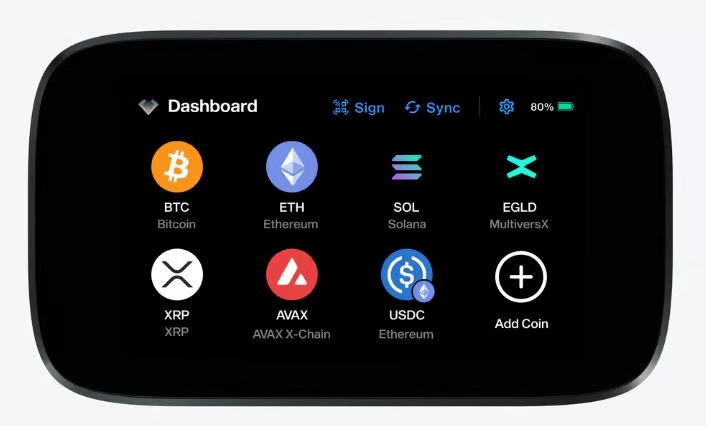
If ultimate security is your priority, the NGRAVE ZERO sets a new standard, even for highly secure wallets like Ledger and Trezor. Operating entirely offline, it uses QR code communication, eliminating the risks associated with USB, Bluetooth, or any wireless connectivity. This ensures your private keys remain completely isolated from online threats. This level of security makes it one of the best air-gapped wallets
The wallet boasts an EAL7 certification, the highest security standard in both the blockchain and financial industries. One of its standout features is its self-destruction capability—if the device is tampered with, it automatically wipes all private keys, leaving no trace for potential attackers. This kind of proactive security is unmatched.
The full-color touchscreen is not just visually appealing but also highly functional, making navigation and transaction verification straightforward. Another innovative feature is its light sensor technology, which securely generates private keys directly on the device, avoiding pre-set recovery phrases. For added security, the wallet pairs seamlessly with the GRAPHENE metal plate backup, offering a recovery solution as durable as the wallet itself.
However, the NGRAVE ZERO’s exceptional security and advanced features come at a price. At just over $400, it is one of the most expensive wallets available, which may deter budget-conscious users.
Pros:
- Air-gapped design with QR code communication for ultimate offline security
- EAL7 certification—highest security standard in the industry
- Self-destruction feature wipes private keys if tampered with
- Light sensor technology for secure, on-device private key generation
- Full-color touchscreen simplifies navigation and transaction verification
- Durable GRAPHENE metal plate for robust backup and recovery
Cons:
- High price point of over $400
- Lack of wireless or USB connectivity might be inconvenient for some users
- Larger size compared to slim, portable wallets
9. Ledger Flex – A high-end option with an E Ink touchscreen display

The Ledger Flex is Ledger’s latest mid-to-premium hardware wallet, built to balance strong security with a more comfortable user experience. It features a 2.84-inch E Ink touchscreen that makes reviewing and confirming transactions easier than on Ledger’s Nano models. The wallet supports both USB-C and Bluetooth connectivity, allowing it to work seamlessly with desktop computers, laptops, and mobile devices.
In terms of security, the Flex uses Ledger’s EAL6+ CC-certified Secure Element, which isolates private keys from the rest of the system. Users can install up to 100 crypto applications on the device and access more than 5,500 supported assets through third-party integrations. Asset management, staking, and dApp access are handled through Ledger Wallet, giving users a single interface for everyday use.
At $249, the Ledger Flex sits at the higher end of the hardware wallet market. This pricing makes more sense for users who transact regularly or value the larger display and customization features, such as personalized lock screens with images or NFTs. For basic cold storage or infrequent use, the cost may be harder to justify compared to simpler Ledger models.
For users willing to spend more, Ledger’s Stax offers an even larger display and additional premium touches at a significantly higher price. The Flex positions itself as a middle ground, offering many premium features without reaching flagship-level pricing, making it a practical choice for active crypto users who want both security and usability.
Pros:
- Large 2.84-inch E Ink touchscreen for easy transaction review
- EAL6+ CC-certified Secure Element for strong key protection
- Works across desktop, laptop, and mobile devices
- Supports both USB-C and Bluetooth connectivity
Cons:
- Bigger and heavier than Ledger’s entry-level wallets
- High price compared to most hardware wallets on the market
10. Cypherock X1 – A seedless hardware wallet
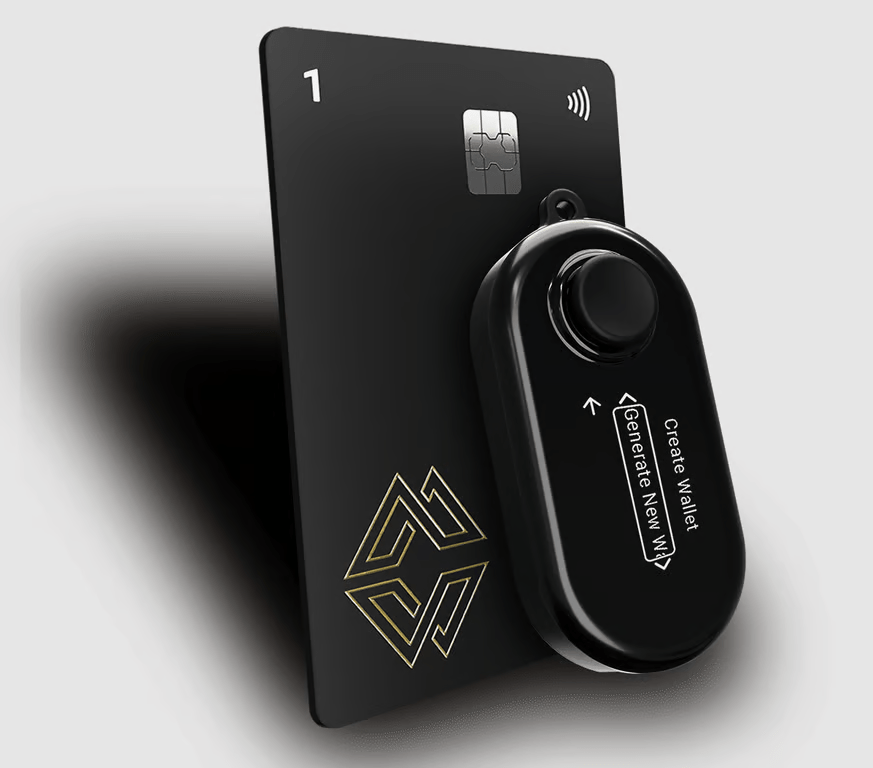
The Cypherock X1 is a revolutionary hardware wallet that removes the need for a traditional seed phrase, solving one of the biggest vulnerabilities in crypto security. Instead of relying on a single recovery phrase, it uses Shamir’s Secret Sharing to split private keys across four encrypted NFC cards, ensuring that no single card holds the complete key. To access your funds, you’ll need at least two of these cards, making it significantly more resilient against theft, loss, or hacks.
Unlike many other hardware wallets, Cypherock X1 operates completely offline, connecting only via USB-C to sign transactions securely. It supports over 9,000 cryptocurrencies and integrates with MetaMask, allowing seamless DeFi and NFT transactions without compromising security.
Pros:
- No seed phrase required – Eliminates a single point of failure
- Multi-factor authentication – Requires at least two NFC cards for access
- Wide asset support – Compatible with over 9,000 cryptocurrencies
- Offline security – No Bluetooth or internet connectivity, reducing attack risks
- Works with MetaMask – Seamless integration for DeFi users
Cons:
- Requires managing multiple NFC cards – Losing too many can result in fund loss
- No Bluetooth connectivity – Some users may prefer wireless transaction signing
11. Ledger Stax – A premium crypto wallet designed for advanced users

Ledger Stax is the most premium hardware wallet in Ledger’s lineup, built with a strong focus on design and usability. Created in collaboration with Tony Fadell, the designer behind the iPod, the device stands out with its curved E Ink touchscreen and high-end materials. Demand has been strong since launch, with early production batches selling out shortly after becoming available.
The Stax features a large E Ink display that makes reviewing transactions far more comfortable than on Ledger’s Nano models. It supports Bluetooth, USB-C, and wireless charging, and includes customization options such as a personalized lock screen that can display images or NFTs. Compared to the Ledger Nano X, the difference is most noticeable in screen size and presentation, as the Nano X uses a much smaller display and does not support home screen customization.
Security remains a core focus, with the Ledger Stax using a secure element chip certified under CC EAL5+ and EMVCo standards. Private keys are kept isolated from the rest of the system, and the device relies on a standard recovery seed for wallet restoration in case of loss or damage. From a software perspective, it offers the same core functionality as other Ledger wallets, including asset management, staking, and Web3 access through Ledger Wallet.
At $399, the Ledger Stax is difficult to justify purely on features. While the design, display, and charging options are clear upgrades, the underlying software experience is largely the same as on the Nano X or even the more affordable Nano S Plus. The Stax is best suited for users who value premium design and a large screen, rather than those looking for the best value-for-money hardware wallet.
Pros:
- High-end design with premium materials
- Large curved E Ink touchscreen display
- Supports thousands of cryptocurrencies and NFTs
- USB-C, Bluetooth, and wireless charging support
- Can hold up to 100 applications at once
- Secure element chip certified to CC EAL5+ standards
Cons:
- Significantly more expensive than most hardware wallets
- Interface may feel unfamiliar at first
- E Ink display refresh rate is slower than traditional screens
12. Coinkite ColdCard Mk4 – A truly air-gapped crypto hardware wallet
ColdCard Mk4 is a maximum-security hardware cryptocurrency wallet produced by the Canadian crypto hardware manufacturer Coinkite. It is one of the rare hardware wallets that can be used without ever being connected to a computer, as everything from wallet creation with seed generation to transaction signing can be done without connection thanks to the natively implemented PSBT (BIP174). Nevertheless, the ability to connect to a computer exists thanks to the USB-C connector at the bottom edge of the device. ColdCard Mk4 includes two secure elements, supplied by two different manufacturers, which additionally minimizes unknown vulnerability risks. The PIN is also entered through a full-size numeric keypad, which is a bit old-school but practical and a bulletproof input method.
ColdCard Mk4 only supports Bitcoin, but the security and utilities of this Bitcoin cold storage are unrivaled. The device features expanded multi-sig capabilities allowing it to handle big and complex Bitcoin transactions. In Coinkite’s official store, this device has a price tag of $148.
Pros of Coinkite ColdCard Mk4:
- Full-sized physical numeric keypad
- Bright OLED display
- Two independent security elements
- A truly air-gapped hardware wallet
- MicroSD card support for backup and data storage
Cons of Coinkite ColdCard Mk4:
- A Bitcoin-only hardware wallet
13. CoolWallet S – Highly portable credit card-like crypto wallet
CoolWallet S is a portable and durable crypto hardware wallet that stands out from its competition mainly due to its design. It comes in the form of a credit card-sized device, that has a thickness of only 0.8 mm and weighs only 6 grams. In addition, this “crypto card” is also waterproof and tamper-resistant. The wallet features a small built-in screen and a button, which is used to confirm transactions. According to the manufacturer, the device should last up to 3 months with a single battery charge.
The wallet connects via an encrypted Bluetooth connection to most mobile devices. On top of the advanced encryption standard AES256 that secures the wireless connection, the device utilizes both biometric and physical 2FA checks to ensure your assets’ safety and has an embedded EAL5+ certified secure element. Nevertheless, the device is easy to interact with and allows a new cold wallet to be created in under 5 minutes due to the simplicity and intuitiveness of the user interface. Furthermore, the wallet features a built-in cryptocurrency swap system. You will have to spend $99 to buy one sleek CoolWallet S but the company offers a small discount if you buy two devices. If you convince a friend to buy it, too, you will have to part with only $89 per device (or $178 for both hardware wallets).
Pros of CoolWallet S:
- Highly portable due to its unique credit card-like design
- Easy-to-use interface
- Encrypted Bluetooth connection
- Long-lasting battery (up to 3 months)
Cons of CoolWallet S:
- Limited cryptocurrency support
14. SecuX V20 – A robust wallet with dual connectivity and a large responsive touchscreen
SecuX V20 is a robust and stylish cryptocurrency hardware wallet with many useful features and a premium feel. The V20 supports over 1000 cryptocurrencies, including Bitcoin, Tether, Litecoin, Ethereum, and Stellar, and has a responsive color 2.8″ touchscreen to ensure smooth interaction. The wallet, which supports multiple operating systems, can connect either via an encrypted Bluetooth connection or a wired USB connection. When you want to establish a connection between your hardware wallet and another device via Bluetooth or USB, the connection needs to be approved on the online interface called SecuXcess, which can be found within SecuXTech.
SecuX V20 allows for the private keys to be created and stored offline but can also integrate with third-party wallets or apps if needed. Private keys and PIN codes are stored on an EAL 5+ certified secure chip. When turning on the SecuX V20 for the first time, the user is prompted to set a 4-digit PIN code, which is later used to interact with the wallet and confirm a transaction. Another rigorous safety measure that many hardware wallets, including V20, employ is the complete wipe-out of data on the device if an incorrect PIN code is entered 4 times in a row. The device allows users to create hidden wallets, which adds an extra layer of security. You can also set a really strong password, as the device supports hidden wallet passwords up to 99 characters long. SecuX V20 has a price tag of $120.
Pros of SecuX V20:
- 2.8″ highly responsive color touchscreen
- Support for multiple passwords and multiple signatures
- Support for most PC operating systems, Chrome, iOS, and Android
- USB and encrypted Bluetooth connectivity
- Hidden wallet feature
Cons of SecuX V20:
- A bit complicated interface
- The bulky design makes it less portable
15. Tangem – A simple and lightweight hardware wallet
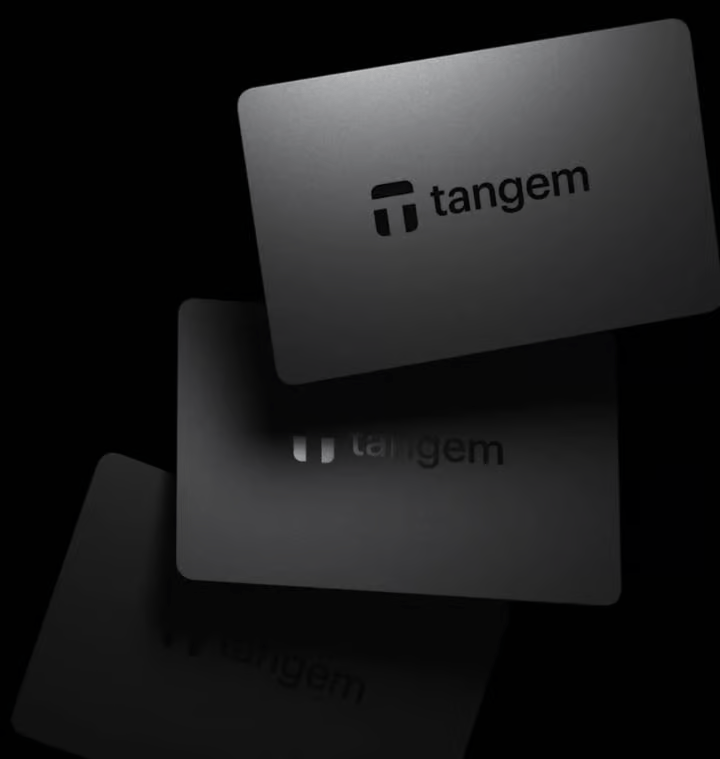
The Tangem wallet stands out with its unique, credit card-like design. Ultra-slim and portable, it lacks a screen and instead relies on NFC (near-field communication) to connect with your smartphone or other NFC-compatible devices.
Despite its minimalist appearance, Tangem is powerful. It supports over 6,000 cryptocurrencies and 30 blockchain networks. With an EAL6+ security standard (one of the highest available) and thorough audits by Kudelski Security, your private keys are well-protected.
One of its most practical features is its packaging: Tangem wallets are sold in packs of up to three cards, providing built-in backups if one is lost or damaged. Adding to its appeal, the wallet comes with an impressive 25-year replacement warranty, a rarity in the hardware wallet market.
Priced at $55, it’s a cost-effective option. However, it does require an NFC-compatible device, so you’ll need a smartphone or tablet with this capability to use it.
Pros:
- Ultra-portable, credit card-sized design
- Supports 6,000+ cryptocurrencies and 30 blockchains
- High security with EAL6+ certification and Kudelski audit
- Affordable price point of $55
- Comes with a 25-year replacement warranty
- Sold in packs for easy backup options
Cons:
- Requires an NFC-compatible device to function
- Lacks a screen, which some users may find limiting
- Dependence on a smartphone or tablet for operation might not suit everyone
16. Keystone Pro – a secure hardware wallet powered by AAA batteries
Keystone Pro is an air-gapped hardware wallet with a range of security-focused features, including an advanced fingerprint biometric authentication system. The device supports wallet backup using Shamir backups and will self-destruct wallet keys if it detects tampering attempts. This hardware wallet is exclusively air-gapped. It cannot be connected via Bluetooth or USB even if you wanted to, as it does not support such connections. Transactions are conducted through the use of a camera and QR codes, while the device also has a 4-inch color touchscreen that displays information about transactions and wallet addresses.
Keystone Pro is available for purchase at the price of $149. Keystone also offers an Essential version of their crypto hardware wallet. For a cheaper option that lacks fingerprint authentication, a self-destruct function, and rechargeable batteries, the Keystone Essential is priced at $119.
Pros of Keystone Pro:
- Large touchscreen and camera
- Support for air-gapped transactions
- Long battery life (powered by 4 AAA batteries)
Cons of Keystone Pro:
- A small onscreen keyboard makes password input difficult
- Bad build quality and cheap materials
- No Bluetooth or USB connectivity
- Fairly expensive ($169)
17. Shift Crypto BitBox02 – Crypto wallet capable of connecting to full Bitcoin nodes
BitBox02 is a simple and easy-to-use but secure cryptocurrency wallet that supports the most popular cryptos such as Bitcoin, Ethereum, and Litecoin but also more than 1500 less-known ones. The hardware wallet is controlled through the BitBoxApp, which features a straightforward user interface. The App’s and BitBox02’s source code is open-source and has been audited by an independent security company.
This hardware wallet, which is produced by Shift Crypto in Switzerland, employs high-level security measures and has a dual-chip design to further increase the security of the crypto storage. What sets BitBox02 apart from most other wallets is the ability to use a microSD card with the wallet’s backup information, thus eliminating the need to enter a 12- or 24-word phrase every time you want to run the wallet. In addition, when connecting to the wallet through the BitBoxApp, users can opt into Tor forwarding, which further increases the security and privacy of the wallet. Worry not, the communication between your computer and your hardware wallet is also encrypted, which minimizes the risk of man-in-the-middle exploits and attacks. For Bitcoin purists, BitBox02 is also available as a Bitcoin-only firmware, which removes ballast code and further reduces the risk of exploits.
Pros of Shift Crypto BitBox02:
- OLED display and responsive touch controls
- Open-source externally audited source code
- Tor forwarding feature
Cons of Shift Crypto BitBox02:
- No app for iOS devices
- Rather expensive (139€ or $153)
The bottom line: There are plenty of options on the market for keeping your crypto safe
By selecting a hardware wallet with a secure backup system that is built out of robust and durable materials, users can be confident that their crypto assets are safeguarded. It is also of key importance to check that the hardware wallet of your choosing supports all your favorite cryptocurrencies.
The prices of commercial cryptocurrency hardware wallets range from around $50 to more than $200. But even the purchase of an expensive high-end hardware wallet packed with security features should not be hard to justify if you are holding a large crypto portfolio. If, however, your portfolio is considered small, you only hold a small number of different coins and rarely interact with DeFi apps, you could do just fine with a lower-end hardware wallet.
Just remember that each and every hardware wallet featured on our list is incomparably safer than keeping your coins on an exchange. Do remember (and live by) the age-old crypto saying: “Not your keys, not your coins!”
If you really want to up your crypto security game to the next level, we suggest investing in metal crypto wallets for seed phrase storage. This method of storing your seed phrase is much better than writing it down on a piece of paper, as paper is susceptible to various forms of damage.


You May Also Like

GOP lawmakers want nothing to do with Trump's ballroom chaos: report

Not a loophole: Singapore AI export controls let China tap US AI legally

LIST: Bayanihan initiatives amid soaring oil prices


Trending News
More24/7 Live News
MoreQuick Reads
More