

Privacy for Subdomains: Here's What You Should Be Focusing On
Last week, I described a gloomy situation: all public TLS certificate providers log your requests. By browsing through the subdomains, one can get their respective IP addresses. If one of them points to your home route, they know your general location.
\ I analyzed several solutions and decided to use wildcard certificates, which don't leak subdomain information, while continuing to use Let's Encrypt. My solution caters to my Synology NAS, as it's the one I'm using.
Getting a Wildcard Certificate for Synology NAS
The Synology UI allows configuring Let's Encrypt for automated certificate renewal. But you can get wildcard certificates only for Synology subdomains:
\
\ It's time to become creative. The most widespread Let's Encrypt client is Certbot, but a surface search reveals it doesn't run on Synology. Underneath, Let's Encrypt delivers certificates via the Automatic Certificate Management Environment protocol. Lots of clients already implement the Automatic Certificate Management Environment (ACME) protocol. acme.sh looked like an interesting candidate:
\
\ Icing on the cake, acme.sh provides a Docker image. At the same time, Synology offers a Docker runtime. I thus decided to implement certificate renewal with the acme.sh Docker image. Here's how I proceeded.
\ Go to the Docker menu. In the opening window, click on Container, then Create. It opens a Create Container window. Click on Download and search for neilpang/acme.sh.
\ We will need to create two containers out of it: one for requesting a new certificate, and one for managing the update of the certificate on the NAS.
Prerequisites
Before we go further, we need:
-
To get a token with permissions to edit the DNS records:
In my case, it's Cloudflare. You can check the process for other providers on the acme.sh wiki.
\ Go to the Cloudflare UI. Create an API token with the template to Edit Zone DNS. Set a relevant name. Then, set the Zone Resources to the following:
| Include | Specific zone | |
\ Write down the token value in a secure place, as you won't be able to access it later!
\
-
Prepare an account for the Synology:
For security purposes, we want to run the containers with a dedicated account.
\ Check the section Create a user in Synology DSM in this post and follow its instructions. It's what I did, and it worked exactly as described.
Requesting the Certificate
Go back to the Synology UI, more specifically, the Docker menu. Click on the Create button. It opens a wizard with several screens:
\ 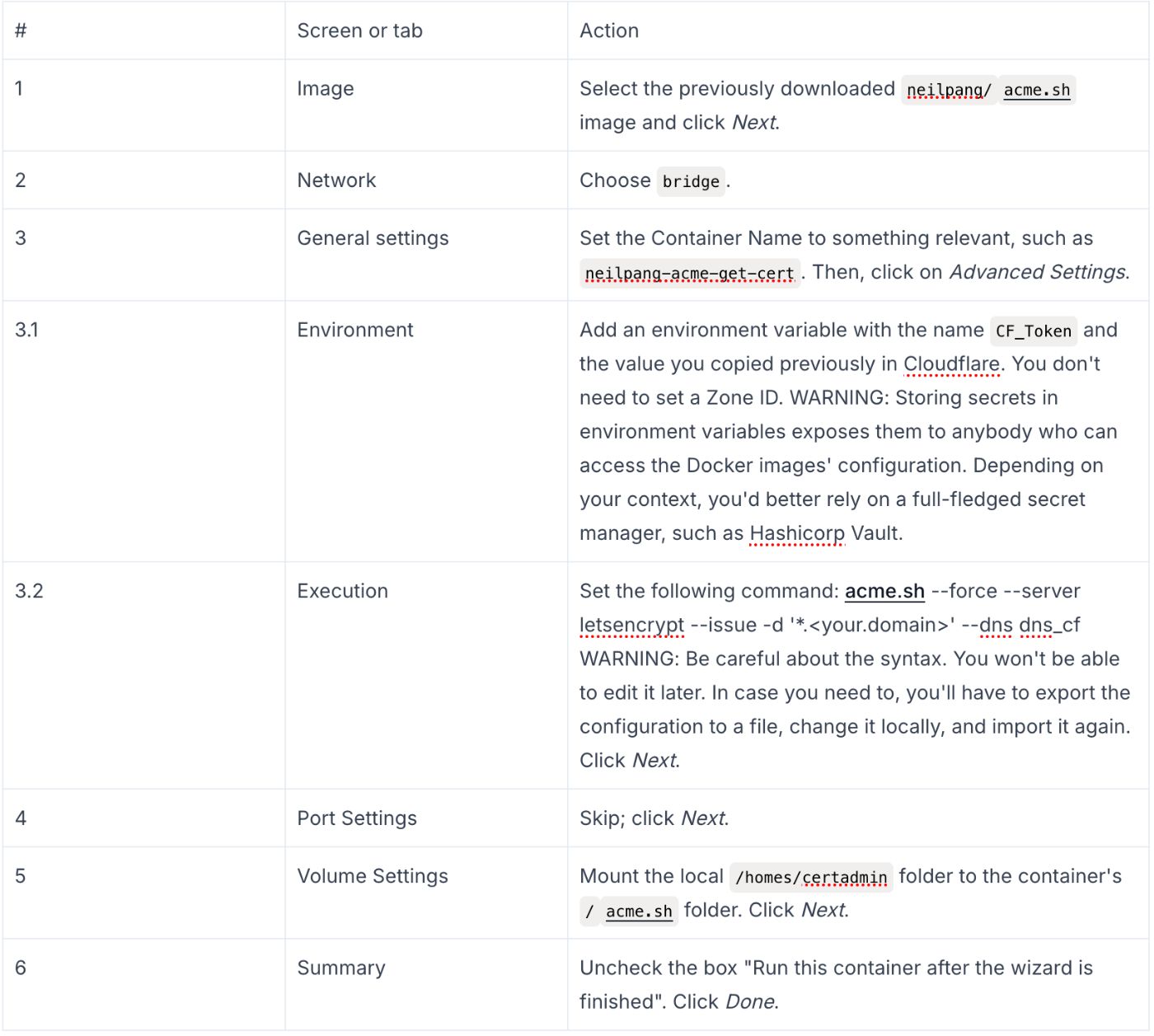
When you run the container, it will create the required files in the homes/certadmin folder.
ls -ltr /volume2/homes/certadmin total 8 drwxrwxrwx+ 1 root root 210 Jun 26 07:58 '*.frankel.ch_ecc' drwxrwxrwx+ 1 root root 56 Jun 26 08:38 ca -rwxrwxrwx+ 1 root root 494 Jul 5 14:30 http.header -rwxrwxrwx+ 1 root root 154 Jul 5 14:30 account.conf \ If it doesn't work, you can access the logs by selecting the image and clicking on the Details button. The log tab shows the logs, broken up by day. Here's a log sample of a successful run:
[Sat Jul 5 12:30:17 UTC 2025] Verification finished, beginning signing." [Sat Jul 5 12:30:17 UTC 2025] Let's finalize the order. [Sat Jul 5 12:30:17 UTC 2025] Le_OrderFinalize='https://acme-v02.api.letsencrypt.org/acme/finalize/2489606761/402920873611' [Sat Jul 5 12:30:19 UTC 2025] Downloading cert. [Sat Jul 5 12:30:19 UTC 2025] Le_LinkCert='https://acme-v02.api.letsencrypt.org/acme/cert/05a220cfe82f0e3576f8230d7f62a58dd28b' [Sat Jul 5 12:30:19 UTC 2025] Cert success. -----BEGIN CERTIFICATE----- REDACTED REDACTED REDACTED REDACTED REDACTED REDACTED -----END CERTIFICATE----- [Sat Jul 5 12:30:19 UTC 2025] Your cert is in: /acme.sh/*.frankel.ch_ecc/*.frankel.ch.cer [Sat Jul 5 12:30:19 UTC 2025] Your cert key is in: /acme.sh/*.frankel.ch_ecc/*.frankel.ch.key [Sat Jul 5 12:30:20 UTC 2025] The intermediate CA cert is in: /acme.sh/*.frankel.ch_ecc/ca.cer [Sat Jul 5 12:30:20 UTC 2025] And the full-chain cert is in: /acme.sh/*.frankel.ch_ecc/fullchain.cer Deploying the Certificate
We will use the same image to deploy the certificate, albeit with a different configuration.
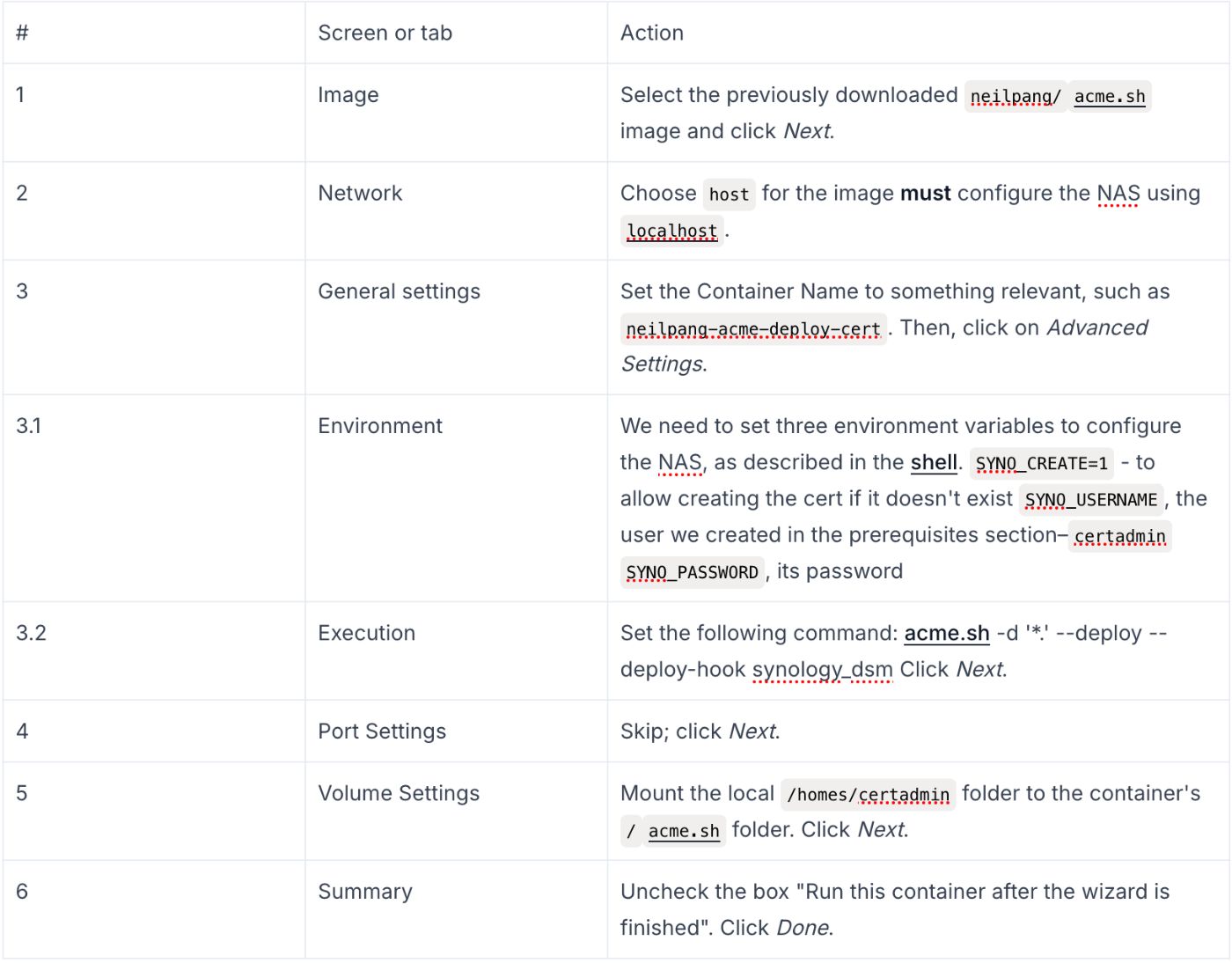
The image uses the files created by the previous image to update the TLS certificate used by the Synology web app.
Scheduling the Run of the Images
In an ideal world, you'd run the first image, and a successful run would trigger the run of the second image. Unfortunately, Synology doesn't lend itself to this, or to be precise, I didn't find a way to achieve it. Instead, I relied on a simple workaround: schedule the second image run one day after the first image run.
\ In the Synology UI, open the Control Panel and search for the Task Scheduler. Click on the Create button. Select Scheduled Task > User-defined script, as there's no dedicated Docker run item.
\ Here's how to configure it:
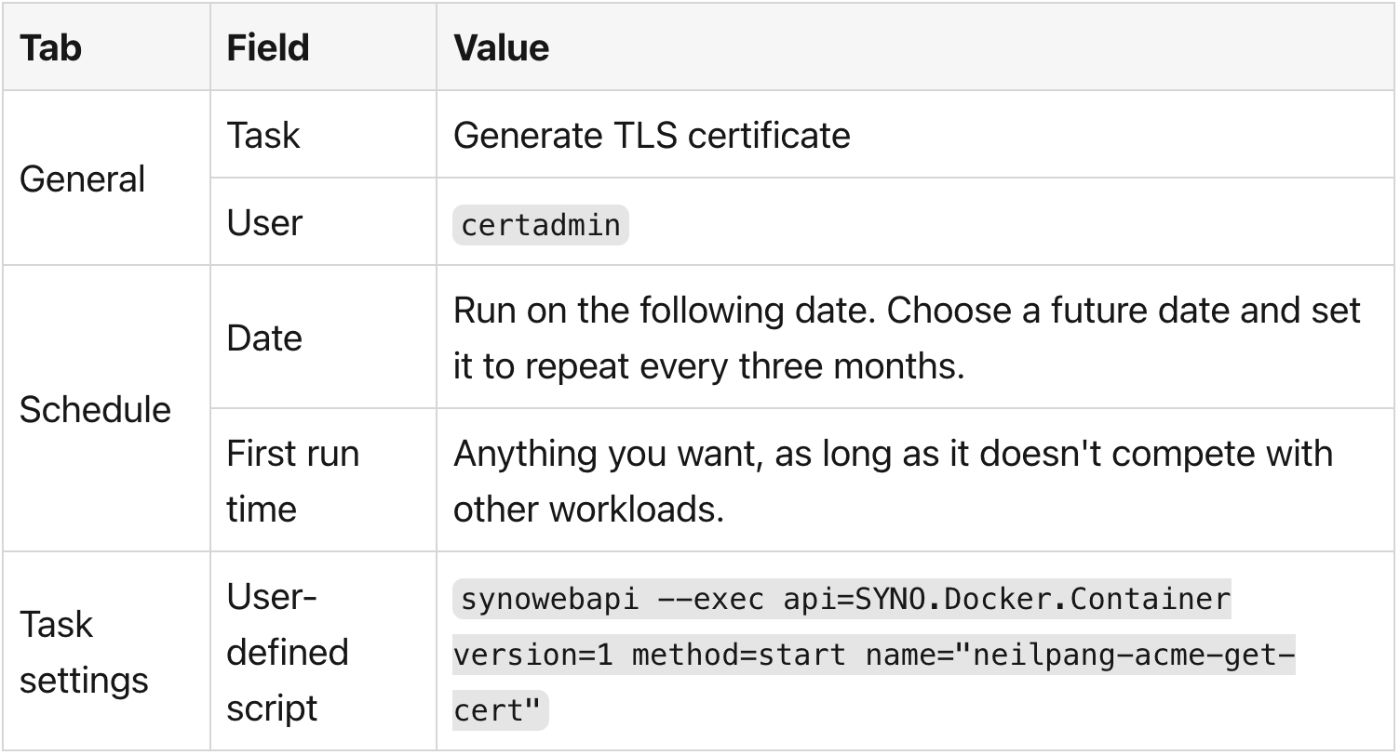
The script uses the synowebapi command. I stumbled upon the command; parameters are self-explanatory, but I didn't find the documentation. You need to create two scheduled tasks and change the task name as well as the image name in the command.
\ For scheduling, space out one day between getting a new certificate and deploying it. That should give enough time and doesn't change the result.
\ Note that because images run to completion, i.e., they don't loop, Synology will send a warning notification similar to the following, regardless of whether the run was successful or not:
\
\ After running the two Docker images in turn, your NAS will be using a joker certificate.
Summary
In this post, we implemented a solution to avoid leaking subdomain information when requesting a TLS certificate: requesting wildcard certificates with acme.sh from Synology. The solution isn't perfect: you can use wildcard certificates on any subdomains, but it represents a security risk if someone steals them.
\ Besides, I stored the secrets as environment variables for configuring Docker images. However, in my context, these are acceptable risks.
\ Note that this approach doesn't remove any previously logged requests. The only workaround is to move to another place, or, barring that, change your Internet Service Provider.
\ To go further:
- Synology DSM 7 with Let's Encrypt and DNS Challenge
- ACME.sh 3rd party deploy plugin for Synology DSM
- How to issue Let's Encrypt wildcard certificate with acme.sh and Cloudflare DNS
- How to use DNS API
- Synology: Schedule Start & Stop For Docker Containers
Originally published at A Java Geek on September 28th, 2025
You May Also Like

UXLINK Approves Token Buyback with 100% Community Support

Best Crypto to Buy as Saylor & Crypto Execs Meet in US Treasury Council
