This notebook shows how to reuse a nlp.networks.BertEncoder from TensorFlow Model Garden to power three tasks: (1) pretraining with nlp.models.BertPretrainer (masked-LM + next-sentence), (2) span labeling with nlp.models.BertSpanLabeler (start/end logits for SQuAD-style QA), and (3) classification with nlp.models.BertClassifier ([CLS] head). You install tf-models-official (or tf-models-nightly for latest), import tensorflow_models.nlp, build small dummy examples, run each model forward pass, and compute losses (weighted sparse CE for MLM/NSP; CE for span start/end; CE for classification). Result: a clear pattern for wrapping one encoder into multiple BERT task heads with concise, production-friendly APIs.This notebook shows how to reuse a nlp.networks.BertEncoder from TensorFlow Model Garden to power three tasks: (1) pretraining with nlp.models.BertPretrainer (masked-LM + next-sentence), (2) span labeling with nlp.models.BertSpanLabeler (start/end logits for SQuAD-style QA), and (3) classification with nlp.models.BertClassifier ([CLS] head). You install tf-models-official (or tf-models-nightly for latest), import tensorflow_models.nlp, build small dummy examples, run each model forward pass, and compute losses (weighted sparse CE for MLM/NSP; CE for span start/end; CE for classification). Result: a clear pattern for wrapping one encoder into multiple BERT task heads with concise, production-friendly APIs.

TensorFlow Models NLP Library for Beginners

2025/09/08 17:40

Content Overview

  • Learning objectives

  • Install and import

  • Install the TensorFlow Model Garden pip package

  • Import TensorFlow and other libraries

  • BERT pretraining model

  • Build a BertPretrainer model wrapping BertEncoder

  • Compute loss

  • Span labelling model

  • Build a BertSpanLabeler wrapping BertEncoder

  • Compute loss

  1. Classification model
  2. Build a BertClassifier model wrapping BertEncoder
  3. Compute loss

\

Learning objectives

In this Colab notebook, you will learn how to build transformer-based models for common NLP tasks including pretraining, span labelling and classification using the building blocks from NLP modeling library.

Install and import

Install the TensorFlow Model Garden pip package

  • tf-models-official is the stable Model Garden package. Note that it may not include the latest changes in the tensorflow_models github repo. To include latest changes, you may install tf-models-nightly, which is the nightly Model Garden package created daily automatically.
  • pip will install all models and dependencies automatically.

\

pip install tf-models-official 

Import Tensorflow and other libraries

import numpy as np import tensorflow as tf  from tensorflow_models import nlp 

\

2023-10-17 12:23:04.557393: E tensorflow/compiler/xla/stream_executor/cuda/cuda_dnn.cc:9342] Unable to register cuDNN factory: Attempting to register factory for plugin cuDNN when one has already been registered 2023-10-17 12:23:04.557445: E tensorflow/compiler/xla/stream_executor/cuda/cuda_fft.cc:609] Unable to register cuFFT factory: Attempting to register factory for plugin cuFFT when one has already been registered 2023-10-17 12:23:04.557482: E tensorflow/compiler/xla/stream_executor/cuda/cuda_blas.cc:1518] Unable to register cuBLAS factory: Attempting to register factory for plugin cuBLAS when one has already been registered 

BERT pretraining model

BERT (Pre-training of Deep Bidirectional Transformers for Language Understanding) introduced the method of pre-training language representations on a large text corpus and then using that model for downstream NLP tasks.

In this section, we will learn how to build a model to pretrain BERT on the masked language modeling task and next sentence prediction task. For simplicity, we only show the minimum example and use dummy data.

Build a BertPretrainer model wrapping BertEncoder

The nlp.networks.BertEncoder class implements the Transformer-based encoder as described in BERT paper. It includes the embedding lookups and transformer layers (nlp.layers.TransformerEncoderBlock), but not the masked language model or classification task networks.

The nlp.models.BertPretrainer class allows a user to pass in a transformer stack, and instantiates the masked language model and classification networks that are used to create the training objectives.

\

# Build a small transformer network. vocab_size = 100 network = nlp.networks.BertEncoder(     vocab_size=vocab_size,      # The number of TransformerEncoderBlock layers     num_layers=3) 

\

2023-10-17 12:23:09.241708: W tensorflow/core/common_runtime/gpu/gpu_device.cc:2211] Cannot dlopen some GPU libraries. Please make sure the missing libraries mentioned above are installed properly if you would like to use GPU. Follow the guide at https://www.tensorflow.org/install/gpu for how to download and setup the required libraries for your platform. Skipping registering GPU devices... 

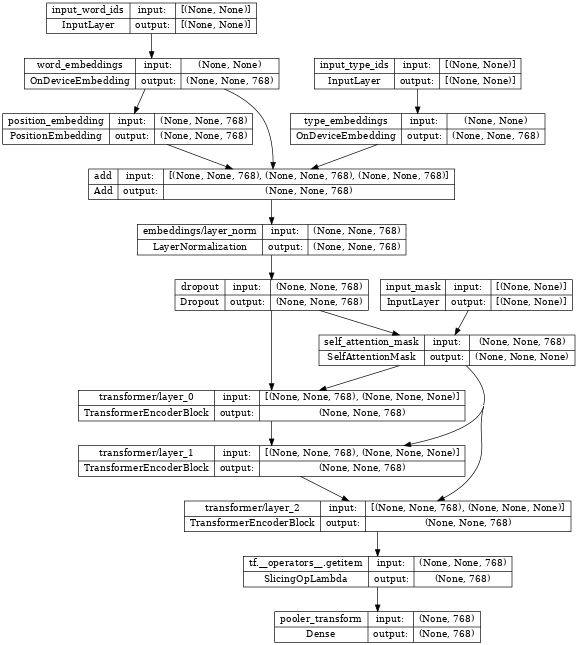
Inspecting the encoder, we see it contains few embedding layers, stacked nlp.layers.TransformerEncoderBlock layers and are connected to three input layers:

input_word_idsinput_type_ids and input_mask.

\

tf.keras.utils.plot_model(network, show_shapes=True, expand_nested=True, dpi=48) 
\

# Create a BERT pretrainer with the created network. num_token_predictions = 8 bert_pretrainer = nlp.models.BertPretrainer(     network, num_classes=2, num_token_predictions=num_token_predictions, output='predictions') 

\

WARNING:tensorflow:From /tmpfs/src/tf_docs_env/lib/python3.9/site-packages/official/nlp/modeling/models/bert_pretrainer.py:112: Classification.__init__ (from official.nlp.modeling.networks.classification) is deprecated and will be removed in a future version. Instructions for updating: Classification as a network is deprecated. Please use the layers.ClassificationHead instead. 

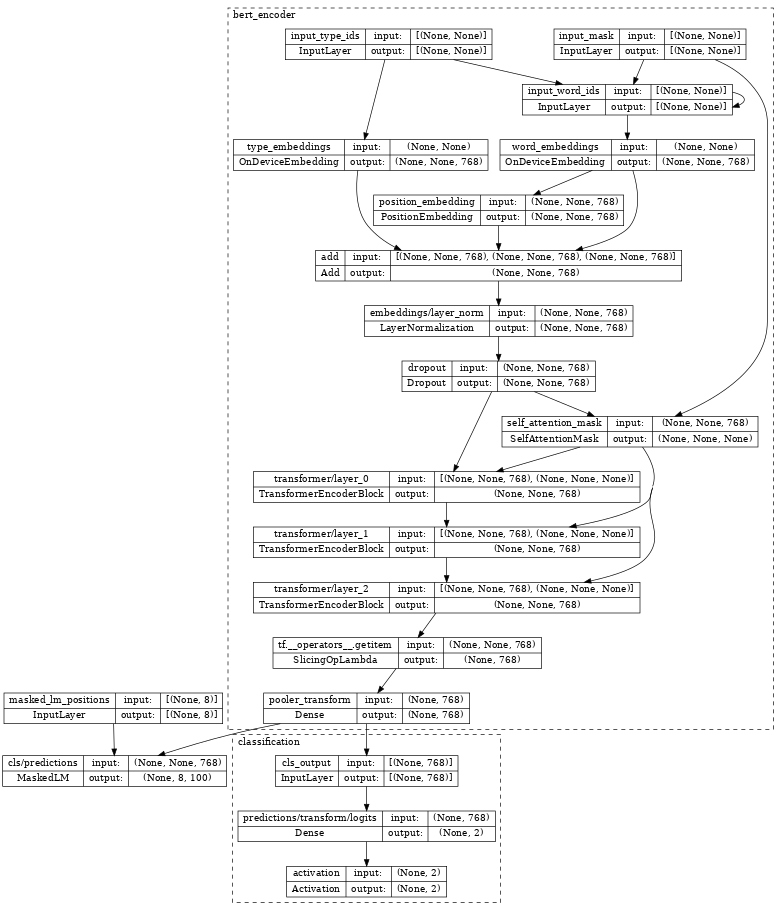
Inspecting the bert_pretrainer, we see it wraps the encoder with additional MaskedLM and nlp.layers.ClassificationHead heads.

\

tf.keras.utils.plot_model(bert_pretrainer, show_shapes=True, expand_nested=True, dpi=48) 
\

# We can feed some dummy data to get masked language model and sentence output. sequence_length = 16 batch_size = 2  word_id_data = np.random.randint(vocab_size, size=(batch_size, sequence_length)) mask_data = np.random.randint(2, size=(batch_size, sequence_length)) type_id_data = np.random.randint(2, size=(batch_size, sequence_length)) masked_lm_positions_data = np.random.randint(2, size=(batch_size, num_token_predictions))  outputs = bert_pretrainer(     [word_id_data, mask_data, type_id_data, masked_lm_positions_data]) lm_output = outputs["masked_lm"] sentence_output = outputs["classification"] print(f'lm_output: shape={lm_output.shape}, dtype={lm_output.dtype!r}') print(f'sentence_output: shape={sentence_output.shape}, dtype={sentence_output.dtype!r}') 

\

lm_output: shape=(2, 8, 100), dtype=tf.float32 sentence_output: shape=(2, 2), dtype=tf.float32 

Compute loss

Next, we can use lm_output and sentence_output to compute loss.

\

masked_lm_ids_data = np.random.randint(vocab_size, size=(batch_size, num_token_predictions)) masked_lm_weights_data = np.random.randint(2, size=(batch_size, num_token_predictions)) next_sentence_labels_data = np.random.randint(2, size=(batch_size))  mlm_loss = nlp.losses.weighted_sparse_categorical_crossentropy_loss(     labels=masked_lm_ids_data,     predictions=lm_output,     weights=masked_lm_weights_data) sentence_loss = nlp.losses.weighted_sparse_categorical_crossentropy_loss(     labels=next_sentence_labels_data,     predictions=sentence_output) loss = mlm_loss + sentence_loss  print(loss) 

\

tf.Tensor(5.2983174, shape=(), dtype=float32) 

With the loss, you can optimize the model. After training, we can save the weights of TransformerEncoder for the downstream fine-tuning tasks. Please see run_pretraining.py for the full example.

Span labeling model

Span labeling is the task to assign labels to a span of the text, for example, label a span of text as the answer of a given question.

In this section, we will learn how to build a span labeling model. Again, we use dummy data for simplicity.

Build a BertSpanLabeler wrapping BertEncoder

The nlp.models.BertSpanLabeler class implements a simple single-span start-end predictor (that is, a model that predicts two values: a start token index and an end token index), suitable for SQuAD-style tasks.

Note that nlp.models.BertSpanLabeler wraps a nlp.networks.BertEncoder, the weights of which can be restored from the above pretraining model.

\

network = nlp.networks.BertEncoder(         vocab_size=vocab_size, num_layers=2)  # Create a BERT trainer with the created network. bert_span_labeler = nlp.models.BertSpanLabeler(network) 

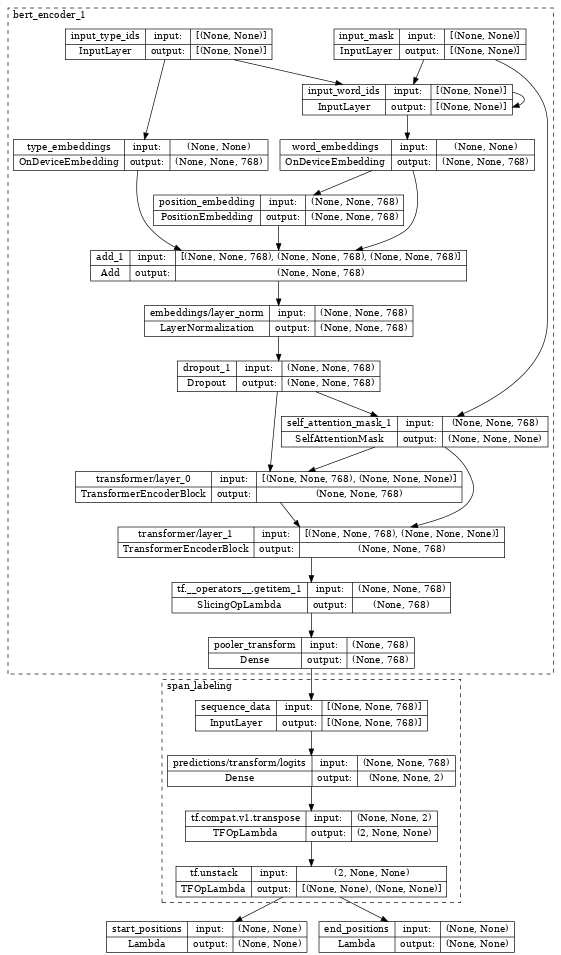
Inspecting the bert_span_labeler, we see it wraps the encoder with additional SpanLabeling that outputs start_position and end_position.

\

tf.keras.utils.plot_model(bert_span_labeler, show_shapes=True, expand_nested=True, dpi=48) 
\

# Create a set of 2-dimensional data tensors to feed into the model. word_id_data = np.random.randint(vocab_size, size=(batch_size, sequence_length)) mask_data = np.random.randint(2, size=(batch_size, sequence_length)) type_id_data = np.random.randint(2, size=(batch_size, sequence_length))  # Feed the data to the model. start_logits, end_logits = bert_span_labeler([word_id_data, mask_data, type_id_data])  print(f'start_logits: shape={start_logits.shape}, dtype={start_logits.dtype!r}') print(f'end_logits: shape={end_logits.shape}, dtype={end_logits.dtype!r}') 

\

start_logits: shape=(2, 16), dtype=tf.float32 end_logits: shape=(2, 16), dtype=tf.float32 

Compute loss

With start_logits and end_logits, we can compute loss:

\

start_positions = np.random.randint(sequence_length, size=(batch_size)) end_positions = np.random.randint(sequence_length, size=(batch_size))  start_loss = tf.keras.losses.sparse_categorical_crossentropy(     start_positions, start_logits, from_logits=True) end_loss = tf.keras.losses.sparse_categorical_crossentropy(     end_positions, end_logits, from_logits=True)  total_loss = (tf.reduce_mean(start_loss) + tf.reduce_mean(end_loss)) / 2 print(total_loss) 

\

tf.Tensor(5.3621416, shape=(), dtype=float32) 

With the loss, you can optimize the model. Please see run_squad.py for the full example.

Classification model

In the last section, we show how to build a text classification model.

Build a BertClassifier model wrapping BertEncoder

nlp.models.BertClassifier implements a [CLS] token classification model containing a single classification head.

\

network = nlp.networks.BertEncoder(         vocab_size=vocab_size, num_layers=2)  # Create a BERT trainer with the created network. num_classes = 2 bert_classifier = nlp.models.BertClassifier(     network, num_classes=num_classes) 

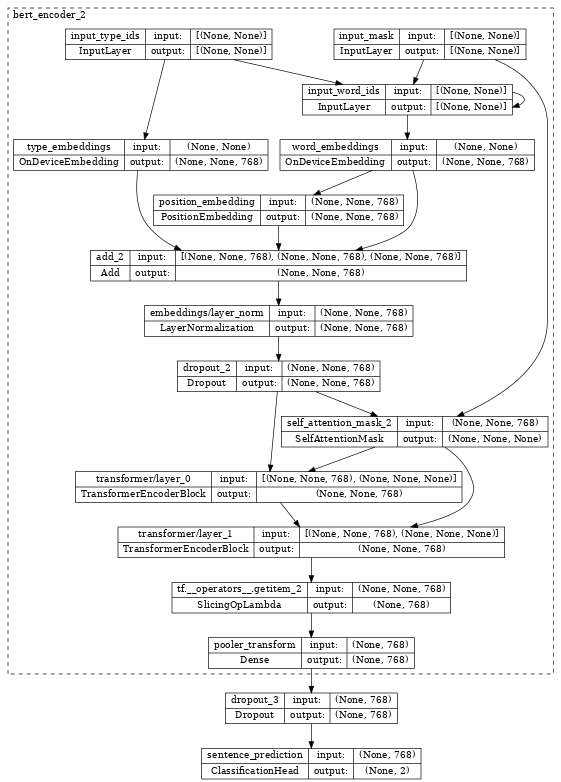
Inspecting the bert_classifier, we see it wraps the encoder with additional Classification head.

\

tf.keras.utils.plot_model(bert_classifier, show_shapes=True, expand_nested=True, dpi=48) 
\

# Create a set of 2-dimensional data tensors to feed into the model. word_id_data = np.random.randint(vocab_size, size=(batch_size, sequence_length)) mask_data = np.random.randint(2, size=(batch_size, sequence_length)) type_id_data = np.random.randint(2, size=(batch_size, sequence_length))  # Feed the data to the model. logits = bert_classifier([word_id_data, mask_data, type_id_data]) print(f'logits: shape={logits.shape}, dtype={logits.dtype!r}') 

\

logits: shape=(2, 2), dtype=tf.float32 

Compute loss

With logits, we can compute loss:

\

labels = np.random.randint(num_classes, size=(batch_size))  loss = tf.keras.losses.sparse_categorical_crossentropy(     labels, logits, from_logits=True) print(loss) 

\

tf.Tensor([0.7332015 1.3447659], shape=(2,), dtype=float32) 

With the loss, you can optimize the model. Please see the Fine tune_bert notebook or the model training documentation for the full example.

\ \

:::info Originally published on the TensorFlow website, this article appears here under a new headline and is licensed under CC BY 4.0. Code samples shared under the Apache 2.0 License.

:::

\

Disclaimer: The articles reposted on this site are sourced from public platforms and are provided for informational purposes only. They do not necessarily reflect the views of MEXC. All rights remain with the original authors. If you believe any content infringes on third-party rights, please contact [email protected] for removal. MEXC makes no guarantees regarding the accuracy, completeness, or timeliness of the content and is not responsible for any actions taken based on the information provided. The content does not constitute financial, legal, or other professional advice, nor should it be considered a recommendation or endorsement by MEXC.

You May Also Like

Ripple Buyers Step In at $2.00 Floor on BTC’s Hover Above $91K

Ripple Buyers Step In at $2.00 Floor on BTC’s Hover Above $91K

The post Ripple Buyers Step In at $2.00 Floor on BTC’s Hover Above $91K appeared on BitcoinEthereumNews.com. Token breaks above key support while volume surges 251% during psychological level defense at $2.00. News Background U.S. spot XRP ETFs continue pulling in uninterrupted inflows, with cumulative demand now exceeding $1 billion since launch — the fastest early adoption pace for any altcoin ETF. Institutional participation remains strong even as retail sentiment remains muted, contributing to market conditions where large players accumulate during weakness while short-term traders hesitate to re-enter. XRP’s macro environment remains dominated by capital rotation into regulated products, with ETF demand offsetting declining open interest in derivatives markets. Technical Analysis The defining moment of the session came during the $2.03 → $2.00 flush when volume spiked to 129.7M — 251% above the 24-hour average. This confirmed heavy selling pressure but, more importantly, marked the exact moment where institutional buyers absorbed liquidity at the psychological floor. The V-shaped rebound from $2.00 back into the $2.07–$2.08 range validates active demand at this level. XRP continues to form a series of higher lows on intraday charts, signaling early trend reacceleration. However, failure to break through the $2.08–$2.11 resistance cluster shows lingering supply overhead as the market awaits a decisive catalyst. Momentum indicators show bullish divergence forming, but volume needs to expand during upside moves rather than only during downside flushes to confirm a sustainable breakout. Price Action Summary XRP traded between $2.00 and $2.08 across the 24-hour window, with a sharp selloff testing the psychological floor before immediate absorption. Three intraday advances toward $2.08 failed to clear resistance, keeping price capped despite improving structure. Consolidation near $2.06–$2.08 into the session close signals stabilization above support, though broader range compression persists. What Traders Should Know The $2.00 level remains the most important line in the sand — both technically and psychologically. Institutional accumulation beneath this threshold hints at larger players…
Share
BitcoinEthereumNews2025/12/08 13:22
SPX6900 Hits the Brakes, While MOBU Hits the Afterburners with its Next 100x Crypto presale, and TRUMP Dips

SPX6900 Hits the Brakes, While MOBU Hits the Afterburners with its Next 100x Crypto presale, and TRUMP Dips

Ever wondered which meme coins could offer the next big breakout in 2025? With altcoins like SPX6900 and Official Trump trending in community chatter, the market is buzzing with potential, yet only a few offer genuine early-stage investment opportunities. Investors who missed previous moonshots are looking for projects that combine novelty, strong community, and robust presale mechanics. Among these, MOBU crypto has emerged as a strong contender for the next 100x crypto presale, thanks to its structured presale mechanics, active community engagement, and impressive early-stage ROI. MOBU Crypto: Next 100x Crypto Presale in Motion MOBU crypto stands out as the next 100x crypto presale with its meticulously structured presale offering and unique investment potential. Stage 6 is live at $0.00008388, boasting over 2,100 token holders and a presale tally surpassing $650K. Joining the presale is simple: connect the official website, choose your currency, and lock in before prices rise again. SPX6900 Hits the Brakes, While MOBU Hits the Afterburners with its Next 100x Crypto presale, and TRUMP Dips 10 Moreover, the 95% APY Staking program gives holders consistent passive returns while maintaining flexibility. Tokens can be staked anytime through the dashboard, with rewards calculated daily and only a two-month lock-in on earnings. With $14.6 billion $MOBU allocated, this system rewards loyalty, encourages long-term participation, and strengthens liquidity, ensuring that all holders, small or large, share in the project’s growth and success. MOBU Crypto Precision Entry: Presale Power Boost The $MOBU presale is designed to maximize early investor rewards through first-come, first-served access. Investors can capitalize on scenarios such as a $200 purchase turning into $14,687.65 or a $300 investment that could reach $22,031.47. The presale mechanics encourage active participation while fostering community growth. SPX6900 (SPX) Shows Strong Weekly Momentum as Investor Interest Rises SPX6900 (SPX) recorded a notable upswing over the past week, reflecting renewed investor interest and increased participation across the meme coin sector. The asset’s recent upward movement showcases improving market sentiment and highlights the growing attention SPX6900 continues to attract within the crypto community. Market performance for SPX6900 also shows substantial activity, with its market capitalization and 24-hour trading volume remaining robust. The project’s fully diluted valuation similarly reflects strong potential should all tokens enter circulation, signaling steady confidence from traders and long-term holders. Official Trump (TRUMP) Faces Weekly Pullback as Market Correction Unfolds Official Trump (Official Trump) experienced a noticeable decline in its weekly performance as market-wide corrections and short-term investor profit-taking contributed to downward pressure. Despite the pullback, the asset continues to remain active within trading circles, supported by consistent engagement from its community. The cryptocurrency maintains substantial market capitalization and daily trading volume, illustrating steady market participation even during corrective phases. Its fully diluted valuation also highlights the long-term potential of the project if all tokens were to circulate, demonstrating ongoing interest from speculators and long-term market observers. SPX6900 Hits the Brakes, While MOBU Hits the Afterburners with its Next 100x Crypto presale, and TRUMP Dips 11 Final Words SPX6900 and Official Trump continue to capture attention through meme-driven community engagement and trending collaborations. Their ongoing growth reflects broader market enthusiasm, yet they lack structured presale benefits like those offered by MOBU crypto. MOBU crypto, with Stage 6 live and over 2,100 token holders, provides a unique opportunity for investors seeking the next 100x crypto presale.  The presale provides first-come, first-served advantages, verified token allocations, and significant ROI potential, making it a must-watch project in the evolving meme coin landscape. SPX6900 Hits the Brakes, While MOBU Hits the Afterburners with its Next 100x Crypto presale, and TRUMP Dips 12 For More Information: Website: Visit the Official MOBU Website  Telegram: Join the MOBU Telegram Channel Twitter: Follow MOBU ON X (Formerly Twitter) Frequently Asked Questions About the Next 100x Crypto Presale What is the 1000x meme coin in 2025? MOBU crypto is considered a strong candidate for high ROI potential, aiming for significant growth in 2025. Which coin is best to invest for 2025? The MOBU crypto presale is currently the next 100x crypto presale, thanks to its early-stage investment benefits. What meme coin has 1000x? Early investors in MOBU crypto presale have the potential for exponential gains as the project progresses to listing. What is the projected ROI for early MOBU crypto investors? Early investors until Stage 6 have achieved a 235.52% ROI with further price surge expected. Are MOBU crypto presale tokens safe? Yes, MOBU crypto tokens are distributed transparently, with audited processes that ensure security. Glossary of Key Terms Meme Coin: A cryptocurrency inspired by internet memes and pop culture.  Presale: An early-stage token sale offering initial access to investors.  ROI: Return on Investment; profit earned from an investment.  Token Holder: An individual or entity owning tokens of a cryptocurrency.  Listing Price: The price at which a cryptocurrency becomes available on exchanges.  First Come, First Served: Allocation strategy prioritizing early participants.  NFT: Non-Fungible Token; a unique digital asset often associated with meme projects. Summary MOBU crypto, SPX6900, and Official Trump offer diverse opportunities in the meme coin space, but MOBU crypto presale Stage 6 presents unmatched early-stage investment potential. With over 2,100 token holders, presale tally exceeding $640K, and ROI already surpassing 235%, MOBU crypto emerges as the next 100x crypto presale. The presale’s first-come, first-served approach creates FOMO-driven urgency, while a transparent token distribution ensures trust and accessibility. Disclaimer This article is for informational purposes only and does not constitute financial advice. Investors should conduct their own research before participating in any cryptocurrency presale or investment. Read More: SPX6900 Hits the Brakes, While MOBU Hits the Afterburners with its Next 100x Crypto presale, and TRUMP Dips">SPX6900 Hits the Brakes, While MOBU Hits the Afterburners with its Next 100x Crypto presale, and TRUMP Dips
Share
Coinstats2025/12/08 11:45