How to Buy Crypto with 0 Fees on MEXCHow to Buy Crypto with 0 Fees on MEXC
Category List
Cancel

How to Buy Crypto with 0 Fees on MEXC

For many users new to crypto, the biggest challenge in buying crypto is not the process itself, but the hidden costs that may come with it. Card processing fees, cross-border payment fees, FX conversion costs, and third-party provider markups can all add to the total cost before the crypto even reaches your account.

To lower the barrier to buying crypto, MEXC currently offers both ongoing and limited-time 0-fee crypto purchase and fiat deposit events across multiple countries and regions. Users can buy crypto at a lower cost through Apple Pay, Google Pay, credit/debit cards, local bank transfers, QR code payments, and other supported methods.


This article will walk you through:
  • Which 0-fee crypto purchase methods are currently supported on MEXC
  • How to buy crypto quickly with Apple Pay / Google Pay
  • Which local payment channels are available in different regions
  • The difference between fiat deposit and quick buy

1. Why Buy Crypto on MEXC?


MEXC offers fiat deposit and quick buy services across multiple regions, making it easier for beginners to complete their first crypto purchase.

Key advantages include:
  • One-tap crypto purchases with Apple Pay / Google Pay
  • 0 fees on selected payment methods
  • Local payment channels across multiple countries and regions
  • Support for local bank transfers and QR code payments
  • Both fiat deposit and quick buy options
  • Direct access to Spot, Futures, and other trading services after purchase

For users looking to enter the crypto market at a lower cost, 0-fee events can help reduce the cost of their first crypto purchase.

2. What 0-Fee Crypto Purchase Methods Does MEXC Support?


MEXC currently supports two types of 0-fee events:
  • Long-term 0-fee Quick Buy
  • Regional 0-fee Fiat Deposit events

Availability may vary depending on your region, currency, and event period.
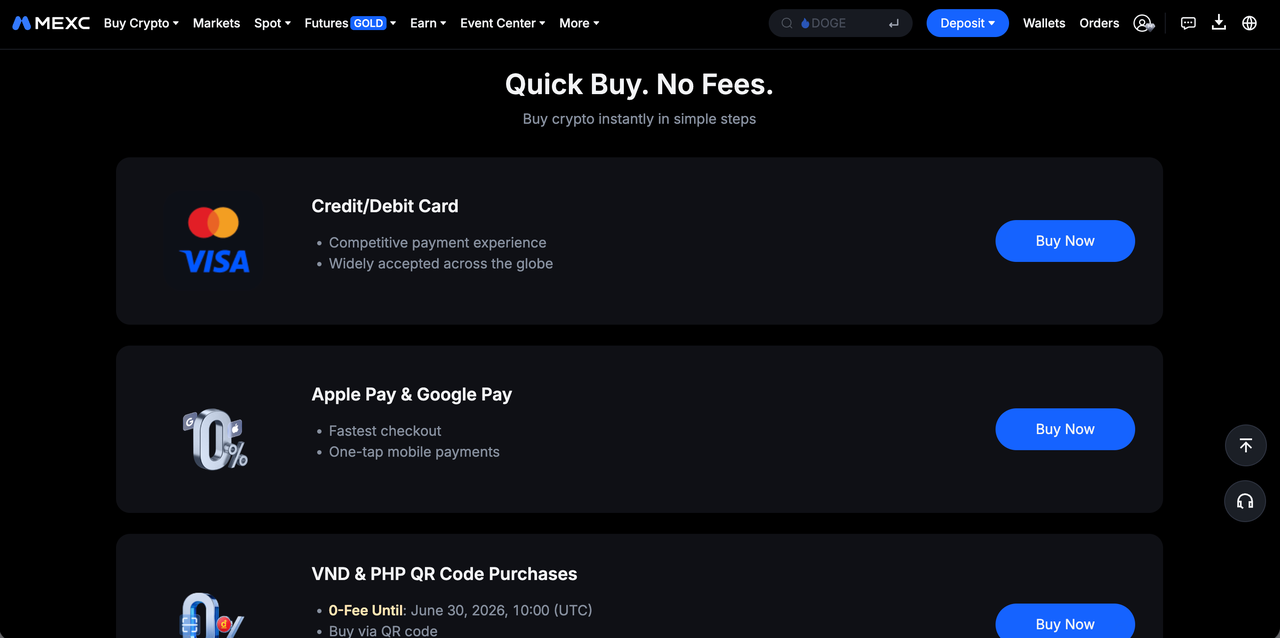

2.1 0-Fee Quick Buy


The following payment methods currently support long-term 0 fees:
  • Apple Pay
  • Google Pay
  • Credit/debit card
  • RUB QR code purchases
  • RUB card purchases

Apple Pay and Google Pay are especially suitable for mobile users. They reduce the need to repeatedly enter card information and provide a faster checkout experience that feels closer to everyday mobile payments.

2.2 Regional 0-fee Fiat Deposit campaigns


In addition to quick buy, MEXC also offers 0-fee fiat deposit events in selected regions.

Region
Deposit Method
Description
Europe
  • SEPA
  • Online Bank Transfer
Suitable for EUR bank transfers.
Brazil
  • Pix
Pix is a widely used real-time payment system in Brazil, offering fast deposits for local users.
Latin America
  • MXN: SPEI
  • COP: PSE
  • ARS: Local QR payment
  • PEN: Bank transfer
  • CLP: Local bank transfer
Users can deposit fiat through familiar local banking channels.
Southeast Asia
  • VND: VietQR
  • PHP: QRPh
Users can pay directly by scanning a QR code through local banking or e-wallet apps.

3. How to Buy Crypto with 0 Fees on MEXC


The process is simple.

Step 1: Sign up for a MEXC account


Visit the MEXC website or App and sign up with your email address or phone number. Before using fiat services, please ensure you have completed KYC verification.

Step 2: Go to Quick Buy


Log in to your account and go to the Quick Buy page.

Depending on your region, you may see supported payment methods such as:
  • Apple Pay
  • Google Pay
  • Credit/debit card
  • Local bank transfer
  • QR code payment
  • Third-party payment channels

For mobile users, Apple Pay and Google Pay are usually the fastest ways to buy crypto.


Step 3: Choose your fiat currency and payment method


Select the fiat currency and payment channel available in your region. For example:
  • EUR → SEPA
  • BRL → PIX
  • MXN → SPEI
  • COP → PSE
  • VND → VietQR
  • PHP → QRPh
  • Other currencies → Apple Pay / Google Pay or credit/debit card

If a 0-Fee label is displayed on the page, it means the payment method currently supports 0 fees.

Step 4: Complete the payment


Enter the purchase amount and follow the on-screen instructions to complete the payment.

In general, Apple Pay, Google Pay, and card purchases are usually completed within minutes. Local real-time payment methods such as PIX are also processed quickly, while standard bank transfers may take longer.

Please note that while MEXC may waive platform fees for selected channels, banks or card issuers may still charge FX conversion fees, cross-border fees, or bank transfer fees. Please refer to your bank's actual rules for details.

4. Fiat Deposit vs Quick Buy: What Is the Difference?


Category
Description
Asset Flow
Suitable For
Fiat Deposit
Deposit fiat to your MEXC Fiat Wallet first, then use the balance to buy crypto.
Fiat deposit → Fiat Wallet
  • Large fiat deposits
  • Users who prefer bank transfers
  • Users looking to lower overall purchase costs
Quick buy
Buy crypto directly through Apple Pay, Google Pay, credit/debit card, or other supported methods. The purchased crypto is credited directly to your Spot Wallet.
Quick buy → Spot Wallet
  • Beginners
  • Small, fast purchases
  • Mobile users

Conclusion


Buying crypto is becoming increasingly similar to everyday payments. With Apple Pay, Google Pay, and local banking payment methods now supported in more regions, the first-time crypto purchase process has become much easier.

By supporting Apple Pay, Google Pay, credit/debit cards, local bank transfers, and QR code payments, MEXC helps global users enter the crypto market in a simpler and lower-cost way.

If you are looking for a platform that supports 0-fee crypto purchases while offering a localized payment experience, MEXC is a user-friendly option.


How to Buy Crypto with 0 Fees on MEXC

For many users new to crypto, the biggest challenge in buying crypto is not the process itself, but the hidden costs that may come with it. Card processing fees, cross-border payment fees, FX conversion costs, and third-party provider markups can all add to the total cost before the crypto even reaches your account.

To lower the barrier to buying crypto, MEXC currently offers both ongoing and limited-time 0-fee crypto purchase and fiat deposit events across multiple countries and regions. Users can buy crypto at a lower cost through Apple Pay, Google Pay, credit/debit cards, local bank transfers, QR code payments, and other supported methods.


This article will walk you through:
  • Which 0-fee crypto purchase methods are currently supported on MEXC
  • How to buy crypto quickly with Apple Pay / Google Pay
  • Which local payment channels are available in different regions
  • The difference between fiat deposit and quick buy

1. Why Buy Crypto on MEXC?


MEXC offers fiat deposit and quick buy services across multiple regions, making it easier for beginners to complete their first crypto purchase.

Key advantages include:
  • One-tap crypto purchases with Apple Pay / Google Pay
  • 0 fees on selected payment methods
  • Local payment channels across multiple countries and regions
  • Support for local bank transfers and QR code payments
  • Both fiat deposit and quick buy options
  • Direct access to Spot, Futures, and other trading services after purchase

For users looking to enter the crypto market at a lower cost, 0-fee events can help reduce the cost of their first crypto purchase.

2. What 0-Fee Crypto Purchase Methods Does MEXC Support?


MEXC currently supports two types of 0-fee events:
  • Long-term 0-fee Quick Buy
  • Regional 0-fee Fiat Deposit events

Availability may vary depending on your region, currency, and event period.


2.1 0-Fee Quick Buy


The following payment methods currently support long-term 0 fees:
  • Apple Pay
  • Google Pay
  • Credit/debit card
  • RUB QR code purchases
  • RUB card purchases

Apple Pay and Google Pay are especially suitable for mobile users. They reduce the need to repeatedly enter card information and provide a faster checkout experience that feels closer to everyday mobile payments.

2.2 Regional 0-fee Fiat Deposit campaigns


In addition to quick buy, MEXC also offers 0-fee fiat deposit events in selected regions.

Region
Deposit Method
Description
Europe
  • SEPA
  • Online Bank Transfer
Suitable for EUR bank transfers.
Brazil
  • Pix
Pix is a widely used real-time payment system in Brazil, offering fast deposits for local users.
Latin America
  • MXN: SPEI
  • COP: PSE
  • ARS: Local QR payment
  • PEN: Bank transfer
  • CLP: Local bank transfer
Users can deposit fiat through familiar local banking channels.
Southeast Asia
  • VND: VietQR
  • PHP: QRPh
Users can pay directly by scanning a QR code through local banking or e-wallet apps.

3. How to Buy Crypto with 0 Fees on MEXC


The process is simple.

Step 1: Sign up for a MEXC account


Visit the MEXC website or App and sign up with your email address or phone number. Before using fiat services, please ensure you have completed KYC verification.

Step 2: Go to Quick Buy


Log in to your account and go to the Quick Buy page.

Depending on your region, you may see supported payment methods such as:
  • Apple Pay
  • Google Pay
  • Credit/debit card
  • Local bank transfer
  • QR code payment
  • Third-party payment channels

For mobile users, Apple Pay and Google Pay are usually the fastest ways to buy crypto.


Step 3: Choose your fiat currency and payment method


Select the fiat currency and payment channel available in your region. For example:
  • EUR → SEPA
  • BRL → PIX
  • MXN → SPEI
  • COP → PSE
  • VND → VietQR
  • PHP → QRPh
  • Other currencies → Apple Pay / Google Pay or credit/debit card

If a 0-Fee label is displayed on the page, it means the payment method currently supports 0 fees.

Step 4: Complete the payment


Enter the purchase amount and follow the on-screen instructions to complete the payment.

In general, Apple Pay, Google Pay, and card purchases are usually completed within minutes. Local real-time payment methods such as PIX are also processed quickly, while standard bank transfers may take longer.

Please note that while MEXC may waive platform fees for selected channels, banks or card issuers may still charge FX conversion fees, cross-border fees, or bank transfer fees. Please refer to your bank's actual rules for details.

4. Fiat Deposit vs Quick Buy: What Is the Difference?


Category
Description
Asset Flow
Suitable For
Fiat Deposit
Deposit fiat to your MEXC Fiat Wallet first, then use the balance to buy crypto.
Fiat deposit → Fiat Wallet
  • Large fiat deposits
  • Users who prefer bank transfers
  • Users looking to lower overall purchase costs
Quick buy
Buy crypto directly through Apple Pay, Google Pay, credit/debit card, or other supported methods. The purchased crypto is credited directly to your Spot Wallet.
Quick buy → Spot Wallet
  • Beginners
  • Small, fast purchases
  • Mobile users

Conclusion


Buying crypto is becoming increasingly similar to everyday payments. With Apple Pay, Google Pay, and local banking payment methods now supported in more regions, the first-time crypto purchase process has become much easier.

By supporting Apple Pay, Google Pay, credit/debit cards, local bank transfers, and QR code payments, MEXC helps global users enter the crypto market in a simpler and lower-cost way.

If you are looking for a platform that supports 0-fee crypto purchases while offering a localized payment experience, MEXC is a user-friendly option.