How to Use Limit Orders in Spot TradingHow to Use Limit Orders in Spot Trading
Category List
Cancel

How to Use Limit Orders in Spot Trading

1. How to Use Limit Orders in MEXC Spot Trading


1.1 What is a limit order in MEXC Spot trading?


A limit order allows users to set their own order price. The order will be executed at the specified price or a better price. When you place a limit order, the system will check whether there are any matching orders in the current order book at your specified price. If there are, the order may be executed immediately at the best available price. If not, the limit order will remain in the order book until it is filled or canceled.


1.2 Key advantages of using limit orders in MEXC Spot trading


The biggest advantage of limit orders lies in their price control and strategic flexibility.
1. Better price control: Users can place orders within their ideal price range and avoid accepting unfavorable fill prices during sharp market fluctuations.
2. Risk management support: When combined with TP/SL settings, traders can preset exit points to lock in profits while controlling potential losses.
3. Suitable for ranging markets: When the market moves back and forth within a range, limit orders can help capture more favorable price levels and improve trading efficiency.
Limit orders are not only an essential tool for beginners, but also an important method for advanced traders to build more complex trading strategies.

1.3 How to place a limit order in MEXC Spot trading


The following uses the MX/USDT trading pair as an example to show the specific steps for placing a limit order.

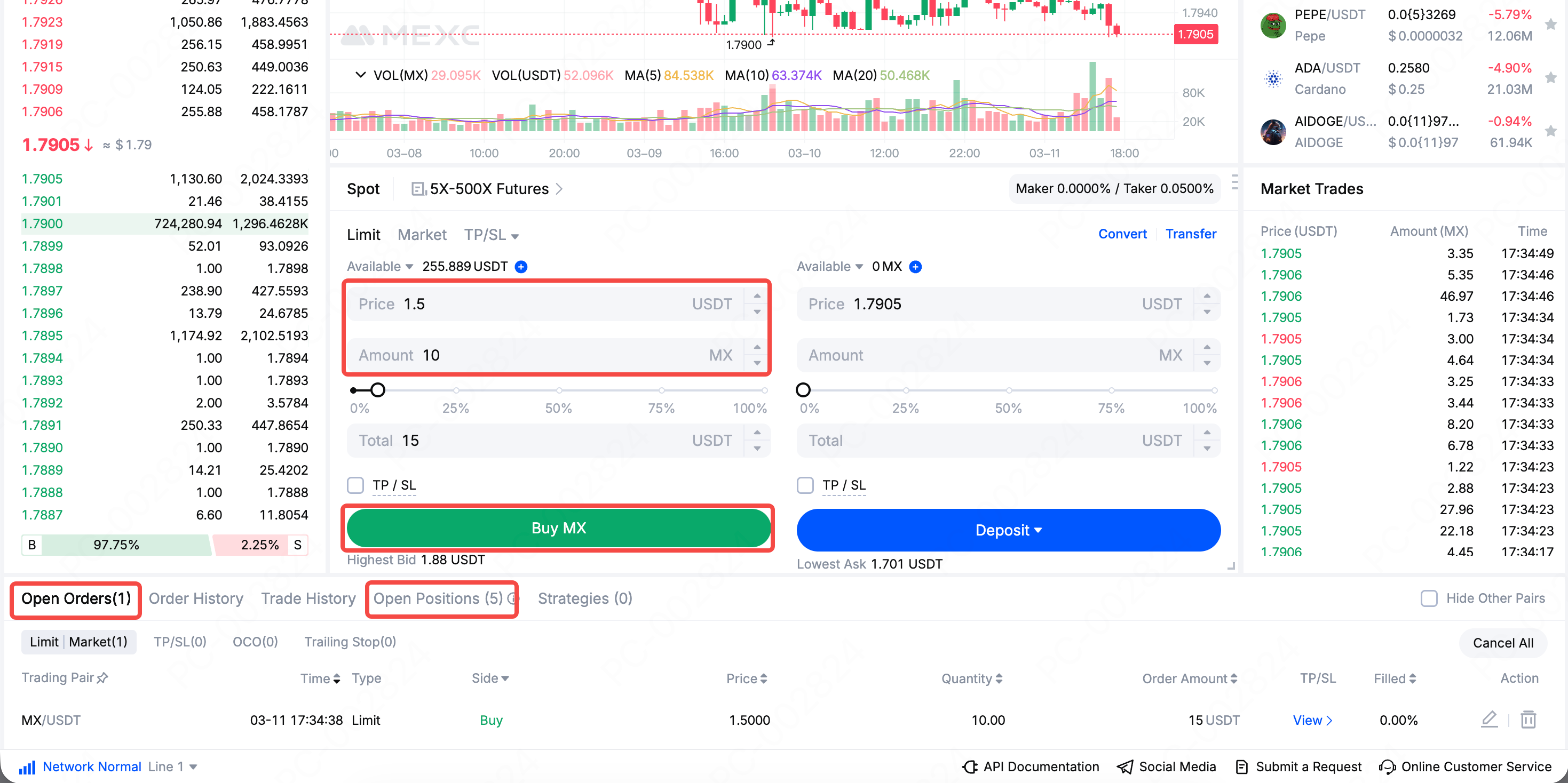
Web: Open and log in to the MEXC official websiteSpot → select the MX/USDT trading pair → Limit → enter Price and Amount → check and set TP/SLBuy MX

Your limit order will be displayed in the Open Orders list. When the market price reaches your specified order price or a better price, your limit order will be executed. After the trade is completed, you can view the purchased token under Open Positions.

App: Open and log in to the MEXC App → Trade → select the MX/USDT trading pair → Limit → enter Price and Amount → check and set TP/SLBuy MX

Your limit order will be displayed under Open Orders. When the market price reaches your specified order price or a better price, your limit order will be executed. After the trade is completed, you can view the purchased token under Positions.


The steps for placing a limit sell order are similar. Enter your target sell price and quantity, then click Sell to place the limit sell order. When the market price reaches your specified order price or a better price, the order will be executed.

1.4 Notes on using Spot limit orders


If the market price does not reach your preset level, the order may remain open for a long time without being filled. If market liquidity is insufficient, the order may not be fully filled even if the price is reached. You should also set TP/SL levels properly to avoid trigger failure under extreme market conditions or missing the best trading opportunity.

2. Limit order FAQ


2.1 Why was my limit order not executed?


A limit order may remain unfilled for the following reasons.
1. The price has not been reached: If your buy price is lower than the current market price, the limit order will only be executed after the market falls to your specified price.
2. Insufficient market liquidity: Even if the market reaches your specified price, the order may not be fully filled or may remain open if there is not enough buying or selling interest on the other side.

2.2 Why was my limit order only partially filled?


1. Due to the high volatility and uncertainty of the crypto market, partial fills may occur on your limit order. Insufficient market liquidity is the most common reason.
2. When the market reaches your order price, if there are not enough matching orders at that level to fully absorb your order, only part of the order will be filled, and the remaining portion will continue waiting in the order book.
3. During highly volatile conditions, the price may move sharply within a very short time. If the market only touches your order price briefly and rebounds quickly, only a small portion of your order may be filled at that moment.

2.3 Why is the fill price of my limit order different from what I expected?


A limit order guarantees that the fill price will not be worse than your preset price, but the actual fill price may be better. For example, if you set a buy limit order at 100 USDT, the actual execution price may be 99.5 USDT, which means you bought at a lower cost. This is a normal feature of limit orders and works in your favor.

2.4 Why was my TP/SL triggered but not executed?


If the market moves too quickly, the order price after the trigger may fail to be filled, which may result in the position not being closed as expected. Incorrect settings may also cause problems. For example, if the stop-loss trigger price is set improperly, the order may be triggered immediately or may fail to execute as expected.

Please also note that for TP/SL preset on a limit order, the system will only place the corresponding order based on the preset price and filled quantity after the main order is fully filled. If the actual order amount after the trigger is lower than the minimum order amount, the order will become invalid, which may prevent the position from being closed automatically.

2.5 Is the trading fee for limit orders high?


Limit orders are usually executed as maker orders, and their fee rate is generally lower than that of market orders, which are treated as taker orders. This is one of the key advantages of using limit orders.

However, there is one case to note. If you set a buy limit order above the latest market price or set a sell limit order below the latest market price in order to chase the price, the system may treat the order as a taker order, which means a higher fee rate may apply.

You can check the latest Spot trading fee rates on the MEXC Fee Overview.


2.6 What is the difference between a limit order and a stop order?


A limit order is executed only when the asset reaches the preset price. It allows traders to control the fill price, but it does not guarantee that the order will be executed.

A stop order, by contrast, is an order that is triggered when the asset price reaches a preset stop price and is mainly used as a risk management tool. It helps limit losses or protect profits once the asset reaches a certain price. A stop order helps ensure that a trade is submitted after the stop price is reached, but the final execution price may still vary depending on market conditions.

2.7 The difference between limit orders and market orders


In crypto trading, limit orders and market orders are the two most commonly used order types, and they differ significantly in execution rules, speed, and use cases.

Limit orders come with price restrictions. Their execution speed is relatively slower, and execution is not guaranteed. They are suitable for traders who want better price control or prefer to wait for an ideal entry or exit point. Market orders, by contrast, do not have price restrictions, are executed quickly, and are almost always filled. They are more suitable for traders who prioritize speed over the exact execution price.

Limit orders are better suited for users who want precise price control and want to avoid buying too high or selling too low, but they carry the risk of not being filled. Market orders help ensure immediate execution and are more suitable for traders who are sensitive to timing or need to enter or exit the market quickly.

How to Use Limit Orders in Spot Trading

1. How to Use Limit Orders in MEXC Spot Trading


1.1 What is a limit order in MEXC Spot trading?


A limit order allows users to set their own order price. The order will be executed at the specified price or a better price. When you place a limit order, the system will check whether there are any matching orders in the current order book at your specified price. If there are, the order may be executed immediately at the best available price. If not, the limit order will remain in the order book until it is filled or canceled.


1.2 Key advantages of using limit orders in MEXC Spot trading


The biggest advantage of limit orders lies in their price control and strategic flexibility.
1. Better price control: Users can place orders within their ideal price range and avoid accepting unfavorable fill prices during sharp market fluctuations.
2. Risk management support: When combined with TP/SL settings, traders can preset exit points to lock in profits while controlling potential losses.
3. Suitable for ranging markets: When the market moves back and forth within a range, limit orders can help capture more favorable price levels and improve trading efficiency.
Limit orders are not only an essential tool for beginners, but also an important method for advanced traders to build more complex trading strategies.

1.3 How to place a limit order in MEXC Spot trading


The following uses the MX/USDT trading pair as an example to show the specific steps for placing a limit order.

Web: Open and log in to the MEXC official websiteSpot → select the MX/USDT trading pair → Limit → enter Price and Amount → check and set TP/SLBuy MX

Your limit order will be displayed in the Open Orders list. When the market price reaches your specified order price or a better price, your limit order will be executed. After the trade is completed, you can view the purchased token under Open Positions.


App: Open and log in to the MEXC App → Trade → select the MX/USDT trading pair → Limit → enter Price and Amount → check and set TP/SLBuy MX

Your limit order will be displayed under Open Orders. When the market price reaches your specified order price or a better price, your limit order will be executed. After the trade is completed, you can view the purchased token under Positions.


The steps for placing a limit sell order are similar. Enter your target sell price and quantity, then click Sell to place the limit sell order. When the market price reaches your specified order price or a better price, the order will be executed.

1.4 Notes on using Spot limit orders


If the market price does not reach your preset level, the order may remain open for a long time without being filled. If market liquidity is insufficient, the order may not be fully filled even if the price is reached. You should also set TP/SL levels properly to avoid trigger failure under extreme market conditions or missing the best trading opportunity.

2. Limit order FAQ


2.1 Why was my limit order not executed?


A limit order may remain unfilled for the following reasons.
1. The price has not been reached: If your buy price is lower than the current market price, the limit order will only be executed after the market falls to your specified price.
2. Insufficient market liquidity: Even if the market reaches your specified price, the order may not be fully filled or may remain open if there is not enough buying or selling interest on the other side.

2.2 Why was my limit order only partially filled?


1. Due to the high volatility and uncertainty of the crypto market, partial fills may occur on your limit order. Insufficient market liquidity is the most common reason.
2. When the market reaches your order price, if there are not enough matching orders at that level to fully absorb your order, only part of the order will be filled, and the remaining portion will continue waiting in the order book.
3. During highly volatile conditions, the price may move sharply within a very short time. If the market only touches your order price briefly and rebounds quickly, only a small portion of your order may be filled at that moment.

2.3 Why is the fill price of my limit order different from what I expected?


A limit order guarantees that the fill price will not be worse than your preset price, but the actual fill price may be better. For example, if you set a buy limit order at 100 USDT, the actual execution price may be 99.5 USDT, which means you bought at a lower cost. This is a normal feature of limit orders and works in your favor.

2.4 Why was my TP/SL triggered but not executed?


If the market moves too quickly, the order price after the trigger may fail to be filled, which may result in the position not being closed as expected. Incorrect settings may also cause problems. For example, if the stop-loss trigger price is set improperly, the order may be triggered immediately or may fail to execute as expected.

Please also note that for TP/SL preset on a limit order, the system will only place the corresponding order based on the preset price and filled quantity after the main order is fully filled. If the actual order amount after the trigger is lower than the minimum order amount, the order will become invalid, which may prevent the position from being closed automatically.

2.5 Is the trading fee for limit orders high?


Limit orders are usually executed as maker orders, and their fee rate is generally lower than that of market orders, which are treated as taker orders. This is one of the key advantages of using limit orders.

However, there is one case to note. If you set a buy limit order above the latest market price or set a sell limit order below the latest market price in order to chase the price, the system may treat the order as a taker order, which means a higher fee rate may apply.

You can check the latest Spot trading fee rates on the MEXC Fee Overview.


2.6 What is the difference between a limit order and a stop order?


A limit order is executed only when the asset reaches the preset price. It allows traders to control the fill price, but it does not guarantee that the order will be executed.

A stop order, by contrast, is an order that is triggered when the asset price reaches a preset stop price and is mainly used as a risk management tool. It helps limit losses or protect profits once the asset reaches a certain price. A stop order helps ensure that a trade is submitted after the stop price is reached, but the final execution price may still vary depending on market conditions.

2.7 The difference between limit orders and market orders


In crypto trading, limit orders and market orders are the two most commonly used order types, and they differ significantly in execution rules, speed, and use cases.

Limit orders come with price restrictions. Their execution speed is relatively slower, and execution is not guaranteed. They are suitable for traders who want better price control or prefer to wait for an ideal entry or exit point. Market orders, by contrast, do not have price restrictions, are executed quickly, and are almost always filled. They are more suitable for traders who prioritize speed over the exact execution price.

Limit orders are better suited for users who want precise price control and want to avoid buying too high or selling too low, but they carry the risk of not being filled. Market orders help ensure immediate execution and are more suitable for traders who are sensitive to timing or need to enter or exit the market quickly.