

MEXC Futures Limit Order FAQs
1. What is a MEXC Futures limit order?
A limit order allows users to set a specific price at which they wish to trade, with the order executing at that price or better.
When submitting a Futures limit order, if there are existing orders in the order book that match your specified price, the order will be executed immediately at the best available price. If no matching orders exist, the limit order will remain in the order book waiting to be executed until it is either fully filled or manually canceled by you.
Key concepts of a Futures limit order include the entry price (the specific price set to open a position), position size (the number of contracts or amount planned for trading), leverage (the multiplier amplifying both profits and risks), and take-profit/stop-loss (TP/SL) functions (where the system automatically places closing orders at preset prices once the initial trigger condition is met).
2. What is the difference between limit orders and market orders in Futures trading?
Limit orders come with a price restriction. Limit orders prioritize price over speed and may not fill due to market volatility, making them suitable for traders who wish to control entry costs or wait for an ideal price level. In contrast, market orders have no price restrictions, offer fast, and almost guaranteed execution, making them ideal for traders who prioritize speed and need to open or close positions quickly.
Simply put, Futures limit orders are better suited for users who want precise control over their entry price, helping them avoid chasing highs when going long or blindly opening short positions at lows, though they carry the risk of non-execution. Market orders guarantee immediate execution, making them suitable for traders needing to enter or exit positions rapidly during periods of intense market volatility.
3. Why has my Futures limit order not been filled after placement?
Unfilled limit orders are typically caused by the following reasons:
1) Price has not been reached: If your limit buy price is set below the current market price, or your limit sell price is set above the current market price, the order must wait for the market price to reach your specified level before it can be executed.
2) Insufficient market liquidity: Even if the price reaches your specified level, insufficient buying or selling pressure may prevent the order from being fully filled, causing it to remain pending in the order book.
3) Post-Only order mode: If you used the "Post-Only" order type, the system will automatically cancel the order if it would immediately match with an existing order in the book. This ensures your order remains a maker order (adding liquidity) so you can benefit from lower maker fees.
4. Why is my limit order only partially filled?
Due to the high volatility and uncertainty of the crypto Futures market, your limit orders may experience partial fills.
Insufficient market liquidity is the most common cause. When the price reaches your specified limit, if the volume of opposing orders at that price level is insufficient to fully absorb your order, only a portion will be executed, while the remainder stays in the order book waiting for further matches.
Price wicks (or "shadows") during highly volatile periods can also lead to partial fills. Since crypto Futures markets have no daily price limits, prices can fluctuate drastically in an instant, forming sharp wicks that briefly touch extreme levels before quickly rebounding. If your limit order is placed near such a wick, only a tiny fraction may execute at the exact moment the price touches that level; as the price rapidly retraces, the remaining portion of your order will fail to fill.
5. Why does the fill price of my Futures limit order differ from my expectation?
A limit order guarantees that the fill price will be no lower than your preset value, but the actual fill price may be better. For example, if you set a limit buy price of 100 USDT to go long, the actual fill price might be 99.5 USDT. This means you established your long position at a lower cost. This is the normal operating mechanism of a limit order and works to your advantage.
6. Why did my TP/SL order not execute after being triggered?
In periods of extreme volatility, the price may move past your trigger level so quickly that your order cannot be filled at the specified price, resulting in the position not closing as expected.
Additionally, incorrect settings can cause issues. For instance, setting a stop-loss trigger price for a long position above the current market price could cause the order to trigger immediately or fail to execute as intended.
It is particularly important to note that for TP/SL orders preset when opening a position via a limit order: the system only submits the closing order based on the preset price and filled quantity after the initial opening order has been fully executed. If the calculated order value upon triggering is less than the minimum allowable order size, the order will become invalid, potentially preventing the position from closing automatically.
7. Are the trading fees for Futures limit orders high?
Futures limit orders are typically executed as maker orders, which incur lower fees compared to market orders (taker orders). This is one of the key advantages of using limit orders. For the latest details on trading fees, please visit the Trading Fee page.
However, there is a situation to note. If you set a limit buy order above the current market price or a limit sell order below the current market price in an attempt to chase the price, the system may treat your order as a taker order, subjecting it to the higher fee rate.
8. What are the risks of using Futures limit orders during highly volatile markets?
During extreme market conditions, Futures limit orders face the risk of price wicks. This occurs when the price momentarily touches a specific level to execute your order and then rapidly rebounds, causing you to open a position at an unfavorable price. Since Futures trading involves leverage, losses in such scenarios can be significantly amplified.
We recommend that in highly volatile markets, if you need to open or close a position urgently, you should prioritize using market orders. If you need precise control over your entry price, use limit orders, but ensure you set your order prices reasonably based on order book depth. Additionally, always set up TP/SL orders to effectively manage position risk.
9. What are the core advantages of using Futures limit orders?
The core advantages of Futures limit orders lie in their controllability and strategic flexibility:
- Price Control: Allows you to open positions within your ideal price range, avoiding the risk of being forced to accept unfavorable entry costs due to intense market volatility.
- Risk Management: Enables you to pre-set exit points by combining Take-Profit and Stop-Loss orders. This helps lock in profits while simultaneously controlling potential losses.
- Lower Fees: As maker orders, they allow you to enjoy preferential fee rates.
- Efficiency in Ranging Markets: In sideways or oscillating markets, limit orders help capture ideal entry levels, thereby improving overall Futures trading efficiency.
10. How to Place a Futures Limit Order on MEXC
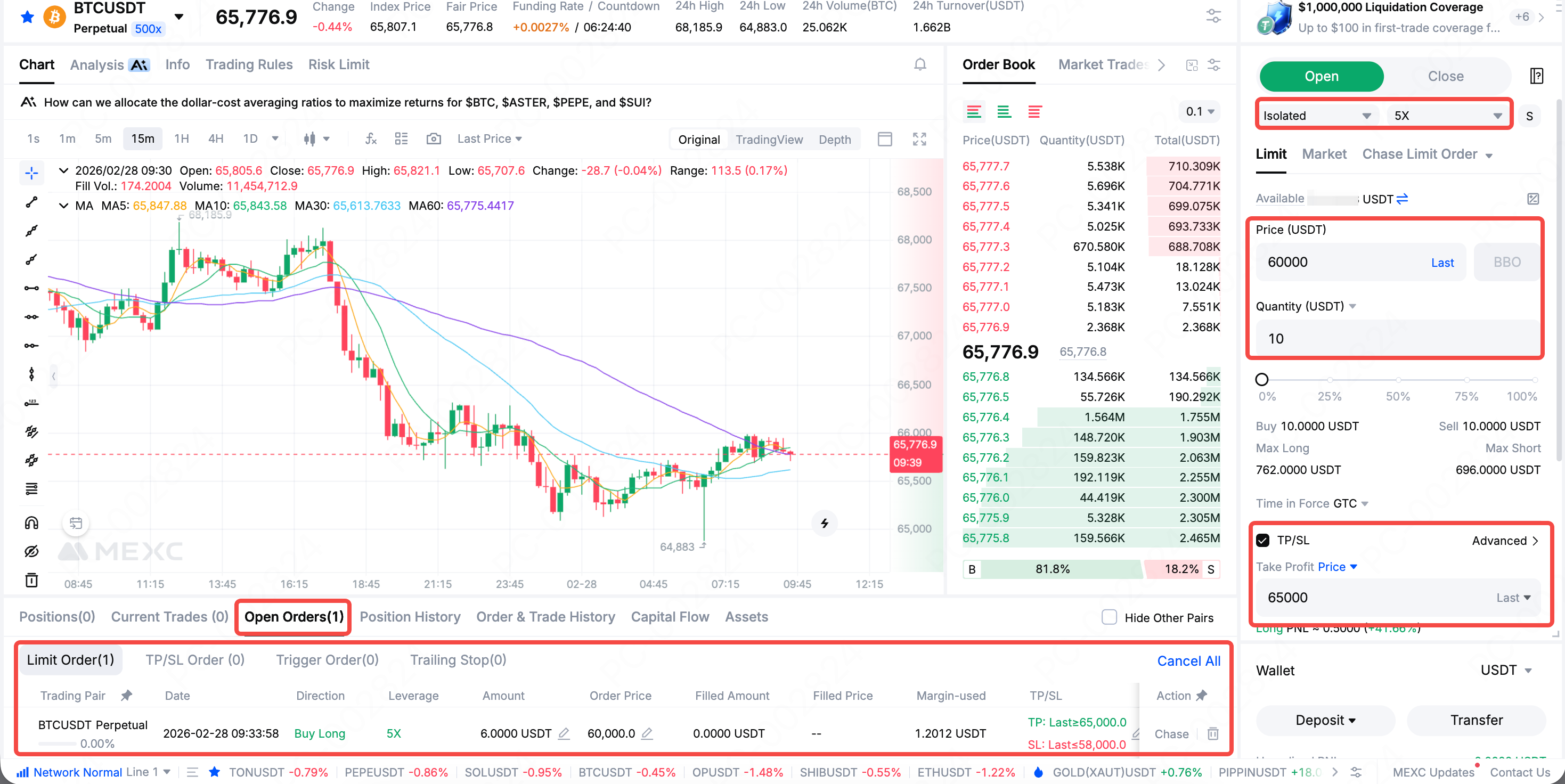
Web: Log in to the MEXC official website and navigate to the Futures trading page. Select your trading pair and set your leverage multiplier. Choose Limit, then enter your desired Price and Quantity. Optionally, set your TP/SL levels. Click Open Long or Open Short to complete the order placement. Your limit order will appear in the Open Orders list. The order will be executed, and a position established, once the market price reaches or becomes better than your order price.
App: Navigate to the Futures trading page, select your trading pair and leverage multiplier. Choose Limit Order, input your Price and Quantity, and optionally set TP/SL as needed, and tap Open Long or Open Short to open the position. After execution, you can view your Futures positions in the Open Orders list.