MEXC Telegram Bot FAQMEXC Telegram Bot FAQ
Category List
Cancel

MEXC Telegram Bot FAQ

1. What is a Telegram bot?


A Telegram bot is an automated program built on the Telegram platform that can perform tasks such as sending messages, responding to commands, and handling workflows without manual input. It helps users reduce repetitive work and improve efficiency.

For MEXC affiliates, the Telegram bot serves as a powerful community management tool. It enables automated group management, customizable entry requirements, and scheduled delivery of market updates and trading signals to keep your community active. The bot also includes a visual dashboard where you can track user sign-ups, trading activity, and other key conversion metrics in real time. This will help you to optimize operations, grow your community, and increase trading volume.

2. What are the core features of the MEXC Telegram Bot?


The MEXC Telegram Bot offers a complete solution for community management. Key features include:

Group Management: Link and manage multiple Telegram groups from a single dashboard. Configure group rules and bot settings in one place for streamlined and consistent operations.

Automated Content Delivery: Automatically share blockchain news, market updates, and AI-driven insights to keep your community informed, active, and engaged.

Interactive Tools: Boost engagement with features like red packets, one-click trading, and AI Q&A, creating a more dynamic community experience.

Data Dashboard: Access real-time insights into group activity and bot performance, enabling you to monitor results and optimize your strategy.

Conversion and Earnings Tracking: Track referral performance, including user activity, conversions, and earnings, to better understand and improve your promotional results.

3. How to add the MEXC Telegram bot to a group


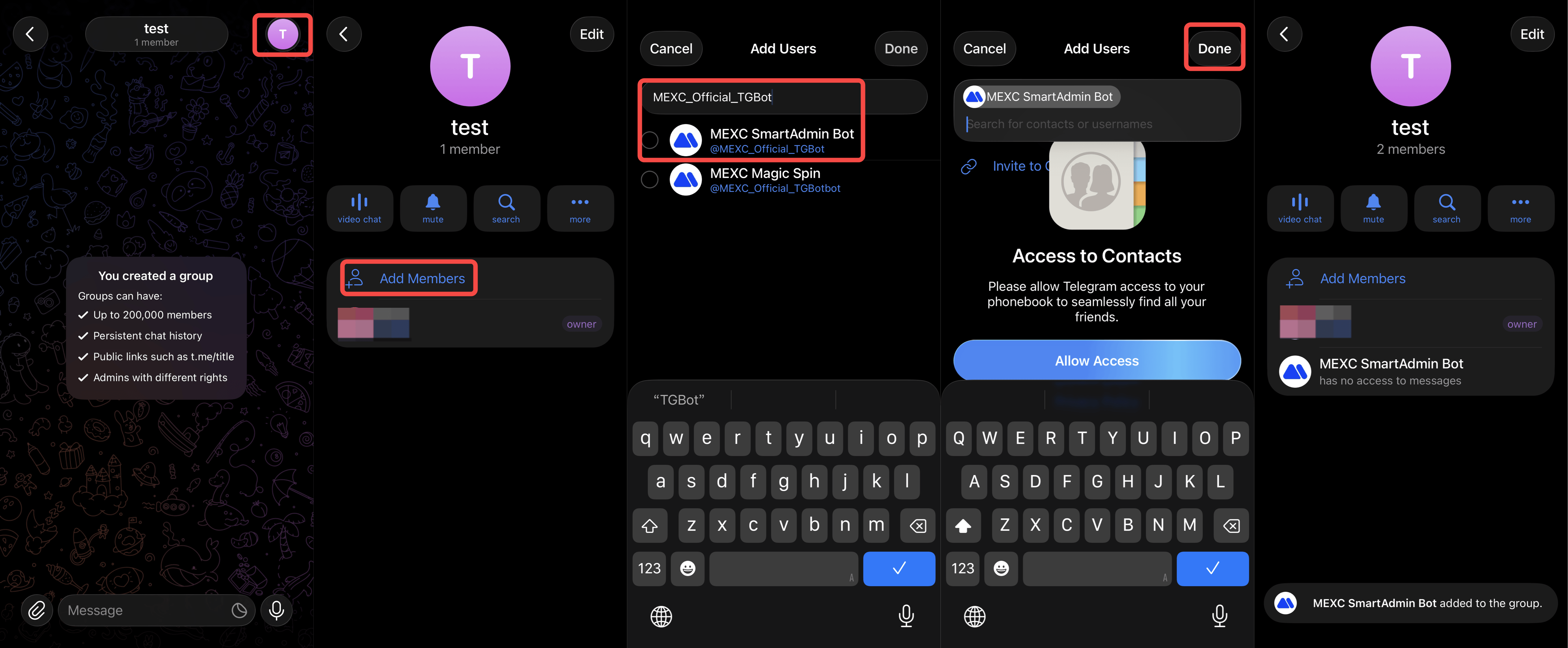
Follow these steps to add: Tap the group avatar icon to enter the group page → Add Members → Search for the MEXC Telegram Bot ID → Add the MEXC Bot to the group.

MEXC Telegram Bot ID: @MEXC_Official_TGBot

4. How to authorize the MEXC Telegram Bot to manage a group


To enable the bot to fully manage your group, you need to grant it administrator permissions. The steps are as follows:

Tap the group avatar icon to enter the group page → Edit → Administrators → Add Admin → Set the MEXC Telegram Bot as an administrator → Configure permissions and Save Changes.

Once administrator permissions are granted, the bot can perform actions such as removing members, muting users, and posting announcements, enabling fully automated group management.


5. How to manage multiple groups on the dashboard


The MEXC Affiliate Dashboard provides a convenient way for you to manage multiple groups at once. You can access the management interface via the following path:

Log in to the MEXC Affiliate Dashboard → Referral Strategy → Telegram Bot → Group Management


On the affiliate dashboard, you can view the overall performance metrics on the Analytics Dashboard, configure and manage multiple groups in Group Management, and track conversions and earnings in Referral Earnings.

Please note that when adding a new group in Group Management, always use the group's unique ID instead of its name. This ensures the system correctly identifies and manages each group without confusion.


6. How to find the Telegram group ID


To get the Telegram group ID, you need to use a helper bot. The steps are as follows:

Tap the group avatar icon → Add Members → Search for MyChatInfoBot → Add the bot to the group → Return to the group to view the Group ID.

MyChatInfo Bot ID: @MyChatInfoBot


7. Why do group IDs start with -100?


In Telegram's system, groups that support management feature configurations use IDs that start with -100. This is an official format used to identify eligible group types.

When configuring group management in the MEXC Bot dashboard, you must enter the full group ID, including the -100 prefix. If your group ID does not start with -100, it may indicate that the group type does not support the required management features.

8. Why is the dashboard data lower?


Dashboard data is calculated within a 30-minute window. When a user clicks a link in the Telegram bot and enters the MEXC App, only trading activity within the next 30 minutes is recorded.

This approach ensures accurate attribution by counting only conversions directly related to the bot. Trades made after the 30-minute window are not included in the bot's performance data. As a result, the figures shown on the dashboard may be lower than the group's total trading volume. This is normal and part of the system's reporting logic, not a data error.

9. What is the purpose of the time zone setting in Group Configuration?


The group time zone setting determines when the bot sends the daily 3-minute content summary. The bot will deliver this content based on the local time of the time zone you select.

For example, if most of your group members are in UTC+8 (Beijing Time), you should set the time zone accordingly. This ensures the summary is delivered at a time that aligns with your members' daily activities. Setting the correct time zone helps maximize visibility, ensuring members receive content when they are most active and improving overall engagement.

10. What is FOMO Sentiment mode?


FOMO Sentiment is a feature that adjusts the bot's messaging style. FOMO stands for "Fear of Missing Out". When enabled, messages become more expressive, excited, and encouraging, similar to how a real person would passionately share news. When disabled, messages are neutral and official, without extra emotional emphasis.

For example, when BTC breaks 70,000 USDT:
With FOMO enabled: BTC has surged past 70,000 USDT! The price is rising fast. Keep an eye on the market 🚀
With FOMO disabled: BTC breaks 70,000 USDT.
You can choose the style based on your group's atmosphere and members' preferences.

11. Why can only one entry requirement group be configured?


When a user applies to join a group with entry requirements via a private chat with the bot, the system needs to know which group they want to join. If multiple groups have entry requirements, the bot cannot automatically determine the correct group. Limiting it to one entry requirement group ensures the bot can guide users accurately through the joining process.

Start using the MEXC Telegram Bot today to streamline your community management, boost user engagement, and increase conversions and revenue. If you have any questions, please reach out to MEXC official customer service for assistance.


MEXC Telegram Bot FAQ

1. What is a Telegram bot?


A Telegram bot is an automated program built on the Telegram platform that can perform tasks such as sending messages, responding to commands, and handling workflows without manual input. It helps users reduce repetitive work and improve efficiency.

For MEXC affiliates, the Telegram bot serves as a powerful community management tool. It enables automated group management, customizable entry requirements, and scheduled delivery of market updates and trading signals to keep your community active. The bot also includes a visual dashboard where you can track user sign-ups, trading activity, and other key conversion metrics in real time. This will help you to optimize operations, grow your community, and increase trading volume.

2. What are the core features of the MEXC Telegram Bot?


The MEXC Telegram Bot offers a complete solution for community management. Key features include:

Group Management: Link and manage multiple Telegram groups from a single dashboard. Configure group rules and bot settings in one place for streamlined and consistent operations.

Automated Content Delivery: Automatically share blockchain news, market updates, and AI-driven insights to keep your community informed, active, and engaged.

Interactive Tools: Boost engagement with features like red packets, one-click trading, and AI Q&A, creating a more dynamic community experience.

Data Dashboard: Access real-time insights into group activity and bot performance, enabling you to monitor results and optimize your strategy.

Conversion and Earnings Tracking: Track referral performance, including user activity, conversions, and earnings, to better understand and improve your promotional results.

3. How to add the MEXC Telegram bot to a group


Follow these steps to add: Tap the group avatar icon to enter the group page → Add Members → Search for the MEXC Telegram Bot ID → Add the MEXC Bot to the group.

MEXC Telegram Bot ID: @MEXC_Official_TGBot


4. How to authorize the MEXC Telegram Bot to manage a group


To enable the bot to fully manage your group, you need to grant it administrator permissions. The steps are as follows:

Tap the group avatar icon to enter the group page → Edit → Administrators → Add Admin → Set the MEXC Telegram Bot as an administrator → Configure permissions and Save Changes.

Once administrator permissions are granted, the bot can perform actions such as removing members, muting users, and posting announcements, enabling fully automated group management.


5. How to manage multiple groups on the dashboard


The MEXC Affiliate Dashboard provides a convenient way for you to manage multiple groups at once. You can access the management interface via the following path:

Log in to the MEXC Affiliate Dashboard → Referral Strategy → Telegram Bot → Group Management


On the affiliate dashboard, you can view the overall performance metrics on the Analytics Dashboard, configure and manage multiple groups in Group Management, and track conversions and earnings in Referral Earnings.

Please note that when adding a new group in Group Management, always use the group's unique ID instead of its name. This ensures the system correctly identifies and manages each group without confusion.


6. How to find the Telegram group ID


To get the Telegram group ID, you need to use a helper bot. The steps are as follows:

Tap the group avatar icon → Add Members → Search for MyChatInfoBot → Add the bot to the group → Return to the group to view the Group ID.

MyChatInfo Bot ID: @MyChatInfoBot


7. Why do group IDs start with -100?


In Telegram's system, groups that support management feature configurations use IDs that start with -100. This is an official format used to identify eligible group types.

When configuring group management in the MEXC Bot dashboard, you must enter the full group ID, including the -100 prefix. If your group ID does not start with -100, it may indicate that the group type does not support the required management features.

8. Why is the dashboard data lower?


Dashboard data is calculated within a 30-minute window. When a user clicks a link in the Telegram bot and enters the MEXC App, only trading activity within the next 30 minutes is recorded.

This approach ensures accurate attribution by counting only conversions directly related to the bot. Trades made after the 30-minute window are not included in the bot's performance data. As a result, the figures shown on the dashboard may be lower than the group's total trading volume. This is normal and part of the system's reporting logic, not a data error.

9. What is the purpose of the time zone setting in Group Configuration?


The group time zone setting determines when the bot sends the daily 3-minute content summary. The bot will deliver this content based on the local time of the time zone you select.

For example, if most of your group members are in UTC+8 (Beijing Time), you should set the time zone accordingly. This ensures the summary is delivered at a time that aligns with your members' daily activities. Setting the correct time zone helps maximize visibility, ensuring members receive content when they are most active and improving overall engagement.

10. What is FOMO Sentiment mode?


FOMO Sentiment is a feature that adjusts the bot's messaging style. FOMO stands for "Fear of Missing Out". When enabled, messages become more expressive, excited, and encouraging, similar to how a real person would passionately share news. When disabled, messages are neutral and official, without extra emotional emphasis.

For example, when BTC breaks 70,000 USDT:
With FOMO enabled: BTC has surged past 70,000 USDT! The price is rising fast. Keep an eye on the market 🚀
With FOMO disabled: BTC breaks 70,000 USDT.
You can choose the style based on your group's atmosphere and members' preferences.

11. Why can only one entry requirement group be configured?


When a user applies to join a group with entry requirements via a private chat with the bot, the system needs to know which group they want to join. If multiple groups have entry requirements, the bot cannot automatically determine the correct group. Limiting it to one entry requirement group ensures the bot can guide users accurately through the joining process.

Start using the MEXC Telegram Bot today to streamline your community management, boost user engagement, and increase conversions and revenue. If you have any questions, please reach out to MEXC official customer service for assistance.