MEXC Affiliate Portal Usage Guide

To further expand the blockchain community and collaborate with partners who share MEXC's core values and mission, MEXC has officially launched the MEXC Affiliate Program.

As a MEXC affiliate, you can create custom referral links, invite friends, and earn trading commissions. This guide will walk you through the features and operations of the MEXC Affiliate Site, helping you develop effective promotion strategies and maximize your earnings.

I. Dashboard


1. Affiliate Asset Overview


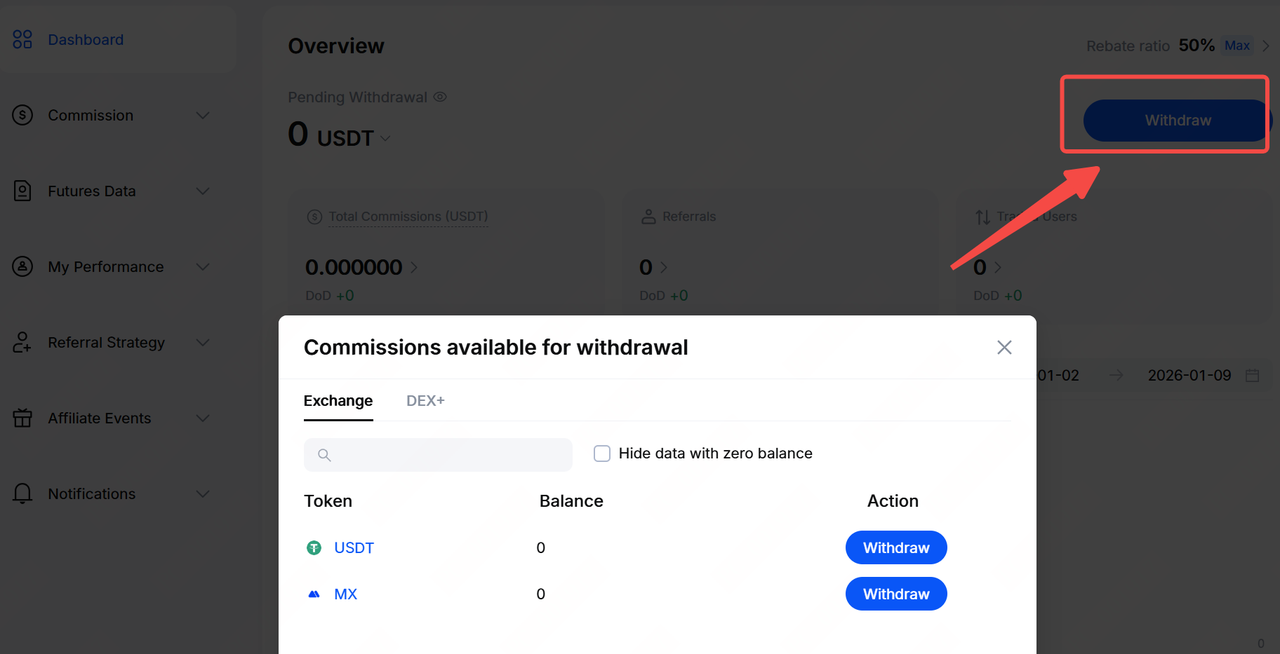
After entering the affiliate portal, you can clearly view the current status of your commission in the affiliate account. The system provides a convenient commission withdrawal feature, allowing you to transfer commissions at any time to the Spot account linked to your Affiliate account.


Note: You can also view detailed records of commission transfers from the affiliate portal to your Spot account via the main site under Wallets Funding HistoryAffiliate Asset Transfer History.

2. Commission Rate Details


In the Commission Rates module, you can view your referral commission ratesand sub-affiliate rates. If there are any changes to these rates, click View History to track detailed adjustments, helping you stay informed about the latest rebate policy updates.


Key metrics such as referral data, trading volume, and commissions are updated in real time (the default query period is the past 7 days). For more detailed analysis, you can go to My Performance → Referrals, select a specific date range to view historical data, and use the data export feature to save records.


4. Promotional Tools


The promotional tools in the affiliate portal showcase the latest MEXC events along with their matched target user groups. By using these tools, you can directly reach relevant users, attract greater participation, and increase your earnings. Event recommendations will be sent to referees via in-site messages, App push notifications, and email. Once a referee completes the event tasks and passes system verification, you will receive the corresponding commission.

(Note: Each promotion tool can reach the same user only once per day. Commission amounts shown are estimates; actual commissions are subject to next-day settlement.)


FAQ

Q1: What benefits does this tool provide for affiliates and referees?
A: The system intelligently recommends referrals to participate in the Get $10,000 event. After referrals complete the required Futures trading volume, affiliates earn commissions, while referees receive task rewards such as bonuses and vouchers.

Q2: Are the estimated commissions displayed by the system accurate?
A: Estimated commissions are for reference only. They are calculated based on the rebate rate and the assumed maximum taker fee. Final commissions are subject to the system's actual settlement results, and any non-compliant trading will be excluded.

Q3: Can all referees invited by affiliates use the recommendation feature?
A: No. Only referees who are determined by the system to be eligible for matching events will be included in the recommendation list.

Q4: How many times per day can an affiliate recommend tasks to the same referee?
A: Each referee can be recommended once per day. The quota resets daily at 16:00 (UTC).

5. Commission Tier Rules


Affiliate tier upgrades are based on the number of valid users and MX holdings. Each month is divided into two evaluation periods (1st–15th and 16th–end of month). Once the upgrade requirements are met, the commission rate will automatically increase by 2 tiers in the next period; otherwise, it will default to 50%.

Upgrade Requirements:
Method 1: Within the evaluation period, complete first trades by 5 valid users, and hold at least 2,000 MX at the end of the period. Method 2: Hold at least 20,000 MX at the end of the period.
Note: A valid first-trade user is defined as a user whose trading fees reach 5 USDT, updated daily at 16:10 (UTC),. MX holding snapshot data is updated at the end of each period (the system takes three random snapshots and uses the lowest value). You can click Rules for more information.


6. Referral Leaderboard


The Referral Leaderboard presents a visual overview of invited users' commission contributions, Futures trading volume, Futures fees, Spot trading volume, Spot fees, and deposit activity. This allows you to clearly identify trading trends and gain a comprehensive understanding of your affiliate promotion performance and revenue sources.


1. Referral Strategy


You can create new links for different promotional campaigns. For example, you may name a strategy for a Telegram community and customize the referral code to generate a dedicated link for more precise promotion.


Notes:
1. If a custom referral code is already in use, please set a new unique code.
2. Referral strategy codes are irreversible. Once successfully created, they are considered final and cannot be modified or deleted.


2. Promotion Strategies (Custom Commission Sharing)


By allocating a portion of your commission to referrees or sub-affiliates, you can improve user satisfaction and trading activity. The system supports customizable commission sharing rates for both Spot and Futures, with a maximum of 20%.

Go to New Strategy to set the strategy name, referral code, validity period, and commission sharing rate.


Notes:
  • If an end date is set, once the strategy expires, users who sign up via the referral link or code will automatically be linked to the default referral code and will no longer enjoy the special commission sharing rate.
  • Commission sharing details can be viewed in the Capital History, where the exact shared amounts are displayed.

You may promote using preset referral links or custom referral codes. Click Share to generate a promotional poster containing your referral code and exclusive QR code, making it easy to share with target users.


To provide more flexible sharing options, the system offers a custom short link feature. You can use any page within the MEXC domain and pair it with your selected referral code to quickly generate and distribute referral links.


4. Strategy Performance


By sharing your exclusive links, you can attract more users and track key metrics, such as sign ups, trading volume, and commission income, in the Strategy Performance module.


III. Commission List


1. Spot & Futures Commission Data


After entering the commission page, you can view commission and trading volume data generated by referrals, sub-affiliates, and their referees within the selected time period. The page supports switching between Spot and Futures data views.


Commissions are settled and distributed on the day following trade completion. Distribution Time: Daily at 00:00 (UTC).

Distribution Status:
  • Pending: Commission has not yet been distributed.
  • Distributed: Commission has been successfully issued; the actual amount distributed shall prevail.

Note: If a user uses Futures bonuses to offset trading fees, the corresponding amount will not be included in commission calculations. Entries involving bonus offsets will be marked with a dotted line, and you can click to view the deduction details.

2. Capital Flow


In the Capital Flow module, you can review the affiliate site's income and expense records, as well as commissions shared with users. This provides a clear overview of fund movements, including the source and usage of each transaction.


3. My Performance


On the My Performance page, you can view comprehensive data related to your referees and sub-affiliates.

3.1 Referral Data


You can view detailed information such as referees' sign-up sources, deposit amounts, commission contributions, and trading volumes. Data can be searched by UID or referral code. In addition, the system allows you to assign tags to referees (up to 10 tags) for easier categorization and management.

3.2 Sub-Affiliate Data


You can view sub-affiliates' number of referees, the date they became sub-affiliates, as well as their commission earnings and deposit information, helping you understand the overall performance of your affiliate network.


IV. Futures Data


You can view Futures trading data for referees and sub-affiliates within a specified time period, including current positions, order history, and fee details. Futures data is updated every 10 minutes. If the data does not appear immediately, please try again later.


V. Leaderboard


The Leaderboard module displays commission income rankings for both the current period and the previous period.

Data Update Time: Daily at 04:00 (UTC)

Displayed Information: Total commission amount, user ranking, and detailed commission data, helping you better understand your affiliate performance.


Latest Updates: On the Latest Updates page, you can view MEXC's most recent events and announcements. You can also join the official affiliate Telegram group to receive real-time updates.