How to Join PoS?

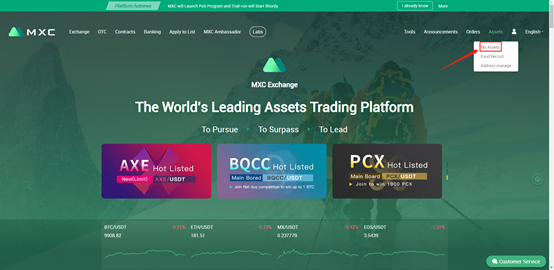
Step 1: Login > My Asset
 mceclip0.png

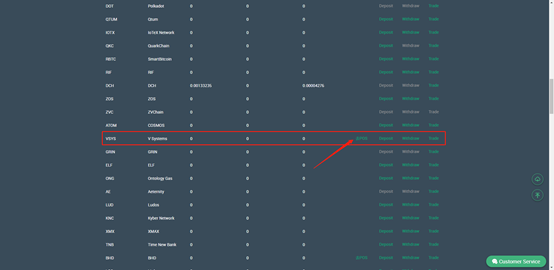
Step 2: Choose the currency available for “PoS” and click “Join PoS

Note: Now DASH, VSYS, ZEL, PCX, IMG and BHD are now first included in the PoS program. (More currencies will be included at a later stage.)
 mceclip1.png

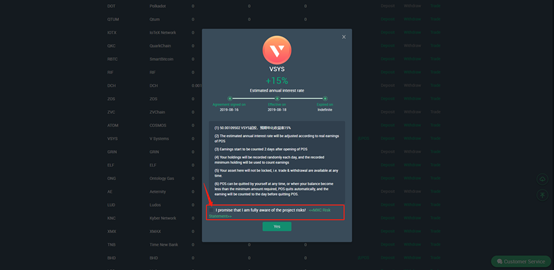
Step 3: After you click “Join PoS”, a popup will tell you the minimum amount required for PoS, estimated yearly staking yield rate, etc., please read it carefully. If you agree, tick the box and click “Confirm”.

Note: Please ensure your minimum holding≥minimum amount required for PoS. 
 mceclip2.png

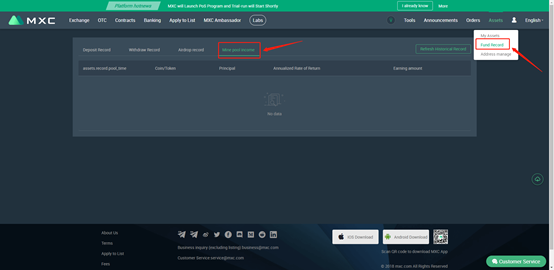
Step 4: After click “Confirm”, you join the PoS program successfully. If you want to check your income, you can go to “Fund Record”>”Mine pool income”.
mceclip3.png 

Note:

1. The specific yield rate and yield distribution time are subject to the rules in the popup when you click “Join PoS”.

2. Take “your earnings will start to be counted 2 days after you join PoS” as an example. mceclip5.png

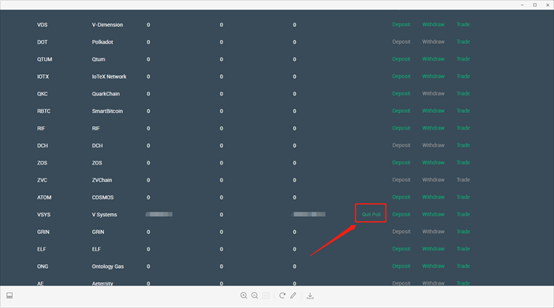
3. You can quit PoS at any time by click “Quit PoS”. 
 mceclip4.png

Note:

1. The estimated yearly staking yield rate is about to be adjusted according to the real earnings of the staking pool.

2. Your holdings will be recorded several times each day, and the minimum holding will be used to count your earning.

3. Trade/withdrawal of the currency that you join PoS is available at any time. i.e. the asset when you join the PoS program is not locked.

4. If the recorded amount of your holding is less than the minimum amount required by PoS program, it then quits automatically.


Coin Icon
Daftar sekarang untuk mendapatkan hadiah pengguna baru senilai 10,000 USDT

Berlangganan MEXC Digest

Pergerakan pasar, listing, & wawasan mingguan, langsung ke kotak masuk Anda.
Dengan berlangganan, Anda setuju untuk menerima buletin dan pembaruan email dari MEXC, serta menyetujui Kebijakan Privasi kami. Konten yang disediakan hanya untuk tujuan informasi dan bukan merupakan saran investasi.

Gabung dengan MEXC di Telegram

Ketahui listing, acara, dan perkembangan terbaru secara aktual, langsung dari saluran Telegram resmi kami.

How to Join PoS?

Step 1: Login > My Asset

 mceclip0.png

Step 2: Choose the currency available for “PoS” and click “Join PoS

Note: Now DASH, VSYS, ZEL, PCX, IMG and BHD are now first included in the PoS program. (More currencies will be included at a later stage.)

 mceclip1.png

Step 3: After you click “Join PoS”, a popup will tell you the minimum amount required for PoS, estimated yearly staking yield rate, etc., please read it carefully. If you agree, tick the box and click “Confirm”.

Note: Please ensure your minimum holding≥minimum amount required for PoS. 

 mceclip2.png

Step 4: After click “Confirm”, you join the PoS program successfully. If you want to check your income, you can go to “Fund Record”>”Mine pool income”.

mceclip3.png 

Note:

1. The specific yield rate and yield distribution time are subject to the rules in the popup when you click “Join PoS”.

2. Take “your earnings will start to be counted 2 days after you join PoS” as an example. mceclip5.png

3. You can quit PoS at any time by click “Quit PoS”. 

 mceclip4.png

Note:

1. The estimated yearly staking yield rate is about to be adjusted according to the real earnings of the staking pool.

2. Your holdings will be recorded several times each day, and the minimum holding will be used to count your earning.

3. Trade/withdrawal of the currency that you join PoS is available at any time. i.e. the asset when you join the PoS program is not locked.

4. If the recorded amount of your holding is less than the minimum amount required by PoS program, it then quits automatically.

Coin Icon
Daftar sekarang untuk mendapatkan hadiah pengguna baru senilai 10,000 USDT

Berlangganan MEXC Digest

Pergerakan pasar, listing, & wawasan mingguan, langsung ke kotak masuk Anda.
Dengan berlangganan, Anda setuju untuk menerima buletin dan pembaruan email dari MEXC, serta menyetujui Kebijakan Privasi kami. Konten yang disediakan hanya untuk tujuan informasi dan bukan merupakan saran investasi.

Gabung dengan MEXC di Telegram

Ketahui listing, acara, dan perkembangan terbaru secara aktual, langsung dari saluran Telegram resmi kami.
mc_announcements_homepage_description_tdkmc_announcements_homepage_description_tdk