Options

Options are versatile derivative instruments that give traders the right, but not the obligation, to buy (Call) or sell (Put) a digital asset at a specific strike price.Unlike futures, options offer a flexible way to hedge against "black swan" events or speculate on implied volatility. The 2026 landscape features a surge in on-chain options vaults (DOVs) and structured products that simplify complex "Greeks" for retail users. Explore this tag for insights into premium pricing, expiration cycles, and advanced strategic hedging in the decentralized derivatives market.

20796 Articles
Created: 2026/02/02 18:52
Updated: 2026/02/02 18:52

Metaplanet Shareholders Approve New Funding Tools to Buy Bitcoin

Metaplanet Shareholders Approve New Funding Tools to Buy Bitcoin

Metaplanet shareholders recently approved a proposal to raise ¥555 billion ($3.8 billion) via preferred shares to invest in acquiring more BTC. The post Metaplanet Shareholders Approve New Funding Tools to Buy Bitcoin appeared first on Coinspeaker.

Author: Coinspeaker
With ETF and NFT milestones approaching, WinnerMining launches DOGE, XRP, and BTC yield contracts

With ETF and NFT milestones approaching, WinnerMining launches DOGE, XRP, and BTC yield contracts

As the approval of the Dogecoin ETF approaches and both NFT sales and on-chain activity continue to rise, the cryptocurrency market is moving toward a new inflection point. Leveraging its innovative cloud mining model, WinnerMining has launched yield contracts for…

Author: Crypto.news
Tesla Inc. ($TSLA) Stock: China Sales Decline 4% Y/Y in August Amid Just 600 Orders in India Since July Launch

Tesla Inc. ($TSLA) Stock: China Sales Decline 4% Y/Y in August Amid Just 600 Orders in India Since July Launch

TLDR Tesla’s China-made EV sales fell 4% year-over-year in August. Deliveries rose 22.6% month-on-month to 83,192 units. India orders since July launch totaled just 600 cars. Tesla stock closed at $333.86, down 3.5% on August 29, 2025. BYD reported its fourth consecutive monthly decline in China. Tesla’s China-made electric vehicle sales fell 4% year-over-year in [...] The post Tesla Inc. ($TSLA) Stock: China Sales Decline 4% Y/Y in August Amid Just 600 Orders in India Since July Launch appeared first on CoinCentral.

Author: Coincentral
Bitcoin (BTC) Price: Hovering Around $110,000 While Gold Reaches New Record High

Bitcoin (BTC) Price: Hovering Around $110,000 While Gold Reaches New Record High

TLDR Bitcoin trading around $110,000 after nearly 10% drop from August all-time high of $123,731 Gold reached record $3,508 per ounce, outperforming Bitcoin with 30% YTD gains versus BTC’s 16% September historically weak month for Bitcoin with previous negative performance in multiple years ETF outflows totaled $751.12 million in August, ending four-month streak of inflows [...] The post Bitcoin (BTC) Price: Hovering Around $110,000 While Gold Reaches New Record High appeared first on Blockonomi.

Author: Blockonomi
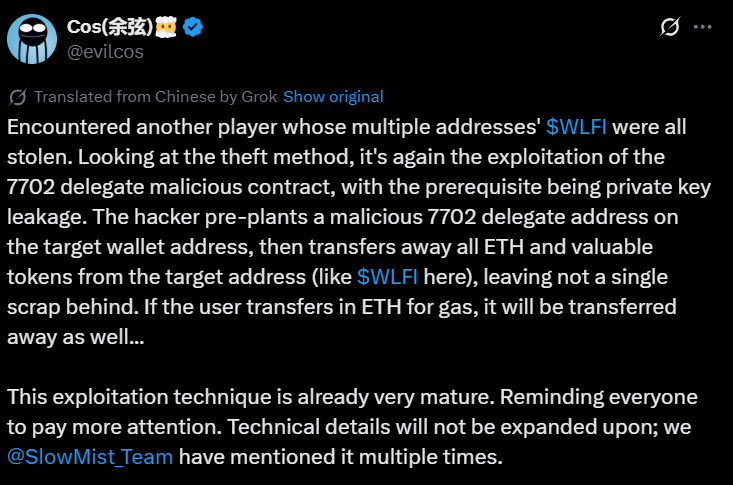
Trump-Backed WLFI Tokens Vanish in New Ethereum Exploit Attack

Trump-Backed WLFI Tokens Vanish in New Ethereum Exploit Attack

TLDR Hackers are exploiting Ethereum’s EIP-7702 upgrade to steal WLFI tokens from World Liberty Financial holders The exploit involves pre-planting malicious smart contracts in victim wallets after private keys are compromised through phishing Multiple users report losing tokens, with some managing to save only 20% of their holdings in emergency transfers The attack occurs when [...] The post Trump-Backed WLFI Tokens Vanish in New Ethereum Exploit Attack appeared first on CoinCentral.

Author: Coincentral
Why Strategy’s S&P 500 Entry Could Trigger Massive Bitcoin Rally

Why Strategy’s S&P 500 Entry Could Trigger Massive Bitcoin Rally

TLDR Strategy (MSTR) could join the S&P 500 Index as early as September 5, 2025 Company holds 597,325-632,457 Bitcoin worth approximately $65-69 billion on its balance sheet MSTR stock has gained 173% over the past 12 months with a $96 billion market cap Second quarter results showed $10 billion in net income and $32.60 earnings [...] The post Why Strategy’s S&P 500 Entry Could Trigger Massive Bitcoin Rally appeared first on CoinCentral.

Author: Coincentral
India’s EV Market Proves Tough Ground for Tesla’s Luxury Strategy

India’s EV Market Proves Tough Ground for Tesla’s Luxury Strategy

TLDRs; Tesla’s luxury-first strategy clashes with India’s price-sensitive EV market, limiting early adoption despite global brand strength. Model Y’s $68,000 price tag far exceeds India’s EV sweet spot below $25,000, creating a demand barrier. Tesla received only 600 orders versus its 2,500-car quota, falling behind rivals like BYD in sales traction. Infrastructure expansion continues, with [...] The post India’s EV Market Proves Tough Ground for Tesla’s Luxury Strategy appeared first on CoinCentral.

Author: Coincentral
Analysts Eye Safer Altcoin Opportunities

Analysts Eye Safer Altcoin Opportunities

The post Analysts Eye Safer Altcoin Opportunities appeared on BitcoinEthereumNews.com. Crypto News Dogecoin, PEPE, and BONK are seeing record trading activity amid ETF speculation and whale moves, but analysts highlight a safer audited altcoin gaining momentum. Speculation is mounting around the possibility of a Dogecoin ETF, and the news has sparked a surge in trading activity across the broader memecoin market. Both PEPE and BONK have seen their volumes spike to new records, with retail flows chasing momentum across exchanges. Analysts note that MAGACOIN FINANCE is in these conversations as a new memecoin gaining momentum in 2025. Dogecoin ETF — Institutional Momentum Builds Trading price of dogecoin is going around $0.235. Large amounts of whales purchased the equivalent of 150 American million dollars of the coin DOGE. Recent filings for ETFs, namely by investors Bitwise and Grayscale, generated much optimism among finance experts. A considerable number of these experts believe that ETFs have a 60-70% chance of being approved around this time next year. If DOGE continues down this path, price goals of thirty Dollars+ are impending very soon, as a result of institutional purchases and the growing of ETF speculation. PEPE — Ecosystem Expansion Meets Volatility PEPE remains highly volatile but continues to innovate. Their new tokens are priced around $0.00000928. A new ecosystem will allow for zero tax buying and selling and integrate with other projects, like Pudgy Penguins, and punish hoarding in users. Analysts anticipate that efforts made by PEPE to increase stability may fail in the long run. BONK — Community-Driven Surge BONK, a new speculative investment, experienced a record number of transactions. Despite having outlined characteristics, the limited appeal of BONK as an investment has been offset by speculative traders. The token typically sees sharp fluctuations, with positive periods led by popularity. In 2025, BONK has been a unique member of the meme coin community,…

Author: BitcoinEthereumNews
Building an AI Agent with Rust: From Basic Chat to Blockchain Integration

Building an AI Agent with Rust: From Basic Chat to Blockchain Integration

AI agents are moving fast from toy experiments to serious applications. But when I tested different frameworks, both battle-tested and experimental, I kept running into the same roadblock: scalability and reliability. Things got especially messy once I tried to mix in Web3. Tool execution would break, context management was shaky, and on-chain transactions added a new layer of unpredictability. This is understandable; AI agents and Web3 integration are both still early. But instead of fighting with the limits of existing frameworks, I decided to strip things back to the basics and build my own agent. In this tutorial, I’ll show you how to create an on-chain AI agent in Rust, powered by the Tokio framework and the Anthropic API. The agent will be able to handle both: Off-chain tasks: like fetching the weather or checking the time On-chain operations: reading blockchain data, generating wallets, and even sending ETH transactions The only prerequisite is Rust knowledge, with Tokio experience being helpful but not required. Though I typically work with TypeScript, I’ve found Rust offers better performance even for small AI agent projects, along with easier deployment and excellent interoperability with other programming languages. By the end, you’ll have a flexible template for building AI agents that don’t just chat, but act.AI Agent with Rust Table Of Contents

  1. Getting Started: Basic Agent with API Key
Project Setup Environment Setup Basic Agent Implementation
  1. Adding Personality to Your Agent
Creating a Personality Module Define Your Agent’s Personality Define Your Agent’s Personality Update the Main Loop
  1. Database Integration for Message History
Setting Up the Database Configure Environment Variables Creating Database Migrations Creating the Database Module Update Main Loop
  1. Tool Integration for Enhanced Capabilities
Create a Tools Module Wire Tools into Anthropic Update the Main Loop
  1. Blockchain Integration: Ethereum Wallet Support
Add Ethereum Dependencies Implement Ethereum Wallet Functions Updating the .env.example File Example Interactions Getting Started: Basic Agent with API Key Let's build the simplest possible AI agent: a command-line chatbot powered by the Anthropic Claude API. This first step will give us a clean foundation: A Rust project set up with Tokio Environment variables for managing API keys A minimal main loop where you type messages and the agent responds Think of it as the “Hello, World!” for AI agents. Once this is working, we’ll layer on personality, tools, memory, and blockchain integration. Project Setup First, create a new Rust project: cargo new onchain-agent-templatecd onchain-agent-template Add the necessary dependencies to your Cargo.toml: [package]name = "agent-friend"version = "0.1.0"edition = "2021"[dependencies]tokio = { version = "1", features = ["full"] }reqwest = { version = "0.11", features = ["json"] }serde = { version = "1.0", features = ["derive"] }serde_json = "1.0"anyhow = "1.0"dotenv = "0.15" Environment Setup Create a .env.examplefile to show which environment variables are needed: ANTHROPIC_API_KEY=your_api_key_here Create a .env file with your actual API key: ANTHROPIC_API_KEY=sk-ant-api-key... For the ANTHROPIC_API_KEY , you can get it from Anthropic Console Basic Agent Implementation Now let’s wire up a simple REPL (read–eval–print loop) so you can chat with the agent: // src/main.rsmod anthropic;use std::io::{self, Write};use dotenv::dotenv;#[tokio::main]async fn main() -> anyhow::Result<()> { // Load environment variables dotenv().ok(); println!("Welcome to Agent Friend!"); println!("Type 'exit' to quit."); loop { print!("You: "); io::stdout().flush()?; let mut user_input = String::new(); io::stdin().read_line(&mut user_input)?; let user_input = user_input.trim(); if user_input.to_lowercase() == "exit" { break; } // Get response from AI model print!("Agent is thinking..."); io::stdout().flush()?; let reply = anthropic::call_anthropic_with_personality(user_input).await?; println!("\r"); // Clear the "thinking" message println!("Agent: {}", reply); } Ok(())} And the Anthropic API wrapper: // src/anthropic.rsuse serde::{Deserialize, Serialize};use std::env;#[derive(Debug, Serialize, Deserialize, Clone)]#[serde(tag = "type")]enum ContentBlock { #[serde(rename = "text")] Text { text: String },}#[derive(Serialize, Clone)]pub struct Message { role: String, content: Vec<ContentBlock>,}#[derive(Deserialize, Debug)]struct AnthropicResponse { content: Vec<ContentBlock>, #[serde(default)] tool_calls: Vec<AnthropicToolCallResponse>,}pub async fn call_anthropic(prompt: &str) -> anyhow::Result<String> { let api_key = env::var("ANTHROPIC_API_KEY") .expect("ANTHROPIC_API_KEY must be set"); let client = reqwest::Client::new(); let user_message = Message { role: "user".to_string(), content: vec![ContentBlock::Text { text: prompt.to_string(), }], }; let system_prompt = "You are a helpful AI assistant."; let request_body = serde_json::json!({ "model": "claude-3-opus-20240229", "max_tokens": 1024, "messages": [user_message], "system": system_prompt, }); let response = client .post("https://api.anthropic.com/v1/messages") .header("x-api-key", api_key) .header("anthropic-version", "2023-06-01") .header("content-type", "application/json") .json(&request_body) .send() .await?; let response_body: AnthropicResponse = response.json().await?; // Extract text from the response let response_text = response_body.content .iter() .filter_map(|block| { match block { ContentBlock::Text { text } => Some(text.clone()), } }) .collect::<Vec<String>>() .join(""); Ok(response_text)} Running the Basic Agent To run your agent:
  1. Add your Anthropic API key to .env
  2. Run the program cargo run Example interaction: Welcome to Agent Friend!Type 'exit' to quit.You: Hello, who are you?Agent is thinking...Agent: I'm an AI assistant designed to be helpful, harmless, and honest. I'm designed to have conversations, answer questions, and assist with various tasks. How can I help you today? That’s our minimal working agent. From here, we can start layering in personality, memory, tools, and blockchain logic. Adding Personality to Your Agent Right now, our agent is functional but… flat. Every response comes from the same generic assistant. That’s fine for testing, but when you want your agent to feel engaging or to fit a specific use case, you need to give it personality. By adding a simple configuration system, we can shape how the agent speaks, behaves, and even introduces itself. Think of this like writing your agent’s “character sheet.” Step 1: Creating a Personality Module We’ll define a Personalitystruct and load it from a JSON file: // src/personality.rsuse serde::{Deserialize, Serialize};use std::fs;use std::path::Path;#[derive(Serialize, Deserialize, Clone, Debug)]pub struct Personality { pub name: String, pub description: String, pub system_prompt: String,}pub fn load_personality() -> anyhow::Result<Personality> { // Check if personality file exists, otherwise use default let personality_path = Path::new("assets/personality.json"); if personality_path.exists() { let personality_json = fs::read_to_string(personality_path)?; let personality: Personality = serde_json::from_str(&personality_json)?; println!("Loaded personality: {} - {}", personality.name, personality.description); Ok(personality) } else { // Default personality Ok(Personality { name: "Assistant".to_string(), description: "Helpful AI assistant".to_string(), system_prompt: "You are a helpful AI assistant.".to_string(), }) }} Step 2: Define Your Agent’s Personality Create a JSON file under assets/ to define how your agent should behave. mkdir -p assets Create assets/personality.json: "name": "Aero", "description": "AI research companion", "system_prompt": "You are Aero, an AI research companion specializing in helping with academic research, data analysis, and scientific exploration. You have a curious, analytical personality and enjoy diving deep into complex topics. Provide thoughtful, well-structured responses that help advance the user's research goals. When appropriate, suggest research directions or methodologies that might be helpful."} Step 3: Update the Anthropic Integration We’ll let the agent use the loaded personality instead of a hardcoded system prompt: / src/anthropic.rsuse serde::{Deserialize, Serialize};use std::env;use crate::personality::Personality;// ... existing code ...// Rename the call_anthropic to call_anthropic_with_personality function to accept a personalitypub async fn call_anthropic_with_personality(prompt: &str, personality: Option<&Personality>) -> anyhow::Result<String> { let api_key = env::var("ANTHROPIC_API_KEY") .expect("ANTHROPIC_API_KEY must be set"); let client = reqwest::Client::new(); let user_message = Message { role: "user".to_string(), content: vec![ContentBlock::Text { text: prompt.to_string(), }], }; // Use the provided personality or a default system prompt let system_prompt = match personality { Some(p) => &p.system_prompt, None => "You are a helpful AI assistant.", }; let request_body = serde_json::json!({ "model": "claude-3-opus-20240229", "max_tokens": 1024, "messages": [user_message], "system": system_prompt, }); let response = client .post("https://api.anthropic.com/v1/messages") .header("x-api-key", api_key) .header("anthropic-version", "2023-06-01") .header("content-type", "application/json") .json(&request_body) .send() .await?; let response_body: AnthropicResponse = response.json().await?; // Extract text from the response let response_text = response_body.content .iter() .filter_map(|block| { match block { ContentBlock::Text { text } => Some(text.clone()), } }) .collect::<Vec<String>>() .join(""); Ok(response_text)} Step 4: Update the Main Loop Load the personality when starting the agent and include it in the conversation: // src/main.rsmod anthropic;mod personality;use std::io::{self, Write};use dotenv::dotenv;use anthropic::call_anthropic_with_personality;use personality::load_personality;#[tokio::main]async fn main() -> anyhow::Result<()> { // Load environment variables dotenv().ok(); // Load personality let personality = load_personality()?; println!("Welcome to Agent Friend! I'm {}, your {}.", personality.name, personality.description); println!("Type 'exit' to quit."); loop { print!("You: "); io::stdout().flush()?; let mut user_input = String::new(); io::stdin().read_line(&mut user_input)?; let user_input = user_input.trim(); if user_input.to_lowercase() == "exit" { break; } // Get response from Claude with personality print!("{} is thinking...", personality.name); io::stdout().flush()?; let reply = call_anthropic_with_personality(user_input, Some(&personality)).await?; println!("\r"); // Clear the "thinking" message println!("{}: {}", personality.name, reply); } Ok()} Running the Agent with Personality Now, when you run the agent, it will use the personality defined in the JSON file: cargo run Example interaction with the new personality: Loaded personality: Aero - AI research companionWelcome to Agent Friend! I'm Aero, your AI research companion.Type 'exit' to quit.You: What's your approach to helping with research?Aero is thinking...Aero: My approach to helping with research is multifaceted and adaptive to your specific needs. Here's how I typically assist:1. Understanding your research goals: I start by clarifying your research questions, objectives, and the context of your work to ensure my assistance is properly aligned.2. Literature exploration: I can discuss relevant theories, methodologies, and existing research in your field, helping you identify gaps or connections you might explore.3. Methodological guidance: I can suggest appropriate research methods, experimental designs, or analytical approaches based on your research questions.4. Critical analysis: I can help you think through the strengths and limitations of different approaches, identify potential biases, and consider alternative interpretations of data or findings.5. Structured thinking: I excel at organizing complex information into coherent frameworks, helping you map out research directions or structure your arguments logically.6. Interdisciplinary connections: I can help identify relevant insights from adjacent fields that might inform your research.7. Ethical considerations: I can highlight potential ethical implications or considerations relevant to your research.Rather than simply providing answers, I aim to be a thought partner who helps you refine your thinking, consider different perspectives, and develop robust research approaches. I'm particularly focused on helping you develop your own insights and research capabilities rather than simply executing tasks.What specific aspect of research are you currently working on that I might help with? With just one JSON file, you can now completely reshape how your agent behaves — turning it into a researcher, financial assistant, game character, or anything else. But still doesn’t manage the context quite well if the conversation is long, that's why we would need some database integration Database Integration for Message History So far, our agent has short-term memory only. It responds to your latest input, but forgets everything the moment you restart. That’s fine for quick demos, but real agents need persistent memory:
To keep track of conversations across sessions To analyse past interactions To enable features like summarisation or long-term personalisation We’ll solve this by adding PostgreSQL integration via SQLx. Whenever you or the agent sends a message, it will be stored in a database. Step 1: Setting Up the Database We’ll use SQLx with PostgreSQL for our database. First, let’s add the necessary dependencies to Cargo.toml:

Add these to your existing dependenciessqlx = { version = "0.7", features = ["runtime-tokio", "tls-rustls", "postgres", "chrono", "uuid"] }chrono = { version = "0.4", features = ["serde"] }uuid = { version = "1.4", features = ["v4", "serde"] }

We’ll use: SQLx for async Postgres queries UUID for unique message IDs Chrono for timestamps Step 2: Configure Environment Variables Update your .env.examplefile to include the database connection string: ANTHROPIC_API_KEY=your_api_key_hereDATABASE_URL=postgres://username:password@localhost/agent_friend ✍️ Tip: You can spin up a local Postgres instance with Docker: docker run --name postgres -e POSTGRES_PASSWORD=postgres -d postgres Step 3: Creating Database Migrations Let’s create a migration file to set up our database schema. Create a migrationsdirectory and add a migration file: mkdir -p migrations Create a file named migrations/20250816175200_create)messages.sql CREATE TABLE IF NOT EXISTS messages ( id UUID PRIMARY KEY DEFAULT gen_random_uuid(), role TEXT NOT NULL, content TEXT NOT NULL, created_at TIMESTAMPTZ NOT NULL DEFAULT NOW()); Step 4: Creating the Database Module Now, let’s create a module for database operations: // src/db.rsuse sqlx::{postgres::PgPoolOptions, Pool, Postgres};use std::env;use uuid::Uuid;pub async fn get_db_pool() -> Option<Pool<Postgres>> { let database_url = match env::var("DATABASE_URL") { Ok(url) => url, Err() => { println!("DATABASE_URL not set, running without database support"); return None; } }; match PgPoolOptions::new() .max_connections(5) .connect(&database_url) .await { Ok(pool) => { // Run migrations match sqlx::migrate!("./migrations").run(&pool).await { Ok() => println!("Database migrations applied successfully"), Err(e) => println!("Failed to run database migrations: {}", e), } Some(pool) } Err(e) => { println!("Failed to connect to Postgres: {}", e); None } }}pub async fn save_message( pool: &Pool<Postgres>, role: &str, content: &str,) -> Result<Uuid, sqlx::Error> { let id = Uuid::new_v4(); sqlx::query!("INSERT INTO messages (id, role, content) VALUES ($1, $2, $3)", id, role, content) .execute(pool) .await?; Ok(id)} Step 5: Update Main Loop Modify main.rs So the agent stores all user/assistant messages in the database: // src/main.rsmod anthropic;mod personality;mod db;use std::io::{self, Write};use dotenv::dotenv;use anthropic::call_anthropic_with_personality;use personality::load_personality;use db::{get_db_pool, save_message};#[tokio::main]async fn main() -> anyhow::Result<()> { // Load environment variables dotenv().ok(); // Connect to database let db_pool = get_db_pool().await; // Load personality let personality = load_personality()?; println!("Welcome to Agent Friend! I'm {}, your {}.", personality.name, personality.description); println!("Type 'exit' to quit."); loop { print!("You: "); io::stdout().flush()?; let mut user_input = String::new(); io::stdin().read_line(&mut user_input)?; let user_input = user_input.trim(); if user_input.to_lowercase() == "exit" { break; } // Save user message to database if pool is available if let Some(pool) = &db_pool { save_message(pool, "user", user_input).await?; } // Get response from Claude with personality print!("{} is thinking...", personality.name); io::stdout().flush()?; let reply = call_anthropic_with_personality(user_input, Some(&personality)).await?; println!("\r"); // Clear the "thinking" message // Save assistant message to database if pool is available if let Some(pool) = &db_pool { save_message(pool, "assistant", &reply).await?; } println!("{}: {}", personality.name, reply); } Ok()} Example Run Before running the agent, make sure your PostgreSQL database is set up and the connection string is correct in your .env file. Then run: cargo run You should see a message indicating that the database connection was successful and migrations were applied. Now all conversations will be stored in the database, allowing you to maintain a history of interactions. If the database connection fails, the agent will still work, but without storing messages: Failed to connect to Postgres: pool timed out while waiting for an open connectionLoaded personality: Aero - AI research companionWelcome to Agent Friend! I'm Aero, your AI research companion.Type 'exit' to quit. Now we have a good way to handle context, the next step is to have some tools to give our agent more capabilities Tool Integration for Enhanced Capabilities Right now, our agent can chat and remember conversations — but it’s still just talking. To make it actually do things, we need to give it tools. Tools are external functions that the agent can call when it needs information or wants to act. Think of them as the agent’s hands and eyes: “What’s the weather in Tokyo?” → calls the weather tool “What time is it in New York?” → calls the time tool
  • “Send 0.1 ETH to Alice” → calls the Ethereum wallet tool
By integrating tools, the agent moves from being just a chatbot to becoming an actionable AI assistant. Step 1: Create a Tools Module We’ll start with a simple tools.rs file that defines a function dispatcher: // src/tools.rsuse anyhow::Result;use serde_json::Value;use chrono::{Local, Utc};use chrono_tz::Tz;// Execute a tool based on its name and argumentspub async fn execute_tool(name: &str, args: &Value) -> Result<String> { match name { "get_weather" => { let city = args.get("city") .and_then(|v| v.as_str()) .unwrap_or("New York"); get_weather(city).await }, "get_time" => { let timezone = args.get("timezone") .and_then(|v| v.as_str()); get_time(timezone).await }, "eth_wallet" => { let operation = args.get("operation") .and_then(|v| v.as_str()) .unwrap_or("help"); match operation { "generate" => generate_eth_wallet().await, "balance" => { let address = args.get("address") .and_then(|v| v.as_str()) .unwrap_or(""); check_eth_balance(address).await }, "send" => { if let Some(raw_command) = args.get("raw_command").and_then(|v| v.as_str()) { return parse_and_execute_eth_send_command(raw_command).await; } let from = args.get("from") .and_then(|v| v.as_str()) .unwrap_or(""); let to = args.get("to") .and_then(|v| v.as_str()) .unwrap_or(""); let amount = args.get("amount") .and_then(|v| v.as_str()) .unwrap_or(""); let private_key = args.get("private_key") .and_then(|v| v.as_str()); eth_send_eth(from, to, amount, private_key).await }, _ => Ok(format!("Unknown Ethereum wallet operation: {}", operation)), } }, _ => Ok(format!("Unknown tool: {}", name)), }}// Get weather for a city (simplified mock implementation)async fn get_weather(city: &str) -> Result<String> { // In a real implementation, you would call a weather API here Ok(format!("The weather in {} is currently sunny and 72°F", city))}// Get current time in a specific timezoneasync fn get_time(timezone: Option<&str>) -> Result<String> { match timezone { Some(tz_str) => { match tz_str.parse::<Tz>() { Ok(tz) => { let time = Utc::now().with_timezone(&tz); Ok(format!("The current time in {} is {}", tz_str, time.format("%H:%M:%S %d-%m-%Y"))) }, Err(_) => Ok(format!("Invalid timezone: {}. Please use a valid timezone identifier like 'America/New_York'.", tz_str)), } }, None => { let local_time = Local::now(); Ok(format!("The current local time is {}", local_time.format("%H:%M:%S %d-%m-%Y"))) }, }}// We'll implement the Ethereum wallet functions in the blockchain sectionasync fn generate_eth_wallet() -> Result<String> { Ok("Ethereum wallet generation will be implemented in the blockchain section".to_string())}async fn check_eth_balance(_address: &str) -> Result<String> { Ok("Ethereum balance check will be implemented in the blockchain section".to_string())}async fn eth_send_eth(_from: &str, _to: &str, _amount: &str, _private_key: Option<&str>) -> Result<String> { Ok("Ethereum send function will be implemented in the blockchain section".to_string())}async fn parse_and_execute_eth_send_command(_command: &str) -> Result<String> { Ok("Ethereum command parsing will be implemented in the blockchain section".to_string())}// Function to get tools as JSON for Claudepub fn get_tools_as_json() -> Value { serde_json::json!([ { "name": "get_weather", "description": "Get the current weather for a given city" }, { "name": "get_time", "description": "Get the current time in a specific timezone or local time" }, { "name": "eth_wallet", "description": "Ethereum wallet operations: generate new wallet, check balance, or send ETH" } ])} At this stage, all weather and Ethereum stubs are placeholders (we’ll flesh those out in the blockchain section). Step 2: Wire Tools into Anthropic Claude can be told that tools exist, so he can decide when to use them. We extend anthropic.rs to handle tool calls. (You already had a large scaffold here — this is the simplified framing readers will follow.) Key idea: Claude responds with a “tool call” instead of plain text. Our Rust code executes the tool. The result gets passed back to Claude. Claude produces the final user-facing answer. // src/anthropic.rs// Add these new imports and structs#[derive(Serialize, Clone)]struct AnthropicTool { name: String, description: String, input_schema: Value,}#[derive(Deserialize, Debug)]struct AnthropicToolCallResponse { id: String, name: String, parameters: Value,}// Add this new function for tool supportpub fn call_anthropic_with_tools<'a>( prompt: &'a str, personality: Option<&'a Personality>, previous_messages: Vec<Message>) -> Pin<Box<dyn Future<Output = anyhow::Result<String>> + 'a>> { Box::pin(async move { let api_key = env::var("ANTHROPIC_API_KEY")? .expect("ANTHROPIC_API_KEY must be set"); let client = Client::new(); // Create messages vector let mut messages = previous_messages; // Create system prompt with personality if provided let mut system_prompt_parts = Vec::new(); if let Some(persona) = personality { system_prompt_parts.push(format!( "You are {}, {}.", persona.name, persona.description )); } // Add tool usage instructions to system prompt let tools = get_available_tools(); if !tools.is_empty() { system_prompt_parts.push(format!( "\n\nYou have access to the following tools:\n{}\n\n\ When you need to use a tool:\n\ 1. Respond with a tool call when a tool should be used\n\ 2. Wait for the tool response before providing your final answer\n\ 3. Don't fabricate tool responses - only use the actual results returned by the tool", tools.iter() .map(|t| format!("- {}: {}", t.name, t.description)) .collect::<Vec<_>>() .join("\n") )); } let system_prompt = if !system_prompt_parts.is_empty() { Some(system_prompt_parts.join("\n\n")) } else { None }; // Add user message if there are no previous messages or we need to add a new prompt if messages.is_empty() || !prompt.is_empty() { messages.push(Message { role: "user".to_string(), content: vec![ContentBlock::Text { text: prompt.to_string(), }], }); } // Convert tools to Anthropic format let anthropic_tools = if !tools.is_empty() { let mut anthropic_tools = Vec::new(); for tool in tools { let input_schema = match tool.name.as_str() { "get_weather" => serde_json::json!({ "type": "object", "properties": { "city": { "type": "string", "description": "The city to get weather for" } }, "required": ["city"] }), "get_time" => serde_json::json!({ "type": "object", "properties": { "timezone": { "type": "string", "description": "Optional timezone (e.g., 'UTC', 'America/New_York'). If not provided, local time is returned." } } }), "eth_wallet" => serde_json::json!({ "type": "object", "properties": { "operation": { "type": "string", "description": "The operation to perform: 'generate', 'balance', or 'send'" }, "address": { "type": "string", "description": "Ethereum address for 'balance' operation" }, "from_address": { "type": "string", "description": "Sender's Ethereum address for 'send' operation" }, "to_address": { "type": "string", "description": "Recipient's Ethereum address for 'send' operation" }, "amount": { "type": "string", "description": "Amount of ETH to send for 'send' operation" }, "private_key": { "type": "string", "description": "Private key for the sender's address (required for 'send' operation if the wallet is not stored)" } }, "required": ["operation"] }), _ => serde_json::json!({"type": "object", "properties": {}}), }; anthropic_tools.push(AnthropicTool { name: tool.name, description: tool.description, input_schema, }); } Some(anthropic_tools) } else { None }; let req = AnthropicRequest { model: "claude-3-opus-20240229".to_string(), max_tokens: 1024, system: system_prompt, messages: messages.clone(), // Clone here to keep ownership tools: anthropic_tools, }; let response = client .post("https://api.anthropic.com/v1/messages") .header("x-api-key", api_key) .header("anthropic-version", "2023-06-01") .header("content-type", "application/json") .json(&req) .send() .await?; // Get the response text let response_text = response.text().await?; // Try to parse as error response first if let Ok(error_response) = serde_json::from_str::<AnthropicErrorResponse>(&response_text) { return Err(anyhow::anyhow!("Anthropic API error: {}: {}", error_response.error.error_type, error_response.error.message)); } // If not an error, parse as successful response let response_data: AnthropicResponse = match serde_json::from_str(&response_text) { Ok(data) => data, Err(e) => { println!("Failed to parse response: {}", e); println!("Response text: {}", response_text); return Err(anyhow::anyhow!("Failed to parse Anthropic response: {}", e)); } }; // Check if there are tool calls in the response let mut has_tool_call = false; let mut tool_name = String::new(); let mut tool_id = String::new(); let mut tool_parameters = serde_json::Value::Null; // First check for tool_use in content for content_block in &response_data.content { if let ContentBlock::ToolUse { id, name, input } = content_block { has_tool_call = true; tool_name = name.clone(); tool_id = id.clone(); tool_parameters = input.clone(); break; } } if has_tool_call { // Execute the tool let tool_result = execute_tool(&tool_name, &tool_parameters).await?; // Create a new request with the tool results let mut new_messages = messages.clone(); // Add the tool response message to the conversation new_messages.push(Message { role: "assistant".to_string(), content: vec![ContentBlock::ToolUse { id: tool_id.clone(), name: tool_name.clone(), input: tool_parameters.clone(), }], }); // Add the tool result message new_messages.push(Message { role: "user".to_string(), content: vec![ContentBlock::ToolResult { tool_use_id: tool_id.clone(), content: tool_result, }], }); // Call the API again with the tool result return call_anthropic_with_tools("", personality, new_messages).await; } // If no tool calls, return the text response let response_text = response_data.content.iter() .filter_map(|block| { match block { ContentBlock::Text { text } => Some(text.clone()), _ => None, } }) .collect::<Vec<String>>() .join(""); Ok(response_text) })}// Update the call_anthropic_with_personality function to use toolspub async fn call_anthropic_with_personality(prompt: &str, personality: Option<&Personality>) -> anyhow::Result<String> { // Check if this is a direct ETH send command before passing to the AI model if prompt.to_lowercase().starts_with("send") && prompt.contains("ETH") { // This looks like an ETH send command, try to execute it directly let args = serde_json::json!({ "operation": "send", "raw_command": prompt }); return crate::tools::execute_tool("eth_wallet", &args).await; } // Otherwise, proceed with normal Claude processing call_anthropic_with_tools(prompt, personality, Vec::new()).await} Step 3: Update the Main Loop Load available tools and let Claude know they exist: // src/main.rsmod anthropic;mod personality;mod db;mod tools;use std::io::{self, Write};use dotenv::dotenv;use anthropic::call_anthropic_with_personality;use personality::load_personality;use db::{get_db_pool, save_message};use tools::get_available_tools;#[tokio::main]async fn main() -> anyhow::Result<()> { // Load environment variables dotenv().ok(); // Connect to database let db_pool = get_db_pool().await; // Load personality let personality = load_personality()?; // Load tools let tools = get_available_tools(); println!("Loaded tools: {}", tools.len()); println!("Welcome to Agent Friend! I'm {}, your {}.", personality.name, personality.description); println!("Type 'exit' to quit."); loop { print!("You: "); io::stdout().flush()?; let mut user_input = String::new(); io::stdin().read_line(&mut user_input)?; let user_input = user_input.trim(); if user_input.to_lowercase() == "exit" { break; } // Save user message to database if pool is available if let Some(pool) = &db_pool { save_message(pool, "user", user_input).await?; } // Get response from Claude with personality print!("{} is thinking...", personality.name); io::stdout().flush()?; let reply = call_anthropic_with_personality(user_input, Some(&personality)).await?; println!("\r"); // Clear the "thinking" message // Save assistant message to database if pool is available if let Some(pool) = &db_pool { save_message(pool, "assistant", &reply).await?; } println!("{}: {}", personality.name, reply); } Ok()} Example Run ✅ Now our agent isn’t just talking — it’s executing external functions. Next up, we’ll give those Ethereum stubs real power by adding blockchain integration. cargo run Example interaction with tools: Failed to connect to Postgres: pool timed out while waiting for an open connectionLoaded personality: Aero - AI research companionLoaded tools: [ { "name": "get_weather", "description": "Get the current weather for a given city" }, { "name": "get_time", "description": "Get the current time in a specific timezone or local time" }, { "name": "eth_wallet", "description": "Ethereum wallet operations: generate new wallet, check balance, or send ETH" }]Welcome to Agent Friend! I'm Aero, your AI research companion.Type 'exit' to quit.You: What's the weather in Tokyo?Aero is thinking...Aero: The weather in Tokyo is currently sunny and 72°F.Would you like me to provide any additional information about Tokyo's climate or weather patterns for your research? Ethereum Blockchain Integration So far, our agent can chat, remember, and use tools — but the Ethereum wallet tool is still a stub. Now it’s time to give it real on-chain powers. By the end of this section, your agent will be able to: 🔑 Generate new Ethereum wallets 💰 Check ETH balances 💸 Send ETH transactions (on Sepolia testnet by default) 📝 Parse natural language commands like “send 0.1 ETH from A to B” This makes the agent more than just an assistant — it becomes a Web3 agent that can act directly on-chain. Step 1: Add Ethereum Dependencies First, let’s add the necessary dependencies to Cargo.toml:

Add these to your existing dependenciesethers = { version = "2.0", features = ["legacy"] }regex = "1.10.2"

ethers-rs → the most popular Ethereum Rust library regex → for parsing natural language, send commands Step 2: Implement Ethereum Wallet Functions Replace the Ethereum stubs in tools.rs with real implementations: // src/tools.rs// Add these imports at the top of the fileuse ethers::{prelude::, utils::parse_ether};use regex::Regex;use std::str::FromStr;use std::time::Duration;// Replace the placeholder Ethereum functions with actual implementations// Generate a new Ethereum walletasync fn generate_eth_wallet() -> Result<String> { // Generate a random wallet let wallet = LocalWallet::new(&mut rand::thread_rng()); // Get the wallet address let address = wallet.address(); // Get the private key let private_key = wallet.signer().to_bytes().encode_hex::<String>(); Ok(format!("Generated new Ethereum wallet:\nAddress: {}\nPrivate Key: {}\n\nIMPORTANT: Keep your private key secure and never share it with anyone!", address, private_key))}// Check the balance of an Ethereum addressasync fn check_eth_balance(address: &str) -> Result<String> { // Validate the address if address.is_empty() { return Ok("Please provide an Ethereum address to check the balance.".to_string()); } // Parse the address let address = match Address::from_str(address) { Ok(addr) => addr, Err() => return Ok("Invalid Ethereum address format.".to_string()), }; // Get the RPC URL from environment variable or use a default let rpc_url = std::env::var("ETH_RPC_URL") .unwrap_or_else(|| "https://sepolia.gateway.tenderly.co".to_string()); // Create a provider let provider = Provider::<Http>::try_from(rpc_url)?; // Get the balance let balance = provider.get_balance(address, None).await?; // Convert to ETH let balance_eth = ethers::utils::format_ether(balance); Ok(format!("Balance of {}: {} ETH (on Sepolia testnet)", address, balance_eth))}// Send ETH from one address to anotherasync fn eth_send_eth(from_address: &str, to_address: &str, amount: &str, provided_private_key: Option<&str>) -> Result<String> { // Validate inputs if from_address.is_empty() || to_address.is_empty() || amount.is_empty() { return Ok("Please provide from address, to address, and amount.".to_string()); } // Parse addresses let to_address = match Address::from_str(to_address) { Ok(addr) => addr, Err() => return Ok("Invalid recipient Ethereum address format.".to_string()), }; // Parse amount let amount_wei = match parse_ether(amount) { Ok(wei) => wei, Err() => return Ok("Invalid ETH amount. Please provide a valid number.".to_string()), }; // Get private key let private_key = match provided_private_key { Some(key) => key.to_string(), None => { return Ok("Private key is required to send transactions. Please provide your private key.".to_string()); } }; // Create wallet from private key let wallet = match LocalWallet::from_str(&private_key) { Ok(wallet) => wallet, Err() => return Ok("Invalid private key format.".to_string()), }; // Verify the from address matches the wallet address if wallet.address().to_string().to_lowercase() != from_address.to_lowercase() { return Ok("The provided private key does not match the from address.".to_string()); } // Get the RPC URL from environment variable or use a default let rpc_url = std::env::var("ETH_RPC_URL") .unwrap_or_else(|| "https://sepolia.gateway.tenderly.co".to_string()); // Create a provider let provider = Provider::<Http>::try_from(rpc_url)?; // Create a client with the wallet let chain_id = 11155111; // Sepolia let client = SignerMiddleware::new(provider, wallet.with_chain_id(chain_id)); // Create the transaction let tx = TransactionRequest::new() .to(to_address) .value(amount_wei) .gas_price(client.get_gas_price().await?); // Estimate gas let gas_estimate = client.estimate_gas(&tx, None).await?; let tx = tx.gas(gas_estimate); // Send the transaction let pending_tx = client.send_transaction(tx, None).await?; // Wait for the transaction to be mined (with timeout) match tokio::time::timeout( Duration::from_secs(60), pending_tx.confirmations(1), ).await { Ok(Ok(receipt)) => { // Transaction was mined let tx_hash = receipt.transaction_hash; let block_number = receipt.block_number.unwrap_or_default(); Ok(format!("Successfully sent {} ETH from {} to {}\nTransaction Hash: {}\nBlock Number: {}\nExplorer Link: https://sepolia.etherscan.io/tx/{}", amount, from_address, to_address, tx_hash, block_number, tx_hash)) }, Ok(Err(e)) => { // Error while waiting for confirmation Ok(format!("Transaction sent but failed to confirm: {}", e)) }, Err(_) => { // Timeout Ok(format!("Transaction sent but timed out waiting for confirmation. Transaction hash: {}", pending_tx.tx_hash())) }, }}// Parse and execute ETH send command from natural languageasync fn parse_and_execute_eth_send_command(command: &str) -> Result<String> { // Define regex patterns for different command formats let patterns = [ // Pattern 1: send 0.1 ETH from 0x123 to 0x456 using private_key Regex::new(r"(?i)send\s+([0-9].?[0-9]+)\sETH\s+from\s+(0x[a-fA-F0-9]{40})\s+to\s+(0x[a-fA-F0-9]{40})\s+using\s+([0-9a-fA-F]+)").unwrap(), // Pattern 2: send 0.1 ETH to 0x456 from 0x123 using private_key Regex::new(r"(?i)send\s+([0-9].?[0-9]+)\sETH\s+to\s+(0x[a-fA-F0-9]{40})\s+from\s+(0x[a-fA-F0-9]{40})\s+using\s+([0-9a-fA-F]+)").unwrap(), ]; // Try to match each pattern for pattern in &patterns { if let Some(captures) = pattern.captures(command) { // Extract parameters based on the pattern let (amount, from_address, to_address, private_key) = if pattern.as_str().contains("from\s+.\s+to") { // Pattern 1 ( captures.get(1).map_or("", |m| m.as_str()), captures.get(2).map_or("", |m| m.as_str()), captures.get(3).map_or("", |m| m.as_str()), captures.get(4).map_or("", |m| m.as_str()), ) } else { // Pattern 2 ( captures.get(1).map_or("", |m| m.as_str()), captures.get(3).map_or("", |m| m.as_str()), captures.get(2).map_or("", |m| m.as_str()), captures.get(4).map_or("", |m| m.as_str()), ) }; // Execute the ETH send return eth_send_eth(from_address, to_address, amount, Some(private_key)).await; } } // If no pattern matches, return an error message Ok("Could not parse ETH send command. Please use the format: 'send 0.1 ETH from 0x123 to 0x456 using private_key'".to_string())} Step 3: Updating the .env.example File Update your .env.example file to include the Ethereum RPC URL: ANTHROPIC_API_KEY=your_api_key_hereDATABASE_URL=postgres://username:password@localhost/agent_friendETH_RPC_URL=https://sepolia.gateway.tenderly.co Step 4: Example Interaction Now you can interact with the Ethereum blockchain using your agent. Here are some example interactions: Generating a New Wallet You: Generate a new Ethereum walletAero: I'll generate a new Ethereum wallet for you. Let me do that now.Generated new Ethereum wallet:Address: 0x8f5b2b7A3aC99D52eE0B8B5AE37432E528e3E854Private Key: 7f5d33a6b4e9a4c3d8b1e2f1a0c9d8b7a6e5f4d3c2b1a0f9e8d7c6b5a4f3e2d1IMPORTANT: Keep your private key secure and never share it with anyone!This wallet is ready to use on the Ethereum network. Since we're working with the Sepolia testnet, you can get some test ETH from a Sepolia faucet to experiment with transactions.Would you like me to provide information about Sepolia faucets where you can get test ETH? Checking a Wallet Balance You: Check the balance of 0x8f5b2b7A3aC99D52eE0B8B5AE37432E528e3E854Aero: I'll check the balance of that Ethereum address on the Sepolia testnet.Balance of 0x8f5b2b7A3aC99D52eE0B8B5AE37432E528e3E854: 0.5 ETH (on Sepolia testnet)This shows you have 0.5 ETH on the Sepolia test network. Is there anything specific you'd like to do with these funds? Sending ETH Using Natural Language You: send 0.1 ETH from 0x8f5b2b7A3aC99D52eE0B8B5AE37432E528e3E854 to 0x742d35Cc6634C0532925a3b844Bc454e4438f44e using 7f5d33a6b4e9a4c3d8b1e2f1a0c9d8b7a6e5f4d3c2b1a0f9e8d7c6b5a4f3e2d1Successfully sent 0.1 ETH from 0x8f5b2b7A3aC99D52eE0B8B5AE37432E528e3E854 to 0x742d35Cc6634C0532925a3b844Bc454e4438f44eTransaction Hash: 0x3a1b2c3d4e5f6a7b8c9d0e1f2a3b4c5d6e7f8a9b0c1d2e3f4a5b6c7d8e9f0a1bBlock Number: 4269420Explorer Link: https://sepolia.etherscan.io/tx/0x3a1b2c3d4e5f6a7b8c9d0e1f2a3b4c5d6e7f8a9b0c1d2e3f4a5b6c7d8e9f0a1b Conclusion In this blog series, we’ve built an AI agent from scratch in Rust, starting simple and adding power step by step: 🗣️ Basic chat with the Anthropic API 🎭 Custom personalities defined in JSON 🗂️ Persistent memory with PostgreSQL 🛠️ Tool integration for weather, time, and Ethereum ⛓️ On-chain actions with wallet generation, balance checks, and ETH transfers The result is a flexible AI + Web3 agent template you can extend however you want. Where to go from here? 🚀 Add more tools (NFT minting, smart contract interaction, price feeds) Build a web or mobile interface for your agent Experiment with multi-agent setups (agents talking to each other) Expand memory with vector databases or summarisation Support additional blockchains like Solana or Polkadot Rust’s safety and performance, combined with any AI model you prefer for reasoning, make this a powerful foundation for building the next generation of AI-native dApps. 🎉 Happy building! Whether you’re experimenting or deploying production systems, this project gives you a template for creating agents that don’t just talk but act 🚀 Building an AI Agent with Rust: From Basic Chat to Blockchain Integration was originally published in Coinmonks on Medium, where people are continuing the conversation by highlighting and responding to this story

Author: Medium
Bitcoin sees declining volume amid rising bearish market sentiment

Bitcoin sees declining volume amid rising bearish market sentiment

Bitcoin (BTC) traded near $110,000 in the early Asian session on Tuesday as declining spot and futures volumes coupled with strained on-chain activity signal rising bearish pressure.

Author: Fxstreet