How to Unlink the Mobile Number from Your MEXC AccountHow to Unlink the Mobile Number from Your MEXC Account
Category List
Cancel

How to Unlink the Mobile Number from Your MEXC Account

Overview

  • Scenarios: When your mobile number is lost, you change carriers, or the number is recycled and you can no longer receive verification codes.
  • How to unlink: The process can be completed via the MEXC App or the Web.
  • Processing time: Requests are processed within one business day after submission.
  • Note: Crypto and fiat withdrawals will be unavailable for 24 hours after the mobile number is successfully unlinked.

If your mobile number is no longer available and you are unable to receive SMS verification codes from MEXC, you may apply to unlink your mobile number through the Help Center's Self-Services feature. The following sections provide detailed instructions for both the app and the web.


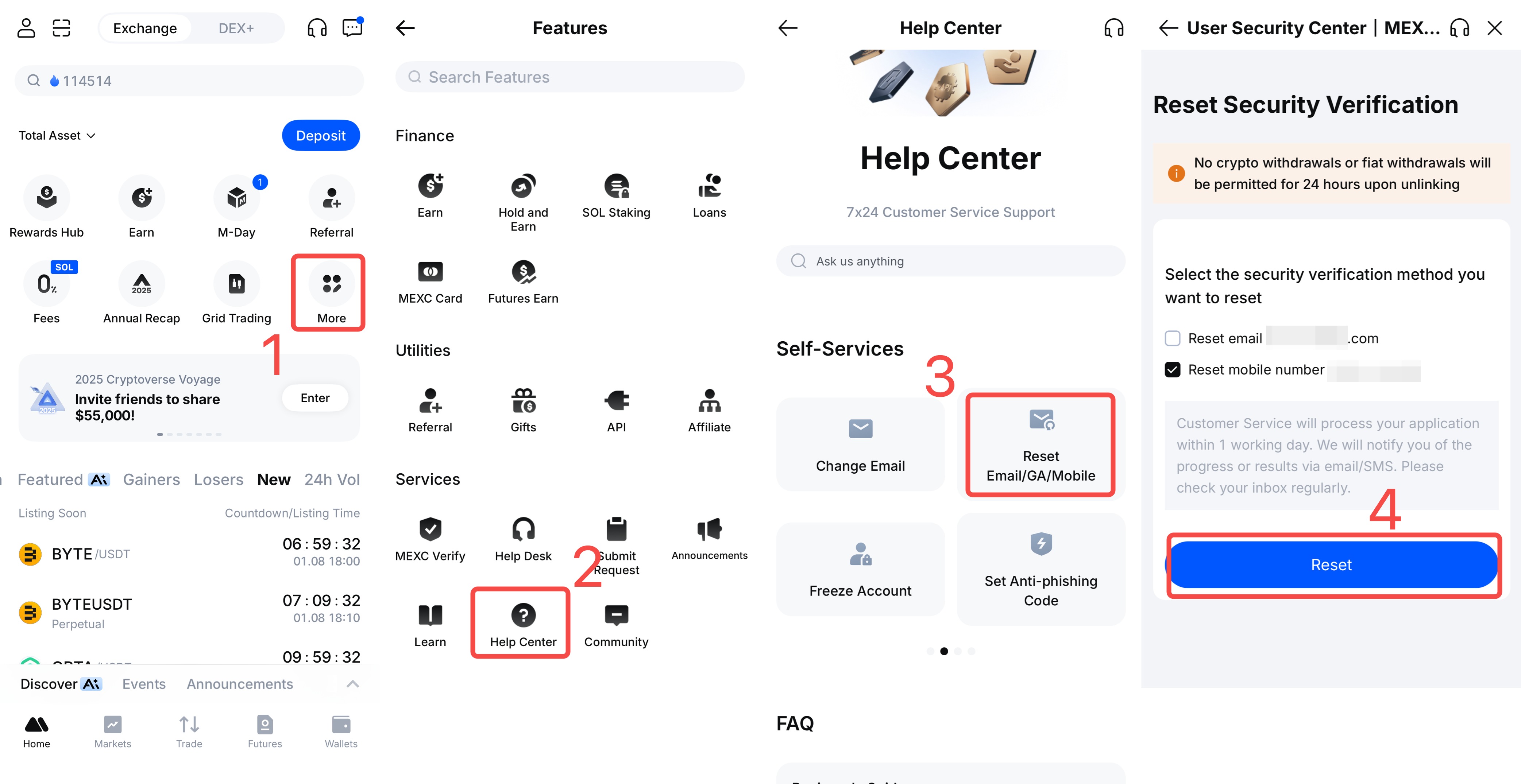
1) Open the MEXC App and log in. On the home page, tap More.
2) Select Help Center.
3) On the Help Center page, select Reset Email/GA/Mobile.
4) On the Reset Security Verification page, select Reset mobile number toapply for reset, then tap Reset to submit the request.

After submission, the request will be processed by MEXC Customer Service within one business day. Processing updates will be sent via email or SMS.

Once the processing result notification is received and the unlinking conditions are met, follow the on-page instructions to complete the unlinking process.


Open the MEXC website and log in. Scroll to the bottom of the page and click Help Center.


In the Help Center Self-Services section, click Reset Email/GA/Mobile to enter the Reset Security Verification page.


On the Reset Security Verification page, select Reset mobile number to apply for reset, then click Reset to submit the request.


After submission, the request will be processed by MEXC Customer Service within one business day. Processing updates will be sent via email or SMS.


Once the processing result notification is received and the unlinking conditions are met, follow the on-page instructions to complete the unlinking process.

3. Notes on Unlinking a Mobile Number


To protect account assets, crypto and fiat withdrawals are temporarily restricted for 24 hours after a mobile number is successfully unlinked. If fund transfers are planned in the near term, timing should be arranged in advance.

How to Unlink the Mobile Number from Your MEXC Account

Overview

  • Scenarios: When your mobile number is lost, you change carriers, or the number is recycled and you can no longer receive verification codes.
  • How to unlink: The process can be completed via the MEXC App or the Web.
  • Processing time: Requests are processed within one business day after submission.
  • Note: Crypto and fiat withdrawals will be unavailable for 24 hours after the mobile number is successfully unlinked.

If your mobile number is no longer available and you are unable to receive SMS verification codes from MEXC, you may apply to unlink your mobile number through the Help Center's Self-Services feature. The following sections provide detailed instructions for both the app and the web.


1) Open the MEXC App and log in. On the home page, tap More.
2) Select Help Center.
3) On the Help Center page, select Reset Email/GA/Mobile.
4) On the Reset Security Verification page, select Reset mobile number toapply for reset, then tap Reset to submit the request.

After submission, the request will be processed by MEXC Customer Service within one business day. Processing updates will be sent via email or SMS.


Once the processing result notification is received and the unlinking conditions are met, follow the on-page instructions to complete the unlinking process.


Open the MEXC website and log in. Scroll to the bottom of the page and click Help Center.


In the Help Center Self-Services section, click Reset Email/GA/Mobile to enter the Reset Security Verification page.


On the Reset Security Verification page, select Reset mobile number to apply for reset, then click Reset to submit the request.


After submission, the request will be processed by MEXC Customer Service within one business day. Processing updates will be sent via email or SMS.


Once the processing result notification is received and the unlinking conditions are met, follow the on-page instructions to complete the unlinking process.

3. Notes on Unlinking a Mobile Number


To protect account assets, crypto and fiat withdrawals are temporarily restricted for 24 hours after a mobile number is successfully unlinked. If fund transfers are planned in the near term, timing should be arranged in advance.