How to Use MEXC On-Chain: A Complete Trading GuideHow to Use MEXC On-Chain: A Complete Trading Guide
Category List
Cancel

How to Use MEXC On-Chain: A Complete Trading Guide

Overview

  • On-Chain is an in-platform on-chain token trading board that allows users to trade without connecting an external wallet.
  • It supports cross-chain token search, real-time price data, charts, and security information in a simple and efficient interface.
  • The buy and sell process is transparent, with clear display of order status and estimated received amounts.
  • It integrates on-chain pricing and routing services, simplifying complex on-chain operations within the MEXC App.

1. What Is On-Chain?


On-Chain is a dedicated on-chain token trading board launched by MEXC to help users access on-chain assets more easily. Users can search for tokens, view market data, price charts, transaction history, and security assessment information, and trade using supported quote currencies directly on the platform.

Compared with traditional on-chain trading, which requires connecting external wallets, switching networks, and accessing DEX liquidity pools, On-chain integrates pricing, routing, and execution into a single platform, significantly reducing operational complexity.

The availability of tradable assets depends on supported liquidity and routing providers, including but not limited to 1inch and Jupiter, as well as supported blockchains, tokens, and liquidity sources. Final availability is subject to the data shown on the trading page.

2. Key Features


Cross-chain search: Instantly search tokens across multiple major blockchains.
Instant trading: Trade directly without connecting an external wallet.
Smart search: Supports token name or contract address search, prioritizing tokens with better liquidity and relevance.
Comprehensive data: View contract details, holder distribution, liquidity depth, and market cap at a glance.
Security check: Displays on-chain risk indicators to help users make informed decisions.
Multi-chain support: Supports major networks such as Ethereum and Solana, with more chains to be added.

3. How to Use On-Chain Trading on MEXC


Step 1: Access the On-Chain trading page


Web: Log in to the MEXC websiteSpot in the top navigation bar → select On-Chain to enter the trading page.
App: Open the MEXC App → WalletsOn-Chain to access the On-Chain trading page.

Step 2: Search for tokens


You can locate tokens using:
  • Keyword search: Enter token name, symbol, or contract address. Results are ranked by relevance and liquidity.
  • Filters: Sort by price, price change and number of holders.

Step 3: Buy / sell tokens


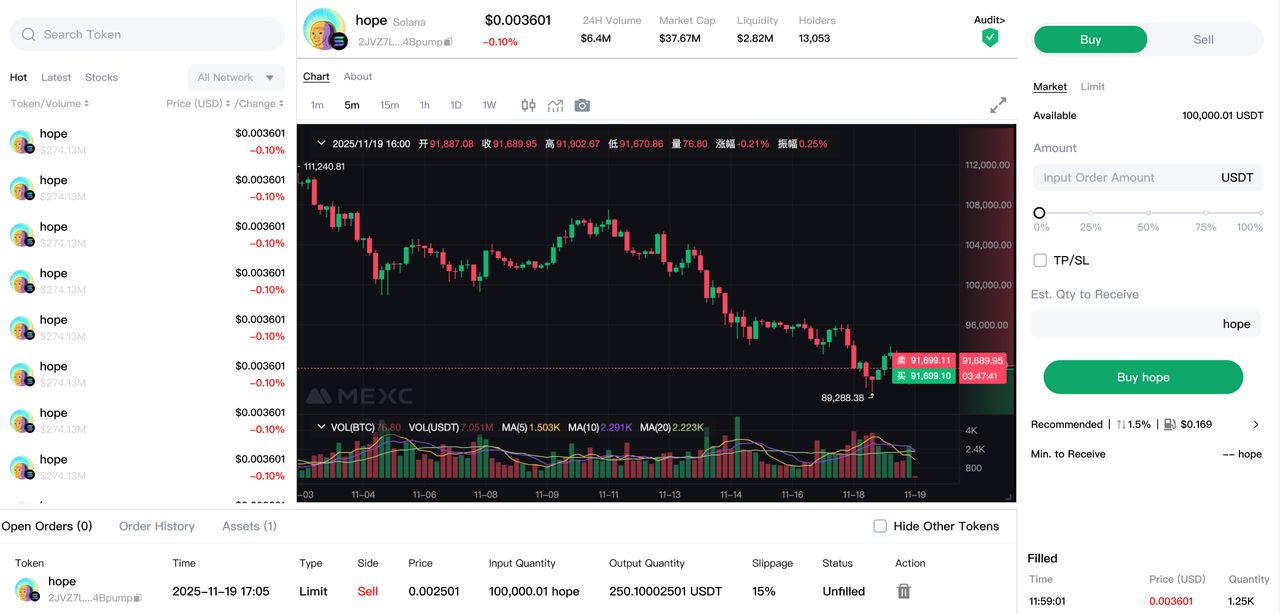
You can place buy or sell orders directly in the trading panel. The following example describes a buy order:

1. Select Buy, choose Market, enter the Amount. Available balance will be displayed automatically.

2. Before placing the order, carefully review key information including Est Receivable, Min Receivable, Slippage, and Network Fee.

3. Click Buy to proceed to the confirmation page.

4. On the confirmation page, review the payment amount and estimated received tokens, then click Confirm. The order will be submitted on-chain and execution time depends on network conditions.

The sell process is similar. Switch to Sell, enter the amount, select the quote currency, and confirm the order.

Step 4: Track your orders


After placing an order, you can view its status in the order section below the page. The initial status will show as Processing.

Once the transaction is confirmed on-chain, the status will update to Completed, and the tokens will be automatically credited to your Assets, where you can view or manage them anytime.

If the order remains unprocessed for a long time, please check your network connection or contact MEXC Customer Service.

Risk Warning and Disclaimer


The content displayed on the On-Chain page is for informational purposes only and does not constitute investment, tax, legal, financial, accounting, or any other professional advice, nor does it constitute a recommendation to buy, sell, or hold any asset.

The listing or availability of a token on the On-chain page does not imply endorsement by MEXC, nor does it guarantee listing on MEXC Spot or Futures markets.

On-chain assets are subject to high volatility and may involve risks such as low liquidity, slippage, failed transactions, contract risks, inability to sell, project-related risks (including rug pull), trading taxes, network congestion, third-party service failure, and data delays. Users should fully understand the risks and trade at their own discretion.

How to Use MEXC On-Chain: A Complete Trading Guide

Overview

  • On-Chain is an in-platform on-chain token trading board that allows users to trade without connecting an external wallet.
  • It supports cross-chain token search, real-time price data, charts, and security information in a simple and efficient interface.
  • The buy and sell process is transparent, with clear display of order status and estimated received amounts.
  • It integrates on-chain pricing and routing services, simplifying complex on-chain operations within the MEXC App.

1. What Is On-Chain?


On-Chain is a dedicated on-chain token trading board launched by MEXC to help users access on-chain assets more easily. Users can search for tokens, view market data, price charts, transaction history, and security assessment information, and trade using supported quote currencies directly on the platform.

Compared with traditional on-chain trading, which requires connecting external wallets, switching networks, and accessing DEX liquidity pools, On-chain integrates pricing, routing, and execution into a single platform, significantly reducing operational complexity.

The availability of tradable assets depends on supported liquidity and routing providers, including but not limited to 1inch and Jupiter, as well as supported blockchains, tokens, and liquidity sources. Final availability is subject to the data shown on the trading page.

2. Key Features


Cross-chain search: Instantly search tokens across multiple major blockchains.
Instant trading: Trade directly without connecting an external wallet.
Smart search: Supports token name or contract address search, prioritizing tokens with better liquidity and relevance.
Comprehensive data: View contract details, holder distribution, liquidity depth, and market cap at a glance.
Security check: Displays on-chain risk indicators to help users make informed decisions.
Multi-chain support: Supports major networks such as Ethereum and Solana, with more chains to be added.

3. How to Use On-Chain Trading on MEXC


Step 1: Access the On-Chain trading page


Web: Log in to the MEXC websiteSpot in the top navigation bar → select On-Chain to enter the trading page.
App: Open the MEXC App → WalletsOn-Chain to access the On-Chain trading page.

Step 2: Search for tokens


You can locate tokens using:
  • Keyword search: Enter token name, symbol, or contract address. Results are ranked by relevance and liquidity.
  • Filters: Sort by price, price change and number of holders.

Step 3: Buy / sell tokens


You can place buy or sell orders directly in the trading panel. The following example describes a buy order:

1. Select Buy, choose Market, enter the Amount. Available balance will be displayed automatically.

2. Before placing the order, carefully review key information including Est Receivable, Min Receivable, Slippage, and Network Fee.

3. Click Buy to proceed to the confirmation page.

4. On the confirmation page, review the payment amount and estimated received tokens, then click Confirm. The order will be submitted on-chain and execution time depends on network conditions.

The sell process is similar. Switch to Sell, enter the amount, select the quote currency, and confirm the order.


Step 4: Track your orders


After placing an order, you can view its status in the order section below the page. The initial status will show as Processing.

Once the transaction is confirmed on-chain, the status will update to Completed, and the tokens will be automatically credited to your Assets, where you can view or manage them anytime.

If the order remains unprocessed for a long time, please check your network connection or contact MEXC Customer Service.

Risk Warning and Disclaimer


The content displayed on the On-Chain page is for informational purposes only and does not constitute investment, tax, legal, financial, accounting, or any other professional advice, nor does it constitute a recommendation to buy, sell, or hold any asset.

The listing or availability of a token on the On-chain page does not imply endorsement by MEXC, nor does it guarantee listing on MEXC Spot or Futures markets.

On-chain assets are subject to high volatility and may involve risks such as low liquidity, slippage, failed transactions, contract risks, inability to sell, project-related risks (including rug pull), trading taxes, network congestion, third-party service failure, and data delays. Users should fully understand the risks and trade at their own discretion.