

How to Use MEXC's Referral Profile Tag Feature
1. What Is Referral Profile Tag
To help agents and BDs manage users more efficiently and enable more refined operations, MEXC has officially launched the Referral Profile Tag feature.
The Referral Profile Tag is a tagging system built on multiple dimensions, including user profile data, trading behavior, activity status, and potential value. It helps affiliates quickly identify, categorize, and manage community users. The system automatically matches users with corresponding tags. Tag examples include, but are not limited to:
- High-value trading users
- Active users / Dormant users
- Users by trading preference
- Potential conversion users
Through this tagging system, affiliates can more quickly understand user characteristics, precisely target specific user groups, and develop more tailored strategies.
2. Key Advantages
- Boost user conversion rates and trading activity
- Enable refined, tiered user management
- Improve user operations efficiency
- Support differentiated operational strategies
- Increase user lifetime value (LTV)
3. How to Use Referral Profile Tag
3.1 Profile Overview
Go to Data Insight and click Referral Profiles.
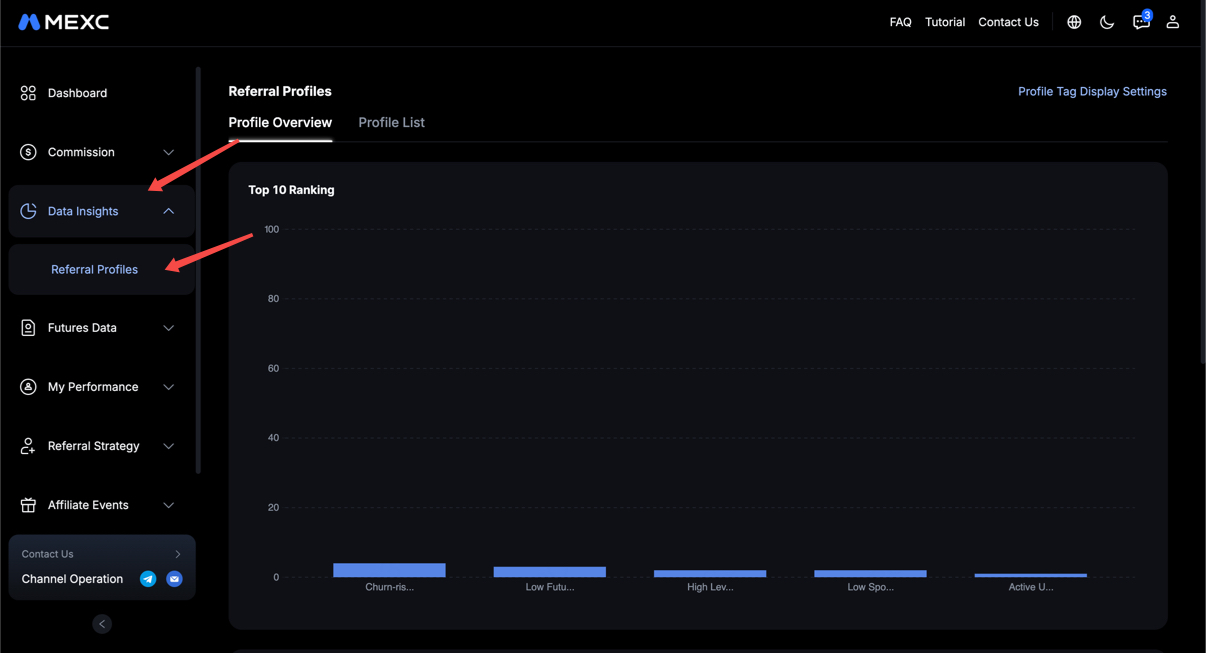
TOP 10 Tag Ranking:
- Displays the top 10 enabled tags with the highest number of matching users (excluding tags with 0 users).
- Hover to view the exact user count.
Profile categories:
- Displays the proportion of users under each tag (donut chart).
- Includes users who don't match any tag (shown as "Unclassified").
- If an entire category contains zero users, it is automatically hidden from view.
3.2 Profile List
Switch to the Profile List tab
Available Filters:
- Direct Referral Status, Referral UID, Profile Tags (multi-select), and Referrer UID.
List display:
- Referral UID, Referrer UID, and Referral Profiles (showing all enabled tags matched to the user).
- Hover over a tag to view its description in multiple languages.
- For users who don't match any tag, the profile column is left blank.
3.3 Profile Tag Display Settings
To adjust your interface layout, click Profile Tag Display Settings on the Referral Profiles page.
Features:
- Drag and drop to adjust the display order of tags.
- The order affects how tags appear in modules such as Commissions, Futures Data, and My Performance.
- Newly enabled tags are automatically added to the end of the list.
- Deleted or disabled tags are automatically removed from the ordering area.
Prompt text: Profile tags will appear in the set order across multiple modules.
4. Notes on the Referral Profile Tags Feature
- Tags are used solely for your own user management and are not displayed publicly to other users.
- A single referral can be assigned multiple tags at the same time; the exact number is subject to the rules of the released version.
- Created tags can be edited, deleted, or reassigned later.
- The platform reserves the right to continuously optimize the feature experience based on product and operational needs.
5. Referral Profile Tags FAQ
5.1 Can a single referral have multiple tags?
Yes. You can add multiple tags to the same referral based on different dimensions, enabling more flexible categorization and management.
5.2 What dimensions determine how tag data is generated?
Tags are mainly generated based on a combination of dimensions, including user trading behavior, asset size, activity status, lifecycle stage, and potential value.
MEXC will continue to improve its product features to provide you with an even better experience. If you have any suggestions for feature improvements, feel free to share your feedback with us anytime.