

MEXC App Navigation: Complete Guide
The MEXC App home page integrates seven core functional sections, enabling users to quickly access account management, trading services, and market information. This guide provides a detailed walkthrough of each navigation section and how to use them effectively.
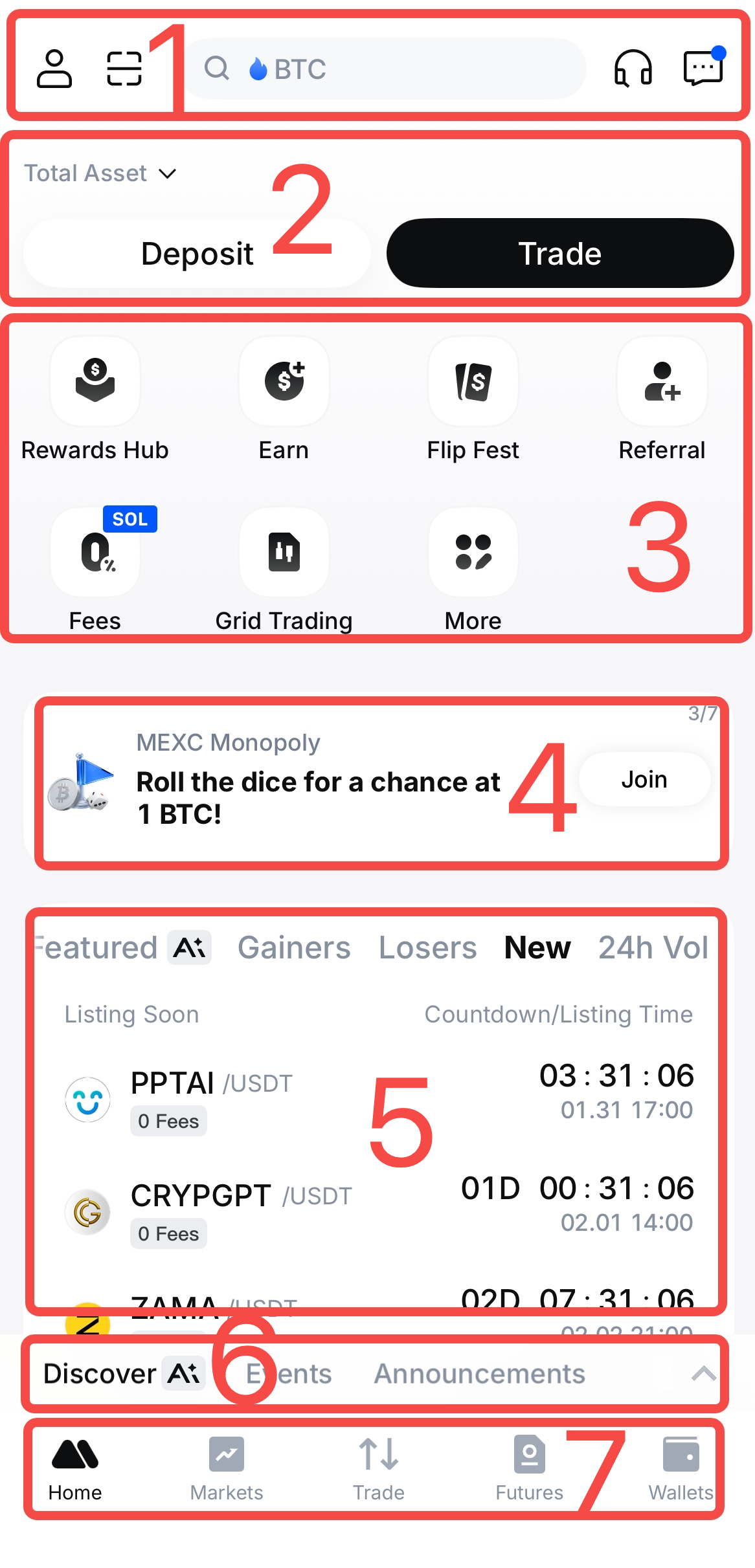
1. Top Navigation Bar
The top navigation bar includes four core features: Profile, Search, Customer Service, and Notifications.
1.1 Profile Icon
Tap the profile icon in the upper-left corner to access the following seven areas:
Profile: View your avatar, nickname, linked email address, and UID. This section also allows you to toggle the visibility of sensitive information.
KYC Verification: Access both Primary and Advanced KYC Verification. Institutional users can switch to the institutional verification page to view the verification benefits. Institutional verification is currently supported on the web version only.
VIP: Displays trading volume requirements for each VIP tier, your current trading data, and the remaining volume needed to upgrade to the next level.
User Center: Includes four features: Rewards Hub, Fee Settings, Transactions, and Referral.
- Rewards Hub shows available events and reward details.
- Fee Settings displays current platform fees and supports using MX to offset trading fees.
- Transactions provide a summary of your past trades.
- Referral helps you increase your account level and unlock exclusive benefits.
App Settings: Manage application preferences and account-related settings.
Customer Service and Support: Provides access to MEXC communities and online Customer Service to assist with any issues during use.
Switch Account: Quickly switch between multiple logged-in accounts.
1.2 Search Bar
Tap the search bar and enter a token name, trading pair, or keyword to view related results. The search page also features AI Trends categorized by tags, as well as popular trading pairs and hot events on the platform.
1.3 Customer Service
Tap the Customer Service icon to contact MEXC's 24/7 online support team directly.
1.4 Notifications
Notifications aggregates all platform notifications, including new token listings, Futures and Spot events, platform rewards, trading alerts, deposit and withdrawal updates, price alerts, system notices, and market insights.
2. Assets and Trading Access
This section provides three core functions:
- Total Assets: Displays the total value of assets across your account.
- Deposit: Offers multiple cryptocurrency deposit methods.
- Trade: Provides quick access to Futures, Spot, Convert, and DEX+ markets.
3. Quick Access Menu
The Quick Access menu allows users to customize and configure frequently used features with a single tap. Tap More to view the full list of services and features available in the MEXC App. To edit the shortcuts displayed on the home page, tap Edit and drag icons to rearrange their order. The Quick Access menu supports up to 11 shortcuts.
4. Event Carousel
This section displays ongoing MEXC events in a rotating banner format. Swipe left or right to quickly browse the details of each event.
5. Markets
The Markets section displays trading pairs along with their 24h price changes, organized into multiple categories, including Favorites, Hot, Stock, Featured AI, Gainers, Losers, New, and 24h Vol.
6. Discover, Events, and Announcements
Discover AI: Provides intelligent market insights based on trending topics.
- Top Questions highlights topics users are most interested in.
- News aggregates market-wide headlines.
- Featured showcases high-quality content from the MEXC platform.
Events: Lists all ongoing events available on MEXC.
Announcements: Publishes official MEXC announcements and platform updates.
7. Bottom Navigation Bar
The bottom navigation bar includes four main sections:
- Markets: Displays prices and 24h changes across different markets by category.
- Trade: Enables trading across markets and provides access to open orders, positions, and order history.
- Futures: Dedicated to Futures trading and viewing positions and open orders.
- Wallets: Displays crypto balances across all MEXC trading accounts.