

How to Activate a Canton Token Address
This guide uses the Loop Wallet as an example to walk you through activating a Canton wallet address and enabling one-step transfers, helping you get started quickly and easily.
Step 1: Create an Account
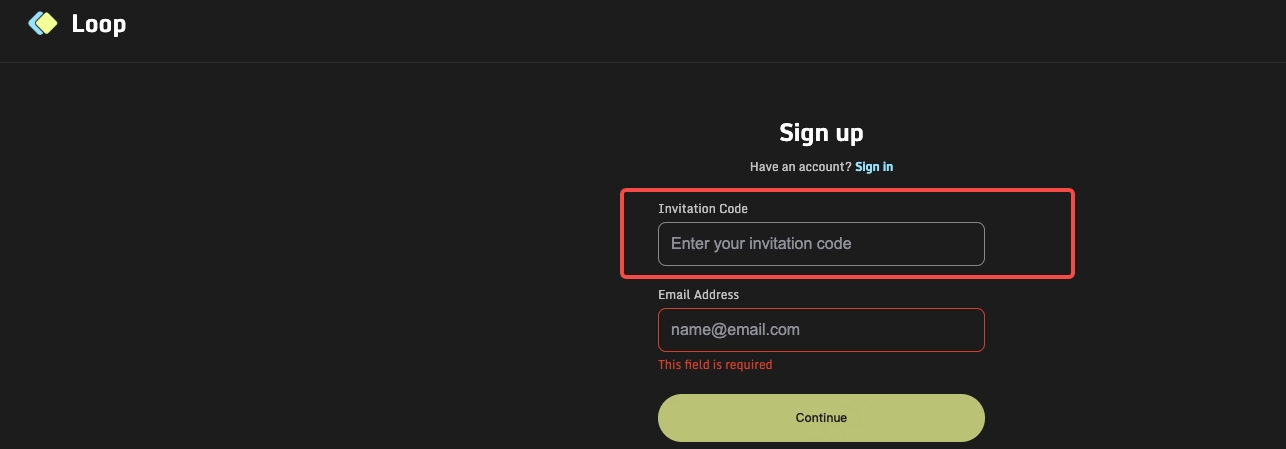
Visit the official Loop account creation page to begin the sign-up process. On the create an account page, you will need to provide two pieces of information: an invitation code and an email address. The invitation code is required. If you do not yet have one, please contact the Loop project team to obtain it. After completing the required fields, follow the on-screen instructions to finish signing up.
Step 2: Sign In to Your Account
Once you've signed up for an account, sign in to the Loop Wallet using your email address and password. After signing in, you will be taken to the wallet home page, where you can view your account balance and access wallet features.
Step 3: Open the Settings Page
On the wallet interface, locate and select Settings to enter the account settings page.
Step 4: Enable One-Step Transfers
On the Settings page, find One-step Transfers and toggle the switch on to complete the pre-approval process. Once enabled, transfers can be completed more conveniently, without the need to confirm each transaction individually.
After completing the above steps, your Loop Wallet setup is complete and your Canton token wallet and address will be activated and ready for use.