

How to Buy Crypto via Google Pay and Apple Pay on MEXC
Here is a step-by-step guide on how to buy crypto using Google Pay and Apple Pay:
Note: Before you begin, please ensure that you have completed KYC verification. Without KYC verification, your purchases may fail.
On App
Step 1: Tap Deposit, thenselect Quick Buy/Sell.
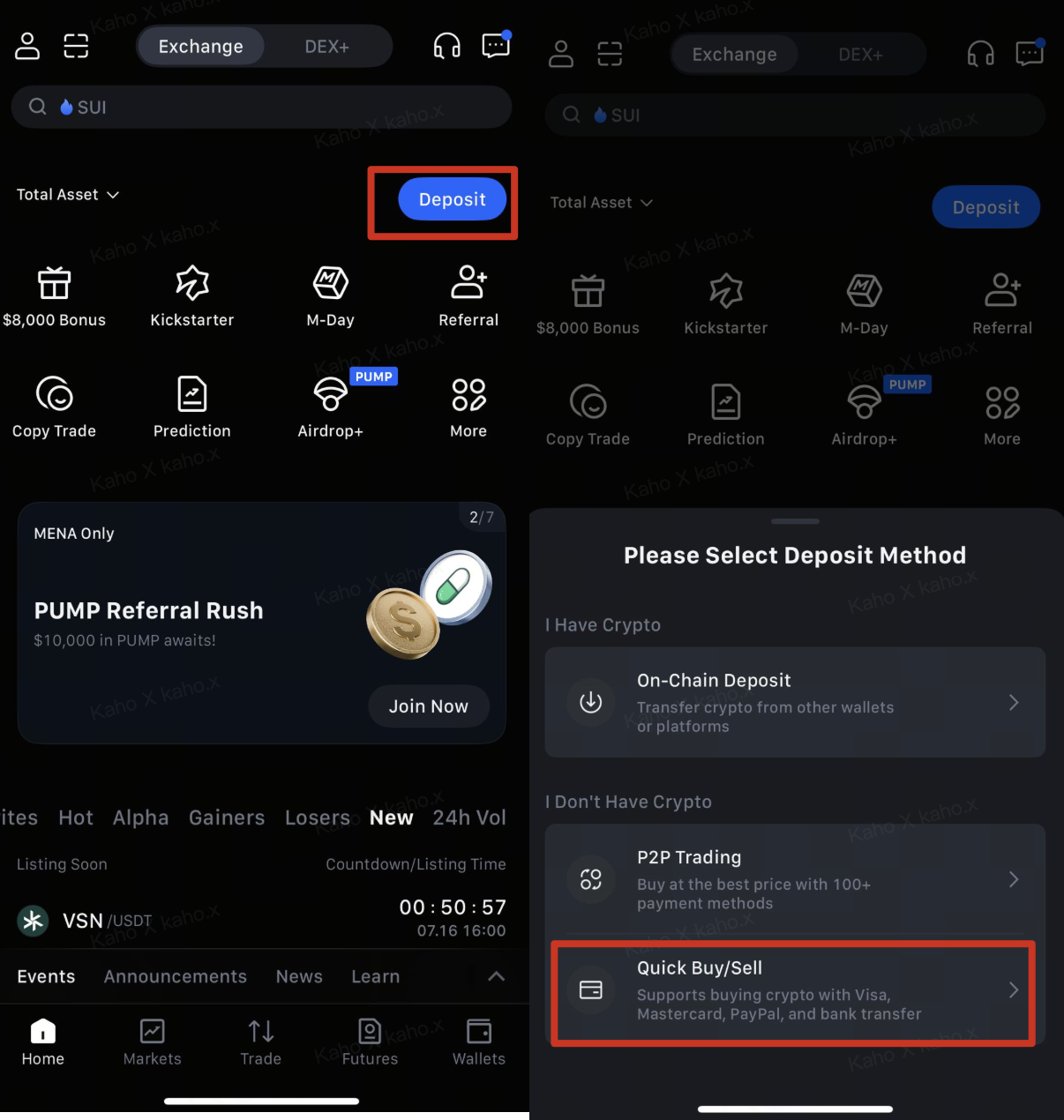
Step 2: Select the fiat currency you want to use and the crypto you want to purchase, then enter the amount.
Step 3: Choose Apple Pay or Google Pay as your payment method, then tap Confirm.
Step 4: Review the payment details carefully, then tap Confirm.
Step 5: If this is the first time using the service, you may be asked to provide your country of residence, phone number, and complete a short questionnaire.
Step 6: Add or select your bank card, then complete the transaction via Google Pay or Apple Pay.
Step 7: Once the payment is completed, you will receive a "Transaction in Progress" notification. Processing time may vary depending on the network and could take a few minutes to appear in your account.
Note: Please remain on the page and do not refresh or exit until the payment is confirmed to avoid discrepancies.
On Web
Step 1: Click Buy Crypto → Quick Buy on the top-left corner of the navigation bar to enter the Quick Buy page.
Step 2: Select the fiat currency you want to use and the crypto you want to purchase, then enter the amount.
Step 3: Choose Apple Pay or Google Pay as your payment method, then click Confirm.
Step 4: Review the payment details carefully, then click Confirm.
Step 5: If this is the first time using the service, you may be asked to provide your country of residence, phone number, and complete a short questionnaire.
Step 6: Add or select your bank card, then complete the transaction via Google Pay or Apple Pay.
Step 7: Once the payment is completed, you will receive a "Transaction in Progress" notification. Processing time may vary depending on the network and could take a few minutes to appear in your account.
Note: Please remain on the page and do not refresh or exit until the payment is confirmed to avoid discrepancies.