Beli Kripto
Pasar
Spot
Futures OILNVDA
Tabungan
Pusat Acara
Hub Hadiah
Lainnya
PoR 100%+
How to Delete Your MEXC Account: A Step-by-Step Guide and FAQHow to Delete Your MEXC Account: A Step-by-Step Guide and FAQ
Batalkan

How to Delete Your MEXC Account: A Step-by-Step Guide and FAQ

Key Takeaways:

  • Only the account holder can request deletion. Submit the request yourself through the MEXC website or app.
  • Deletion is permanent. You cannot recover the account or access its data, including your trading history, after it is deleted.
  • If you cannot submit a request, check your security settings, your account balance, and whether your account is subject to any restrictions.
  • After deletion, you can sign up again with the same email address or phone number and use the same ID document to verify your new account.

1. Before You Delete Your MEXC Account


1.1 What happens when I delete my MEXC account?


Once your MEXC account is deleted, you can no longer log in. Neither the account nor any assets left in it can be recovered. You also lose access to all account data, including your trading history.

Before you request account deletion, save any records you want to keep and check for assets you still need to withdraw.

1.2 What are the requirements for deleting my account?


Before you submit a request, check the following:

1) The total value of the assets in your account must be less than 5 USDT.

2) Your account must meet the security requirements. MEXC recommends linking Google Authenticator as an additional verification method.

3) Your account must have no unresolved risk control restrictions.

Once you meet these requirements, you can submit your deletion request.

1.3 What if I want to keep using my account after I request deletion?


You can keep your account by canceling the request before deletion is complete. Go to the Delete Account page and select Cancel Deletion.

2. How to Request Account Deletion


2.1 How do I submit a deletion request?


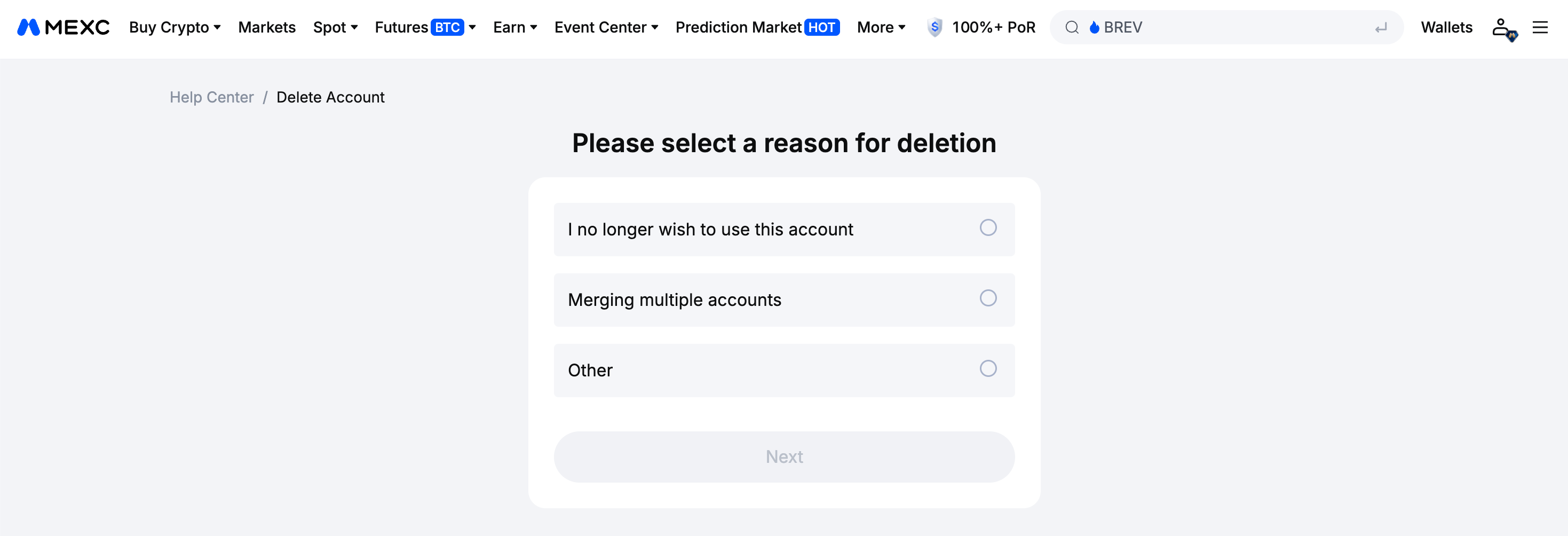
You can submit your request on the MEXC website or in the app:

  • Website: Go to the Delete Account page and submit your request.
  • MEXC App: On the home screen, tap your profile icon. Go to Security, then Manage Account, and select Delete Account.

After you submit your request, the page shows the estimated processing time for your account.

2.2 Can Customer Service delete my account for me?


No. To protect your account and privacy, MEXC requires the account holder to submit the request. If you have decided to delete your account, submit the request yourself on the Delete Account page.

2.3 How long does account deletion take?


Processing time depends on your account's risk status. After you submit your request, check the Delete Account page for your estimated completion time.

2.4 Can I cancel a deletion request after submitting it?


Yes. While the request is pending, open the Delete Account page and select Cancel Deletion. Once the account has been deleted, it cannot be restored.

3. Troubleshooting Account Deletion


3.1 Why do I see an error when I try to delete my account?


Two common reasons are:

1) Your account security level is too low. Set up another verification method and try again. MEXC recommends linking Google Authenticator.

2) You are using a sub-account. Sub-accounts cannot be deleted directly. If you no longer need a sub-account, you can freeze it under Sub-Account Management instead.


3.2 Why do I keep seeing an unusual activity warning?


The warning means your account is under a risk control restriction. Use the submission button on the page to upload the requested documents. Once MEXC approves them and lifts the restriction, submit your deletion request again.

3.3 Why does the page say my assets exceed 5 USDT?


First, check that the total value of your assets is below 5 USDT. If it is and the warning still appears, contact Customer Service through live chat and share a screenshot or screen recording of the warning so our Customer Service representative can investigate.

3.4 What if I cannot log in to delete my account?


If MEXC has restricted certain services in your region to meet local requirements, those restrictions may also prevent you from logging in. Check the official announcement for your region. For India, see Service Suspension for India Users Now in Effect.

4. After Your MEXC Account Is Deleted


4.1 Will I be notified when my account is deleted?


Yes. MEXC will notify you by email or text message at your registered email address or phone number as soon as deletion is complete.

4.2 Can I use the same email address, phone number, or ID document again?


Yes. You can sign up for a new MEXC account with the same email address or phone number. You can also use the same ID document to verify your identity on the new account.

4.3 Can I get my trading history after my account has been deleted?


No. After deletion, MEXC cannot restore your account or provide its records, including your trading history. Export and save any records you need before requesting deletion.

Account deletion is permanent. Before you submit your request, make sure you have withdrawn any assets you want to keep and saved the records you need. If you have questions, visit the Help Center or contact MEXC through live chat.


How to Delete Your MEXC Account: A Step-by-Step Guide and FAQ

Key Takeaways:

  • Only the account holder can request deletion. Submit the request yourself through the MEXC website or app.
  • Deletion is permanent. You cannot recover the account or access its data, including your trading history, after it is deleted.
  • If you cannot submit a request, check your security settings, your account balance, and whether your account is subject to any restrictions.
  • After deletion, you can sign up again with the same email address or phone number and use the same ID document to verify your new account.

1. Before You Delete Your MEXC Account


1.1 What happens when I delete my MEXC account?


Once your MEXC account is deleted, you can no longer log in. Neither the account nor any assets left in it can be recovered. You also lose access to all account data, including your trading history.

Before you request account deletion, save any records you want to keep and check for assets you still need to withdraw.

1.2 What are the requirements for deleting my account?


Before you submit a request, check the following:

1) The total value of the assets in your account must be less than 5 USDT.

2) Your account must meet the security requirements. MEXC recommends linking Google Authenticator as an additional verification method.

3) Your account must have no unresolved risk control restrictions.

Once you meet these requirements, you can submit your deletion request.

1.3 What if I want to keep using my account after I request deletion?


You can keep your account by canceling the request before deletion is complete. Go to the Delete Account page and select Cancel Deletion.

2. How to Request Account Deletion


2.1 How do I submit a deletion request?


You can submit your request on the MEXC website or in the app:

  • Website: Go to the Delete Account page and submit your request.
  • MEXC App: On the home screen, tap your profile icon. Go to Security, then Manage Account, and select Delete Account.

After you submit your request, the page shows the estimated processing time for your account.


2.2 Can Customer Service delete my account for me?


No. To protect your account and privacy, MEXC requires the account holder to submit the request. If you have decided to delete your account, submit the request yourself on the Delete Account page.

2.3 How long does account deletion take?


Processing time depends on your account's risk status. After you submit your request, check the Delete Account page for your estimated completion time.

2.4 Can I cancel a deletion request after submitting it?


Yes. While the request is pending, open the Delete Account page and select Cancel Deletion. Once the account has been deleted, it cannot be restored.

3. Troubleshooting Account Deletion


3.1 Why do I see an error when I try to delete my account?


Two common reasons are:

1) Your account security level is too low. Set up another verification method and try again. MEXC recommends linking Google Authenticator.

2) You are using a sub-account. Sub-accounts cannot be deleted directly. If you no longer need a sub-account, you can freeze it under Sub-Account Management instead.


3.2 Why do I keep seeing an unusual activity warning?


The warning means your account is under a risk control restriction. Use the submission button on the page to upload the requested documents. Once MEXC approves them and lifts the restriction, submit your deletion request again.

3.3 Why does the page say my assets exceed 5 USDT?


First, check that the total value of your assets is below 5 USDT. If it is and the warning still appears, contact Customer Service through live chat and share a screenshot or screen recording of the warning so our Customer Service representative can investigate.

3.4 What if I cannot log in to delete my account?


If MEXC has restricted certain services in your region to meet local requirements, those restrictions may also prevent you from logging in. Check the official announcement for your region. For India, see Service Suspension for India Users Now in Effect.

4. After Your MEXC Account Is Deleted


4.1 Will I be notified when my account is deleted?


Yes. MEXC will notify you by email or text message at your registered email address or phone number as soon as deletion is complete.

4.2 Can I use the same email address, phone number, or ID document again?


Yes. You can sign up for a new MEXC account with the same email address or phone number. You can also use the same ID document to verify your identity on the new account.

4.3 Can I get my trading history after my account has been deleted?


No. After deletion, MEXC cannot restore your account or provide its records, including your trading history. Export and save any records you need before requesting deletion.

Account deletion is permanent. Before you submit your request, make sure you have withdrawn any assets you want to keep and saved the records you need. If you have questions, visit the Help Center or contact MEXC through live chat.